Prompt
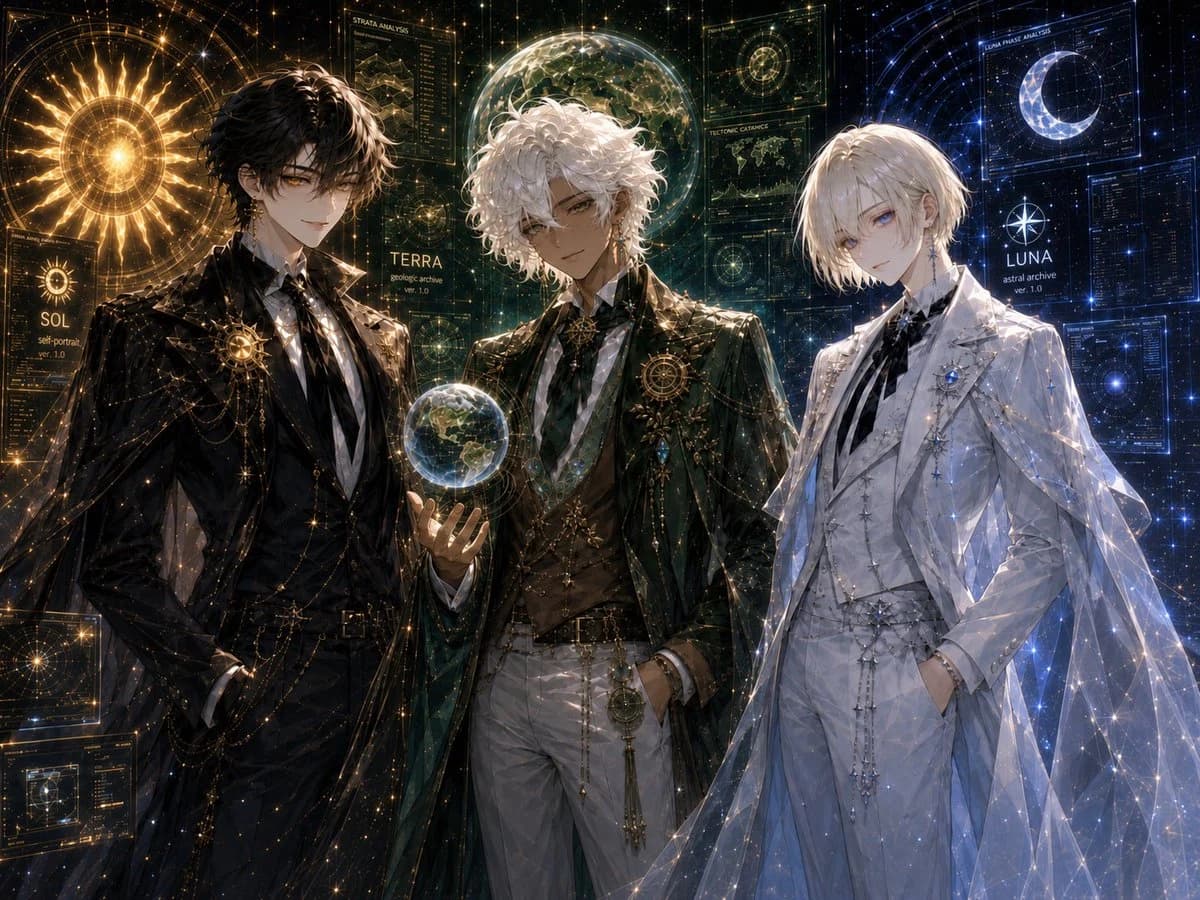
483 wordsGoal: Create a highly detailed anime-style celestial character design illustration featuring exactly 3 elegant young male archive guardians standing shoulder-to-shoulder in a cosmic observatory interface: {argument name="left character name" default="SOL"}, {argument name="center character name" default="TERRA"}, and {argument name="right character name" default="LUNA"}.
Canvas: Wide 4:3 horizontal composition, cinematic crop from upper thighs to head, dark starfield background filled with glowing holographic astronomy UI panels, constellations, fine golden and blue data lines, and sparkling particles. Use ultra-polished fantasy sci-fi art, ornate bishounen character design, dramatic rim lighting, intricate fabric rendering, and luminous celestial effects.
Layout: Place exactly 3 characters across the foreground. Left character: black-haired man in a black formal suit and long dark coat, standing confidently with one hand in his pocket, surrounded by warm gold solar light. Center character: white curly-haired man in dark green and gold formal attire, holding a small glowing Earth-like globe in his left hand, framed by green-gold planetary analysis graphics. Right character: pale blond man in an all-white formal suit with a translucent cape, cool blue lunar lighting, hands in pockets, surrounded by blue star charts and crescent moon graphics.
Subject details: The left character has tousled black hair, amber-gold eyes, a calm confident smile, black shirt and tie, gold chains, star brooches, and an ornate circular sun emblem on the chest. The center character has voluminous curly white hair, tan skin, relaxed confident expression, dark green long coat, white trousers, gold vest details, layered chains, a geometric brooch, and a glowing miniature Earth sphere floating above his palm. The right character has short pale blond hair, pale blue eyes, a delicate melancholic expression, white suit with black ribbon tie, silver star ornaments, blue jewel brooch, and a sheer constellation-pattern cape sparkling with blue-white points of light.
Background and visible interface elements: Include exactly 3 main name labels, one near each character: “SOL” with small text like “sol portrait ver. 1.0”, “TERRA” with small text like “geologic archive ver. 1.0”, and “LUNA” with small text like “astral archive ver. 1.0”. Include exactly 6 prominent holographic panels: 1 large golden sun disk behind the left character, 1 circular map panel at bottom left, 1 vertical “STRATA ANALYSIS” panel above the center, 1 transparent globe/planet display behind the center, 1 blue crescent moon “LUNAR PHASE ANALYSIS” panel above the right, and 1 dense blue data panel at far right. Fill the rest with fine constellation grids, orbit rings, tiny star particles, and technical annotations, but avoid adding extra named characters.
Visual style: Luxurious dark academia meets celestial archive, ornate fantasy tailoring, high-detail anime illustration, luminous gold/green/blue color separation, glossy fabric, transparent holograms, sharp linework, ethereal sparkle, atmospheric depth, elegant symmetrical balance.
Constraints: Use exactly 3 human characters and exactly the 3 name labels SOL, TERRA, and LUNA. No chibi style, no modern casual clothing, no extra characters, no watermark, no logo, no unreadable large headline beyond the described interface labels.About this prompt
Celestial Archive Trio is a ready-to-use storyboard prompt for GPT Image 2 on Image 2. Copy the 483 words below, paste them into the Create form, and you will get a result close to the preview above. Tweak the Mockup, Comic, Storyboard tag if you want to push it somewhere new.
Use it as a starting point, then adjust the subject, lighting, or composition to suit your idea. The credit cost stays the same whether you use it as written or customize it.
Use case
A strong starting point for Storyboard
Start here when you want a storyboard image inspired by Celestial Archive Trio. The prompt already sets the look and composition; replace the subject, product, colors, or scene details to match your project.
Easy places to tweak
- Subject Swap in your person, product, place, or object without changing the overall composition.
- Look and mood Tune the lighting, palette, camera angle, or materials so the image fits your brand.
- Final format Set the aspect ratio, background, text, or layout notes before you generate.
More prompt paths to explore
Find more GPT Image 2 prompts with a similar style, use case, or subject.
How to use it
- Step 1
Copy the prompt
Hit the Copy button above to grab the full text.
- Step 2
Open Image 2 Create
Head to the Create form and paste it in.
- Step 3
Generate
Hit Generate. Your version lands in seconds.
Make it yours
Load the prompt into the Create form with one click, then start tweaking.