Prompt
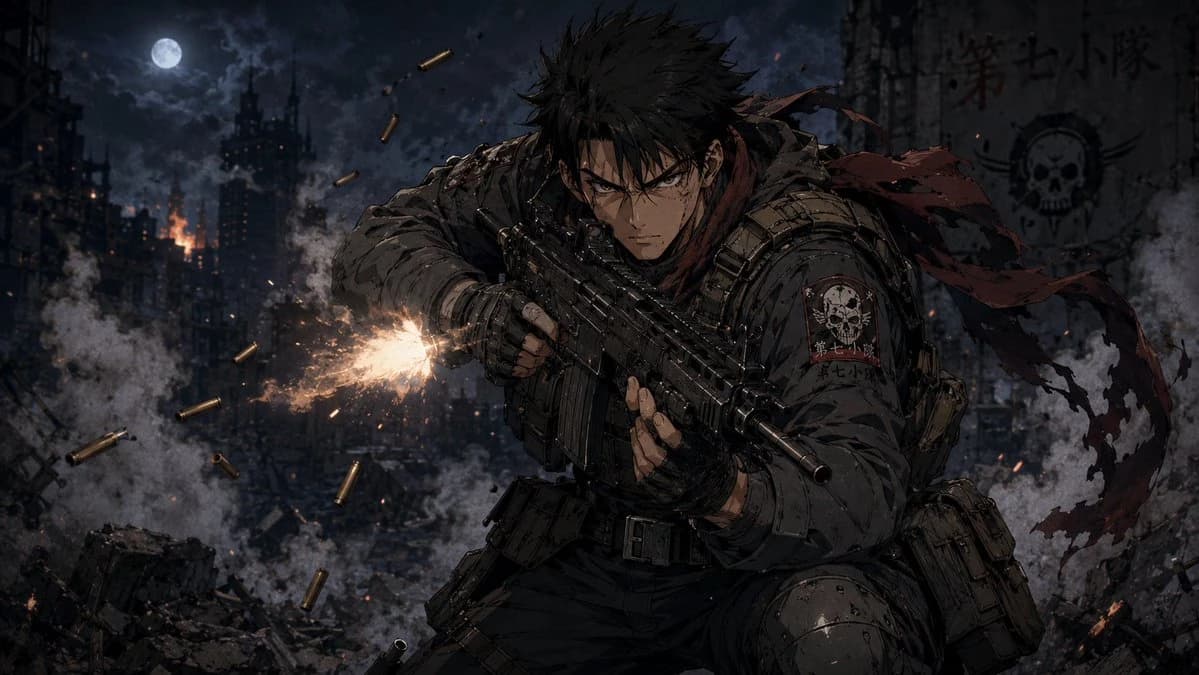
201 wordsCreate a dark, cinematic anime war illustration in a gritty seinen style: a single young male special-operations soldier with {argument name="hair color" default="spiky black hair"} crouches in the foreground, leaning forward aggressively while firing a compact black assault rifle toward the left side of the frame. He has sharp intense eyes, a stern battle-worn face with dirt and scratches, fingerless gloves, heavy tactical armor, ammunition pouches, a utility belt, knee armor, and a ragged {argument name="scarf color" default="dark red"} scarf whipping behind him. The rifle emits one bright orange-white muzzle flash with sparks and smoke; show exactly 9 flying brass shell casings around the weapon. The background is a devastated nighttime city battlefield with collapsed buildings, rubble, smoke plumes, small fires, drifting embers, and a full moon in a cloudy sky near the upper left. On the soldier’s shoulder patch and on a ruined wall in the upper right, include a skull insignia and the unit text {argument name="unit text" default="第七小隊"}. Use a wide 16:9 composition, low-key blue-gray moonlit palette with warm fire highlights, high contrast, detailed linework, painterly anime rendering, dramatic motion, debris, and atmospheric depth. Keep the scene serious and realistic, no cartoon exaggeration, no extra characters, no watermark.About this prompt
Anime Soldier in Moonlit Urban Warzone is a ready-to-use character design prompt for GPT Image 2 on Image 2. Copy the 201 words below, paste them into the Create form, and you will get a result close to the preview above. Tweak the UI, Comic, Storyboard tag if you want to push it somewhere new.
Use it as a starting point, then adjust the subject, lighting, or composition to suit your idea. The credit cost stays the same whether you use it as written or customize it.
Use case
A strong starting point for Character Design
Start here when you want a character design image inspired by Anime Soldier in Moonlit Urban Warzone. The prompt already sets the look and composition; replace the subject, product, colors, or scene details to match your project.
Easy places to tweak
- Subject Swap in your person, product, place, or object without changing the overall composition.
- Look and mood Tune the lighting, palette, camera angle, or materials so the image fits your brand.
- Final format Set the aspect ratio, background, text, or layout notes before you generate.
More prompt paths to explore
Find more GPT Image 2 prompts with a similar style, use case, or subject.
How to use it
- Step 1
Copy the prompt
Hit the Copy button above to grab the full text.
- Step 2
Open Image 2 Create
Head to the Create form and paste it in.
- Step 3
Generate
Hit Generate. Your version lands in seconds.
Make it yours
Load the prompt into the Create form with one click, then start tweaking.