


01Transformations
Live crowd-cam framing
Telephoto broadcast composition with the subject pulled out from a blurred stadium crowd.
Upload a selfie and create the Korean AI baseball trend look: a realistic sports broadcast crowd-cam screenshot with stadium lighting, a team jersey, blurred fans, and a natural caught-on-camera expression.
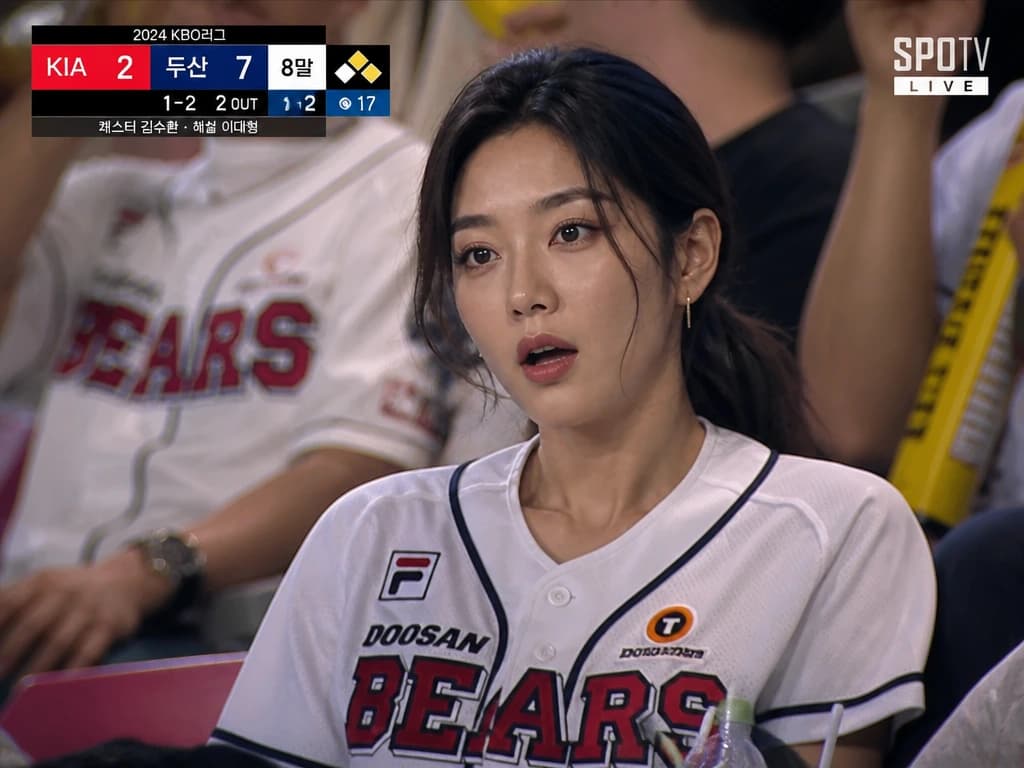
Upload a selfie and create the Korean AI baseball trend look: a realistic sports broadcast crowd-cam screenshot with stadium lighting, a team jersey, blurred fans, and a natural caught-on-camera expression.
Telephoto broadcast composition with the subject pulled out from a blurred stadium crowd.
Stadium floodlights, jersey styling, scoreboard glow, and candid fan energy create the Korean baseball look.
Use the generated first frame with motion prompts for blinking, small gaze shifts, slow zoom, and crowd movement.
Copy an image prompt for the first frame, or use a motion prompt when animating the result into a short video.
Convert this image into a realistic sports broadcast screenshot of the person from the reference photo sitting in the crowd at a Korean baseball game. Natural candid crowd-cam feeling, surprised but focused expression, team jersey, realistic stadium lighting, documentary broadcast style, blurred crowd background, telephoto sports camera look, preserve facial identity. Add visible generic live TV broadcast graphics: a top score and inning bar, a small LIVE label, Korean baseball scoreboard text, a corner channel-style bug, and subtle safe-area broadcast UI. Make it feel like an authentic Korean sports broadcast screenshot, with clean readable overlay text and score numbers that do not cover the face.
Realistic Korean baseball broadcast crowd-cam video. The person from the reference image sits in the stadium crowd wearing a team jersey, cheering for the game with a surprised but focused expression. Natural candid sports broadcast feeling, subtle blinking, slight head movement, gentle handheld camera shake, slow telephoto zoom, realistic stadium lighting, blurred background fans moving naturally.
Candid stadium broadcast moment. The person glances toward the field, blinks naturally, then briefly notices the camera. Keep movement minimal and believable. Slight handheld shake, shallow depth of field, realistic crowd motion, live Korean baseball broadcast color grade.
Subtle live sports broadcast camera. The subject briefly looks toward the camera and gives a small natural smile, then looks back at the game. Minimal movement, gentle blink, slight telephoto zoom, crowd motion in the background, realistic stadium light.
Convert this image into a realistic Korean soccer match broadcast crowd-cam screenshot. The same person sits among fans in a packed stadium, wearing a team jersey, surprised but focused, cheering naturally, documentary sports broadcast style, telephoto lens, blurred crowd, realistic night stadium lighting.
Common questions about using Korean AI Baseball Trend
It is a viral AI video format where a person appears as if they were caught by a live Korean baseball broadcast crowd camera. The look usually includes a packed stadium, team jersey, telephoto lens, blurred fans, realistic lighting, and a natural surprised or focused expression.
Start with a clear portrait, generate a realistic Korean baseball broadcast screenshot with this style page, then animate that image in Seedance 2.0, Veo 3.1, or another image-to-video tool with subtle motion: blinking, a small gaze shift, slight camera shake, slow zoom, and background crowd movement.
Clear waist-up portraits or selfies work best. Avoid heavy filters, sunglasses, covered faces, extreme shadows, or group photos. A neutral or natural expression gives the AI more room to create a believable crowd-cam reaction.
Yes. Generate the first-frame image in Image 2, then copy one of the motion prompts from the Prompt Gallery into Seedance 2.0, Veo 3.1, or another image-to-video model. Keep the video prompt focused on motion, not rewriting the whole image.
The default prompt tells the model to preserve facial identity, age, skin tone, hairstyle, and recognizable features. Like any AI edit, results can vary, so regenerate or use a clearer source photo if the face drifts.
Each generation uses 2/2/6 (1K/2K/4K) credits depending on the selected output resolution. New users can try it with signup credits, and more credits are available through plans, top-ups, check-ins, or referrals.
Yes. Results can be used for TikTok, Instagram Reels, YouTube Shorts, profile posts, and creator content, subject to Image 2 terms and any rights connected to your uploaded photo.
Still have questions? Contact us at [email protected]