


01Transformations
Forgotten camera roll
Heavy grain, faded color, and low dynamic range make the image feel found rather than generated.
Turn polished images into a forgotten 1998 disposable camera photo. GPT Image 2 adds heavy film grain, slight blur, accidental framing, soft light leaks, faded colors, natural skin texture, and a raw unedited feeling that does not look overly AI.
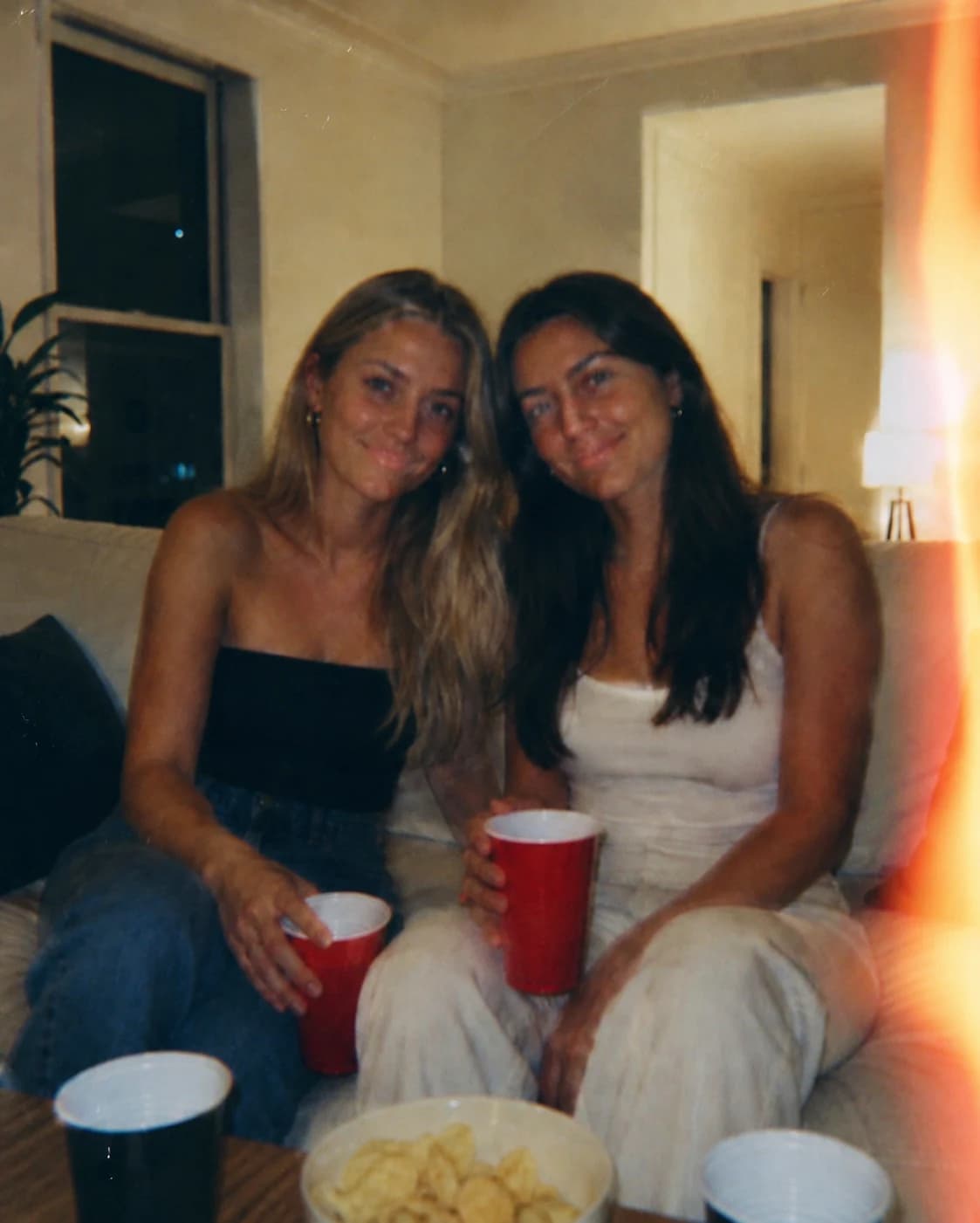
Turn polished images into a forgotten 1998 disposable camera photo.
Heavy grain, faded color, and low dynamic range make the image feel found rather than generated.
Warm edge leaks and uneven exposure break the overly clean AI finish.
Slight blur, awkward framing, and natural skin texture create a believable candid moment.
Use the default anti-AI prompt, or copy a variant for film grain, light leaks, bad lighting, or motion blur.
Make this image look imperfect and authentic like a forgotten 1998 disposable camera photo. Add heavy film grain, slight blur, accidental framing, soft light leaks, faded colors, realistic motion imperfections, low dynamic range, nostalgic emotional atmosphere, natural skin texture, raw unedited feeling. Preserve identity, pose, clothing, and the original scene. Avoid plastic skin, HDR sharpness, beauty retouching, and a polished AI finish.
Edit the uploaded photo into an authentic analog memory from a cheap 1990s disposable camera. Preserve the same person and identity. Add warm red-orange light leaks from one edge, heavy film grain, faded color, low contrast shadows, soft focus, uneven exposure, tiny dust specks, imperfect crop, and a quiet nostalgic mood. Make it feel found in an old shoebox, not generated by AI.
Turn this photo into an accidental candid snapshot with bad indoor lighting. Keep the face recognizable. Add underexposed shadows, weak on-camera flash falloff, slightly wrong white balance, visible grain, mild motion blur, low dynamic range, imperfect off-center framing, natural skin pores, and no beauty retouching. The result should feel raw, human, and unedited.
Make this image look like a half-missed moment from an old camera roll. Preserve the subject and scene. Add realistic motion imperfections, soft blur on hands or hair, heavy film grain, faded color, low dynamic range, small exposure mistakes, accidental framing, and emotional nostalgic atmosphere. Avoid sharp commercial lighting, plastic skin, and overly clean AI detail.
Common questions about using Anti-AI Photo Filter
It is an Image 2 style template for making images look less AI-generated and more like real casual photography. It adds disposable-camera grain, slight blur, light leaks, faded color, low dynamic range, and raw unedited texture.
Creators are pushing back against overly smooth AI images, plastic skin, and hyper-clean lighting. Controlled imperfections make the result feel more personal, nostalgic, and believable.
Yes. The prompt is designed to preserve the original person, identity, age, expression, clothing, pose, and scene while changing the camera feel.
Solo portraits, selfies, candid social photos, travel shots, and indoor snapshots work best. Clear faces with a little room around the subject give the most natural result.
Retro Digital Camera Filter targets early-2000s digicam flash and timestamps. This template is broader and more anti-AI: 1998 disposable camera mood, film grain, light leaks, bad lighting, blur, and raw emotional atmosphere.
Each generation uses 2/2/6 (1K/2K/4K) credits. New users can try it with signup credits, and more credits are available through plans, top-ups, check-ins, or referrals.
Yes. Results can be used for social posts, profile photos, creator content, and commercial campaigns, subject to Image 2 terms and any rights connected to your source photo.
Still have questions? Contact us at [email protected]