Prompt
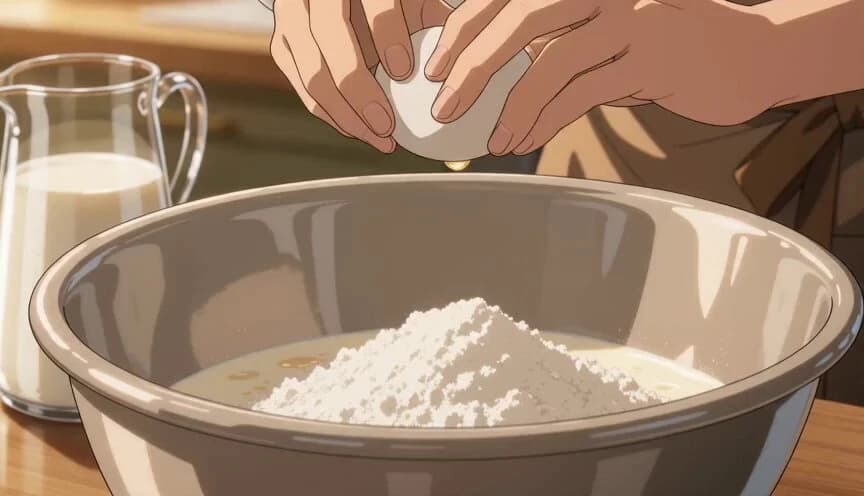
284 wordsUse @Image1 as the chef character reference. Keep the chef’s face, outfit, hairstyle, proportions, rounded glasses, and anime style consistent throughout. Create a 10-second horizontal 16:9 anime cooking video showing pancakes being fried in a fast cinematic step-by-step montage. Each second shows a new cooking step. Style: premium Japanese anime food commercial, warm kitchen lighting, cozy breakfast mood, beautiful food close-ups, golden textures, butter shine, soft steam, smooth camera motion, shallow depth of field, elegant and satisfying. No subtitles, no text, no logo, no watermark. 0:00–0:01 Close-up of the chef cracking eggs into a mixing bowl with flour and milk already prepared nearby. 0:01–0:02 The chef whisks the batter smoothly until it becomes creamy and lump-free. 0:02–0:03 The chef lightly greases a hot frying pan with butter. The butter melts and sizzles. 0:03–0:04 The chef pours pancake batter into the pan, forming a neat round pancake. 0:04–0:05 Small bubbles appear on the pancake surface as it cooks. Soft steam rises. 0:05–0:06 The chef slides a spatula under the pancake and flips it cleanly in one smooth motion. 0:06–0:07 The pancake cooks on the second side, becoming evenly golden-brown with a soft fluffy look. 0:07–0:08 The chef lifts the finished pancake from the pan and places it onto a plate, stacking it with others. 0:08–0:09 The chef adds a pat of butter on top and drizzles syrup slowly over the pancake stack. 0:09–0:10 Final plating shot: a beautiful stack of fluffy pancakes with butter, glossy syrup, and optional berries on the side. Soft steam rises. End on an appetizing hero shot. Use smooth quick cuts, macro food shots, warm highlights, rich golden colors, and a refined anime aesthetic similar to a high-end Japanese food animation.
About this prompt
Anime Pancake Cooking Montage is a Anime Seedance 2.0 prompt with 284 words, structured around shot timing, camera direction, motion cues, and remixable scene details.
Use the visual preview, when available, to understand the composition, then treat the prompt text as a production brief you can adapt for your own subject, brand, or story.
Video prompt structure
Use it for Anime videos
Best for Seedance 2.0 generations that need Anime, Multi-Shot, Image Reference. Replace the subject, setting, product, dialogue, music, and timing before sending it to the generator.
Customize before generating
- Swap the subject. Keep the camera and timing structure, but change the character, product, or environment.
- Tighten the timeline. Shorten or expand shot blocks so they match the duration you want to render.
- Add reference media. Use first frames, last frames, images, video, or audio when the prompt depends on a specific look or rhythm.
More Seedance paths to explore
Browse adjacent styles and techniques from the same Seedance 2.0 prompt library.
How to use it
- Step 1
Copy or start from this prompt
Use the full prompt as a structured draft rather than rewriting the whole video brief.
- Step 2
Open Seedance 2.0
Send the text into the Seedance generator and choose text, image, or reference mode.
- Step 3
Adapt and render
Tune duration, aspect ratio, reference media, camera notes, and dialogue before generating.
Make it a Seedance video
Start from this prompt in the Seedance 2.0 generator, then adjust the scene, duration, aspect ratio, and reference media.