Prompt
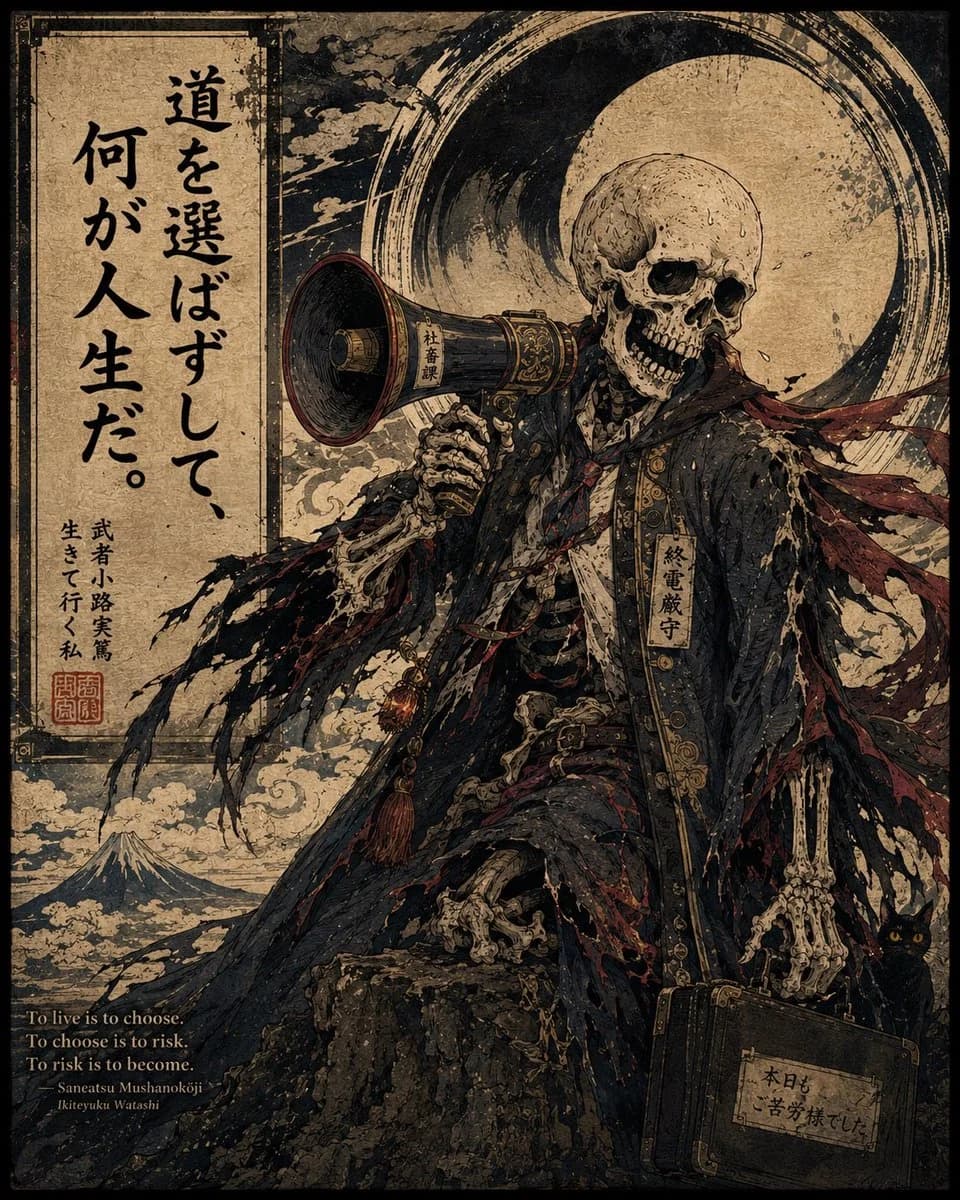
466 wordsGoal: Create a dark, highly detailed Japanese ukiyo-e style poster featuring a skeletal salaryman as a grim motivational figure, combining Edo-period woodblock print texture with modern corporate burnout satire.
Canvas: Vertical poster, roughly 4:5 aspect ratio, aged parchment background with heavy black border, weathered paper stains, ink splatter, scratches, distressed print grain, muted tan, black, charcoal, bone white, and deep crimson palette.
Layout: Split the image visually into two zones. On the left, place a tall rectangular parchment calligraphy panel occupying about one quarter of the width, bordered with thin black ornamental lines. On the right and center, place the main character large and dramatic, standing or perched on a rocky mound, framed by a huge black circular ink-brush halo behind the skull. Add waves, smoke-like clouds, and a small Mount Fuji landscape in the lower left background. Include exactly 3 main text areas: 1 large vertical Japanese quote panel on the left, 1 small English translation block near the bottom left, and 1 small handwritten label on the briefcase at bottom right.
Main subject: A full-body human skeleton wearing a tattered dark navy-black business suit or overcoat, ornate but decayed, with frayed sleeves, ripped fabric, exposed ribs and bones, red torn necktie ribbons blowing to the right, decorative gold trim, and small hanging talismans. The skull has hollow black eye sockets and a slightly open grinning jaw. The figure holds a vintage black and brass megaphone near its mouth in the left hand; the megaphone has a small vertical paper label reading 「社畜課」. The right skeletal hand hangs down holding a battered black leather briefcase with metal corners. A vertical name tag on the character’s chest reads 「終電厳守」. Add a small black cat with glowing yellow eyes partially hidden behind the briefcase near the lower right edge.
Text content: On the left calligraphy panel, write large expressive vertical Japanese brush calligraphy: 「{argument name="Japanese quote" default="道を選ばずして、何が人生だ。"}」. Beneath it in smaller vertical Japanese text: 「武者小路実篤 生きて行く私」, plus two red seal stamps. In the lower left corner, add a small serif English translation in off-white: “To live is to choose. To choose is to risk. To risk is to become.” followed by “Saneatsu Mushanokōji” and “Ikiteyuku Watashi”. On the briefcase label, write 「本日も苦労様でした」 in rough handwritten Japanese.
Style: Intricate linework, dramatic manga-meets-ukiyo-e illustration, antique woodblock print, gritty etching detail, rough ink outlines, high contrast shadows, asymmetrical composition, ornate decayed textures, solemn but darkly humorous mood. Make it look like an old Japanese illustrated proverb poster rather than a clean digital painting.
Constraints: Use exactly 1 skeleton character, 1 megaphone, 1 briefcase, 1 black cat, 1 Mount Fuji, 1 large ink-brush circle, 2 red seal stamps, and 3 main text areas. Keep all Japanese text vertical where specified, avoid modern logos or watermarks, and do not add extra characters.About this prompt
Ukiyo-e Skeleton Salaryman Quote Poster is a ready-to-use poster prompt for GPT Image 2 on Image 2. Copy the 466 words below, paste them into the Create form, and you will get a result close to the preview above. Tweak the Social Media, Poster, Product tag if you want to push it somewhere new.
Use it as a starting point, then adjust the subject, lighting, or composition to suit your idea. The credit cost stays the same whether you use it as written or customize it.
Use case
A strong starting point for Poster
Start here when you want a poster image inspired by Ukiyo-e Skeleton Salaryman Quote Poster. The prompt already sets the look and composition; replace the subject, product, colors, or scene details to match your project.
Easy places to tweak
- Subject Swap in your person, product, place, or object without changing the overall composition.
- Look and mood Tune the lighting, palette, camera angle, or materials so the image fits your brand.
- Final format Set the aspect ratio, background, text, or layout notes before you generate.
More prompt paths to explore
Find more GPT Image 2 prompts with a similar style, use case, or subject.
How to use it
- Step 1
Copy the prompt
Hit the Copy button above to grab the full text.
- Step 2
Open Image 2 Create
Head to the Create form and paste it in.
- Step 3
Generate
Hit Generate. Your version lands in seconds.
Make it yours
Load the prompt into the Create form with one click, then start tweaking.