Prompt
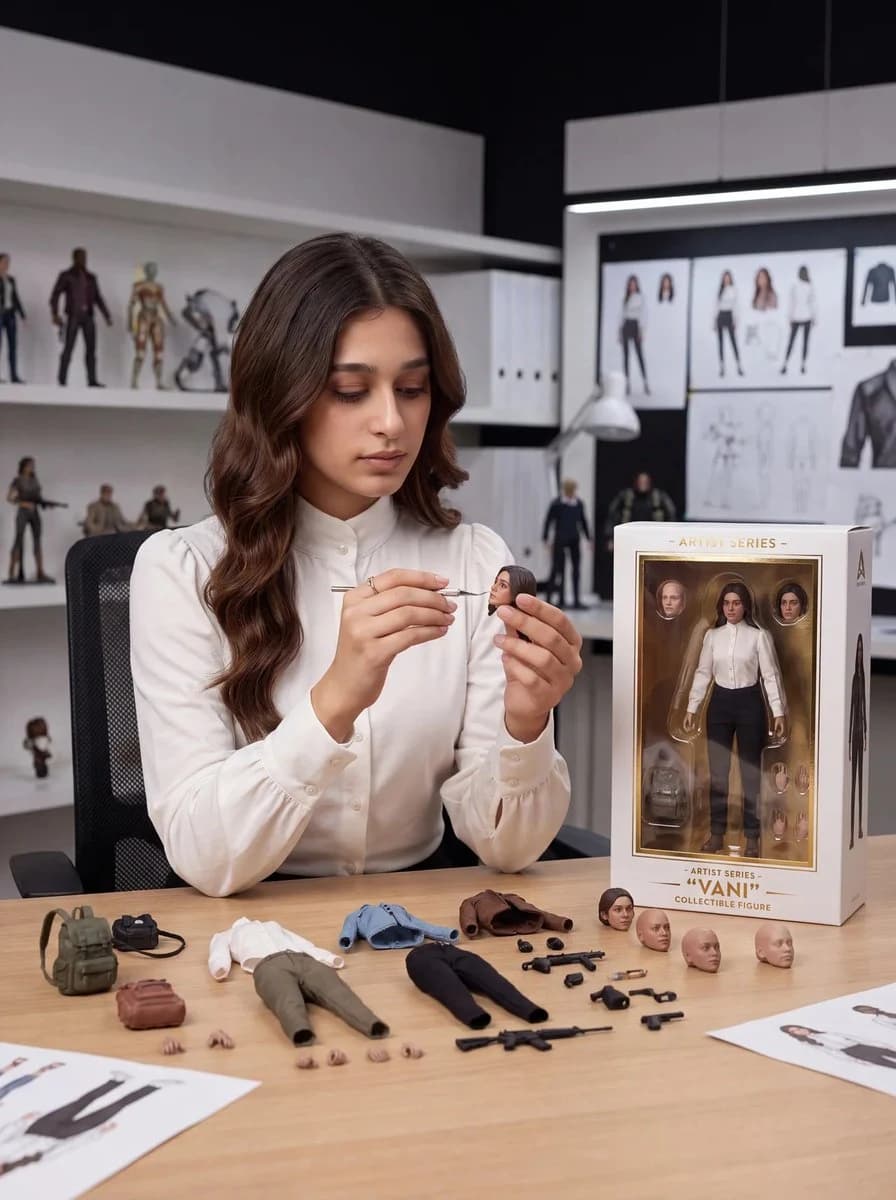
467 wordsGoal: Create a realistic premium toy design studio scene where {argument name="character name" default="VANI"}, a young woman toy designer, is customizing a collectible action figure based on herself.
Canvas: Vertical 3:4 editorial product-photography composition, eye-level camera, shallow depth of field, crisp studio lighting, modern white-and-black designer workspace.
Main subject: A young woman with {argument name="hair color" default="long wavy dark brown hair"}, center-left at a wooden worktable, wearing a high-neck white blouse with buttoned cuffs. She sits in a black mesh office chair, looking down with calm concentration while holding a small action-figure head in one hand and painting it with a fine detail brush in the other. The miniature head should resemble her face and hairstyle.
Environment: Premium toy design studio with white shelving on the left and a large design board on the back wall. On the shelves, show exactly 8 background collectible figures: 5 standing figures on the upper shelf, 2 armed figures on the middle shelf, and 1 tiny chibi-style figure on the lower shelf. On the rear wall, include pinned character concept sheets showing front/back outfit views, head studies, pose sketches, and a jacket design. Add white binders, a desk lamp, and a few blurred prototype figures for depth.
Table layout and counted objects: Arrange exactly 32 visible loose toy-design components on the table: 1 green backpack, 1 small black bag, 1 brown pouch, 1 white shirt torso piece, 1 pair of olive pants with attached legs, 1 blue jacket, 1 brown jacket, 1 pair of black pants with attached legs, 3 separate painted human heads, 3 separate unpainted bald heads, 2 tiny loose hands near the pouch, 4 tiny loose hands in front of the pants, 1 long rifle, 1 compact rifle, 4 small pistols, and 6 small black accessory parts. Also include two printed character reference sheets partially visible at the bottom corners.
Packaging: On the right side of the table, place a premium boxed action figure with a clear display window and white packaging trimmed in gold. The box contains the full figure wearing a white blouse, black pants, and brown shoes, plus visible portrait/head accessories inside. Printed text on the box should read “ARTIST SERIES” at the top, “ARTIST SERIES” above the name, “{argument name="figure name" default="VANI"}” in large quotation marks, and “COLLECTIBLE FIGURE” below. Add a small minimalist triangular studio logo near the top-right of the box.
Visual style: Photorealistic, high-end collectible toy photography, realistic skin texture, soft shadows, accurate scale for 1/12 action-figure accessories, clean luxury product design aesthetic, neutral palette of whites, wood, black, olive green, brown, and muted blue.
Constraints: Keep all text legible, avoid extra logos or watermarks, do not add extra table accessories beyond the counted objects, keep the designer’s expression focused and serene, and make the boxed figure clearly match the designer.About this prompt
Toy Designer Collectible Figure Studio is a ready-to-use ad creative prompt for GPT Image 2 on Image 2. Copy the 467 words below, paste them into the Create form, and you will get a result close to the preview above. Tweak the Product Ad, Ad Creative, Product tag if you want to push it somewhere new.
Use it as a starting point, then adjust the subject, lighting, or composition to suit your idea. The credit cost stays the same whether you use it as written or customize it.
Use case
A strong starting point for Ad Creative
Start here when you want a ad creative image inspired by Toy Designer Collectible Figure Studio. The prompt already sets the look and composition; replace the subject, product, colors, or scene details to match your project.
Easy places to tweak
- Subject Swap in your person, product, place, or object without changing the overall composition.
- Look and mood Tune the lighting, palette, camera angle, or materials so the image fits your brand.
- Final format Set the aspect ratio, background, text, or layout notes before you generate.
More prompt paths to explore
Find more GPT Image 2 prompts with a similar style, use case, or subject.
How to use it
- Step 1
Copy the prompt
Hit the Copy button above to grab the full text.
- Step 2
Open Image 2 Create
Head to the Create form and paste it in.
- Step 3
Generate
Hit Generate. Your version lands in seconds.
Make it yours
Load the prompt into the Create form with one click, then start tweaking.