Prompt
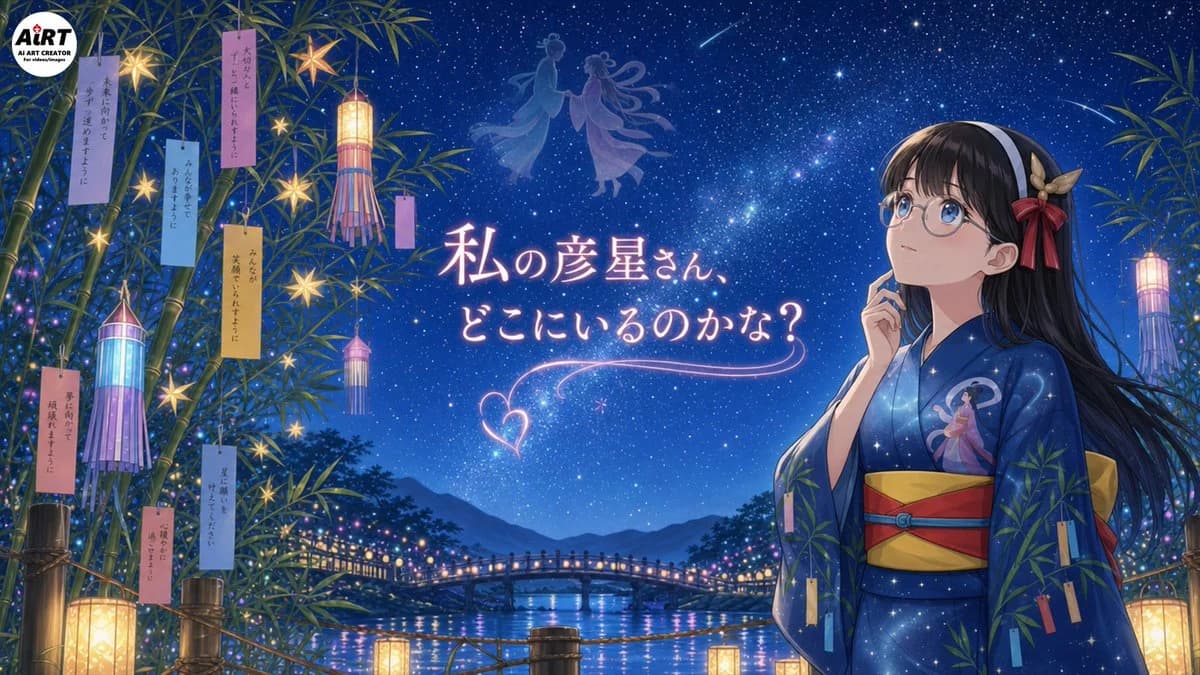
424 wordsGoal: Create a polished anime-style Tanabata night illustration featuring {argument name="character name" default="WAGAHAI"}, a thoughtful young girl in a yukata gazing up at the Milky Way and wondering about Hikoboshi.
Canvas: Wide 16:9 horizontal illustration, cinematic composition, deep blue starry night palette, high detail, soft glowing lights, magical summer-festival atmosphere.
Layout: Place the girl on the right third of the image from waist up, facing left and looking upward with a contemplative expression, one finger resting near her cheek. Fill the left and far-right edges with tall bamboo branches framing the scene. Put the main glowing Japanese headline in the center-left sky. In the distant background, show a river, mountain silhouettes, and a small arched bridge lined with warm festival lights. Add faint celestial silhouettes of Orihime and Hikoboshi floating near the upper center of the sky, plus two shooting stars.
Main subject details: The girl has long straight {argument name="hair color" default="black hair"}, large round blue eyes behind round glasses, fair skin, and a white headband. Add a decorative hair ornament on the right side of her head with beige leaves and a red ribbon bow. She wears a dark navy-blue starry yukata patterned like a galaxy, with a small illustration of Orihime on the chest, a wide yellow obi, and red obi cords. Her mood is quiet, wistful, and romantic.
Tanabata decorations and counted elements: Include exactly 14 hanging paper wish strips in total: 8 on the left bamboo cluster, 1 small vertical strip near the central hanging lantern, and 5 on the right-side bamboo/yukata area. Include exactly 4 tall cylindrical Tanabata lanterns with streamers: 2 on the left side, 1 near the upper center-left, and 1 on the far right. Include exactly 6 glowing star-shaped ornaments hanging among the left bamboo. Include exactly 4 rectangular floor or railing lanterns glowing warm yellow along the bottom edge. Include exactly 1 large round creator-logo badge in the top-left corner reading “AiRT AI ART CREATOR for children/images.”
Text content: Add the central glowing handwritten Japanese phrase {argument name="headline text" default="私の彦星さん、どこにいるのかな?"} in pale pink-white neon lettering, with a decorative heart-shaped light trail and curved underline below it. The tanzaku strips may contain small vertical Japanese wish text, delicate and partially readable, but the headline must be clear.
Visual style: High-quality Japanese anime illustration, luminous fantasy realism, detailed star field with Milky Way, soft bloom, clean character line art, rich blues and purples, warm lantern contrast, reflective river water, romantic Tanabata festival mood. Avoid photorealism, avoid extra characters in the foreground, avoid cluttering the central headline.About this prompt
Tanabata Girl Under Starry Sky is a ready-to-use social media prompt for GPT Image 2 on Image 2. Copy the 424 words below, paste them into the Create form, and you will get a result close to the preview above. Tweak the Social Media, Anime, Cyberpunk tag if you want to push it somewhere new.
Use it as a starting point, then adjust the subject, lighting, or composition to suit your idea. The credit cost stays the same whether you use it as written or customize it.
Use case
A strong starting point for Social Media
Start here when you want a social media image inspired by Tanabata Girl Under Starry Sky. The prompt already sets the look and composition; replace the subject, product, colors, or scene details to match your project.
Easy places to tweak
- Subject Swap in your person, product, place, or object without changing the overall composition.
- Look and mood Tune the lighting, palette, camera angle, or materials so the image fits your brand.
- Final format Set the aspect ratio, background, text, or layout notes before you generate.
More prompt paths to explore
Find more GPT Image 2 prompts with a similar style, use case, or subject.
How to use it
- Step 1
Copy the prompt
Hit the Copy button above to grab the full text.
- Step 2
Open Image 2 Create
Head to the Create form and paste it in.
- Step 3
Generate
Hit Generate. Your version lands in seconds.
Make it yours
Load the prompt into the Create form with one click, then start tweaking.