Prompt
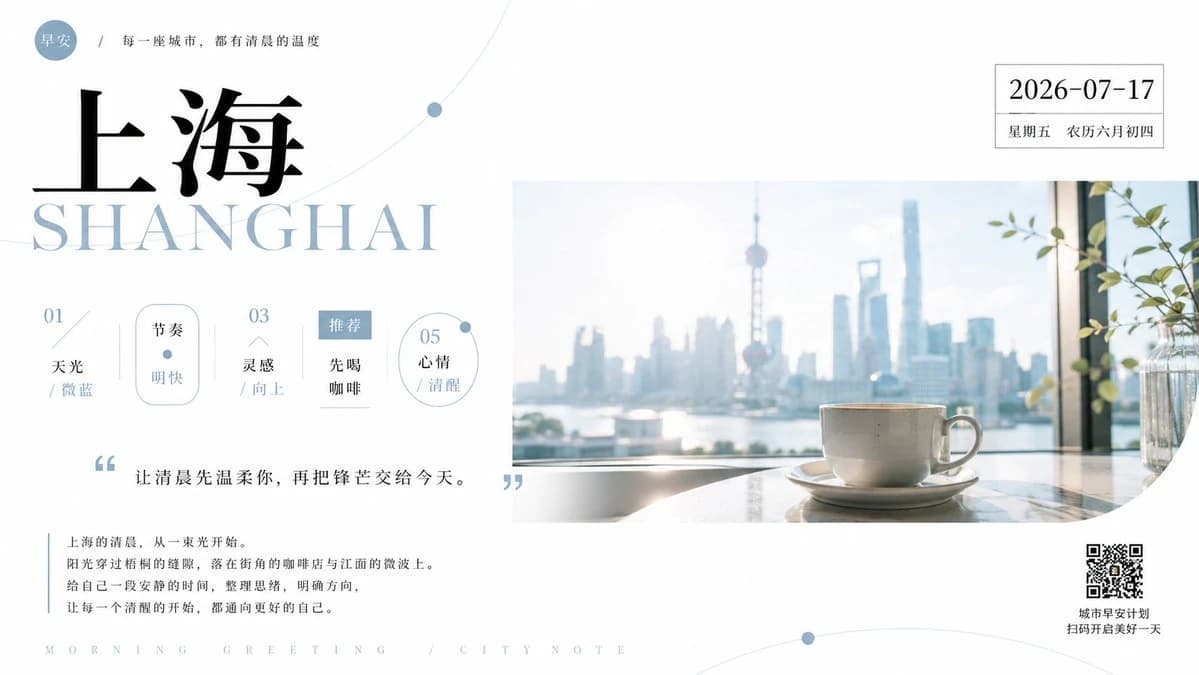
463 wordsGoal: Create a refined minimalist morning greeting poster for {argument name="city name" default="上海"}, blending city travel aesthetics, light editorial typography, and a calm coffee-by-the-window mood.
Canvas: Wide horizontal poster, 16:9 ratio, clean white background with generous negative space and pale blue-gray accents. Overall feeling is airy, quiet, premium, and slightly poetic.
Layout: Left half is a typography and information panel; right half is a large soft-focus lifestyle photo panel. Place a small pale-blue circular badge at the top left reading 「早安」, followed by a thin slash and the small Chinese line 「每一座城市,都有清晨的温度」. Below it, create an oversized black Chinese city title 「上海」, with a very large pale blue-gray serif English title “SHANGHAI” underneath, partially overlapping the Chinese characters. Add subtle thin orbital curve lines and small blue dots across the white background.
Right image panel: A rectangular photo area occupying the middle-right, showing a white ceramic coffee cup on a saucer on a bright windowsill or table, with a hazy Shanghai skyline in the background, including the Oriental Pearl Tower and tall modern skyscrapers. Morning sunlight, slight overexposure, soft blue atmosphere, shallow depth of field. Include a small glass vase with green leafy stems near the far right edge. The lower-right corner of the photo panel should have a rounded or curved cutout edge.
Top-right date card: Add a thin outlined white box in the upper right with the date {argument name="date" default="2026-07-17"} in black serif numerals, and smaller text underneath: 「星期五 农历六月初四」.
Info row: Under the main title on the left, create exactly 5 small vertical information items, evenly spaced, with light blue-gray numbers and delicate divider lines. The five items are: 1) “01 / 天光 / 微蓝”, 2) a rounded vertical pill labeled 「节奏」 with 「明快」 below and a small blue dot, 3) “03 / 灵感 / 向上”, 4) a small blue filled rectangle labeled 「推荐」 with 「先喝 / 咖啡」 below, 5) a thin outlined circle labeled “05 / 心情 / 清醒” with a small blue dot on its rim.
Quote section: Below the info row, place large pale-blue quotation marks around the quote {argument name="quote" default="让清晨先温柔你,再把锋芒交给今天。"}. Use elegant Chinese typography, centered-left under the info row.
Body copy: At the lower left, add a thin vertical blue line and a short paragraph in small Chinese text: 「上海的清晨,从一束光开始。阳光穿过梧桐的缝隙,落在街角的咖啡店与江面的微波上。给自己一段安静的时间,整理思绪,明确方向,让每一个清醒的开始,都通向更好的自己。」
Footer and QR: Along the bottom, add widely spaced pale-blue uppercase footer text: “MORNING GREETING / CITY NOTE”. In the lower right, place a small QR code with two lines of Chinese caption: 「城市早安计划」 and 「扫码开启美好一天」.
Visual style: Editorial magazine layout, luxury city postcard, pale sky-blue accents, black Chinese calligraphy-like serif title, high-end serif English lettering, thin rules, precise alignment, soft gradients, quiet morning atmosphere. Keep the design spacious, balanced, and uncluttered. No extra icons, no watermark, no additional text beyond the specified content.About this prompt
Shanghai Morning Greeting Poster is a ready-to-use social media prompt for GPT Image 2 on Image 2. Copy the 463 words below, paste them into the Create form, and you will get a result close to the preview above. Tweak the Social Media, Infographic, Food tag if you want to push it somewhere new.
Use it as a starting point, then adjust the subject, lighting, or composition to suit your idea. The credit cost stays the same whether you use it as written or customize it.
Use case
A strong starting point for Social Media
Start here when you want a social media image inspired by Shanghai Morning Greeting Poster. The prompt already sets the look and composition; replace the subject, product, colors, or scene details to match your project.
Easy places to tweak
- Subject Swap in your person, product, place, or object without changing the overall composition.
- Look and mood Tune the lighting, palette, camera angle, or materials so the image fits your brand.
- Final format Set the aspect ratio, background, text, or layout notes before you generate.
More prompt paths to explore
Find more GPT Image 2 prompts with a similar style, use case, or subject.
How to use it
- Step 1
Copy the prompt
Hit the Copy button above to grab the full text.
- Step 2
Open Image 2 Create
Head to the Create form and paste it in.
- Step 3
Generate
Hit Generate. Your version lands in seconds.
Make it yours
Load the prompt into the Create form with one click, then start tweaking.