Prompt
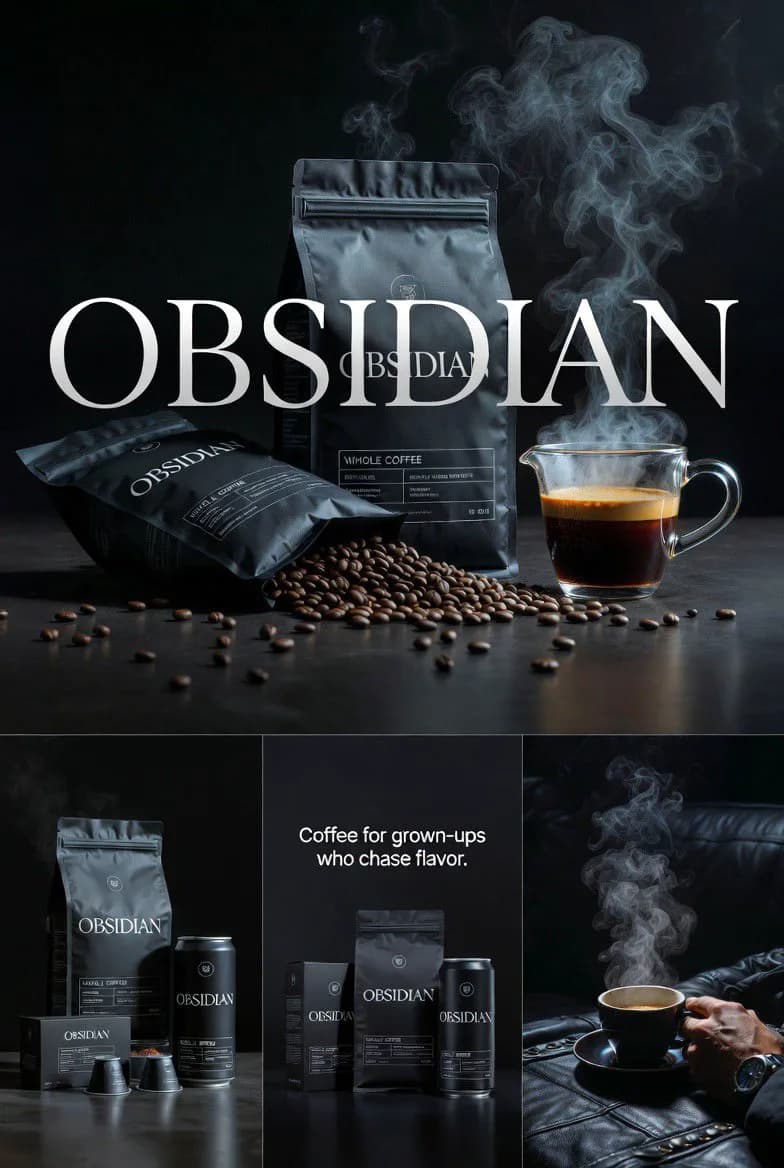
99 wordsGenerate four cohesive high-end realistic editorial visuals for OBSIDIAN coffee brand. Cinematic, dark, mature aesthetic inspired by luxury sportswear and premium coffee advertising. Studio lighting that's dramatic yet controlled, photorealistic textures, clean compositional layout. Shot 1: Hero brand poster featuring 'OBSIDIAN' lettering with an artful coffee display — steam rising, beans scattered. Shot 2: Full product range — coffee bags, cans, and capsules arranged together. Shot 3: Tight packaging detail with tagline 'Coffee for grown-ups who chase flavor.' Shot 4: Lifestyle close-up of a steaming cup. Ultra-polished finish, crisp realistic materials, unified brand identity, no fantastical or surreal elements
About this prompt
OBSIDIAN Coffee Brand Campaign is a ready-to-use ad creative prompt for GPT Image 2 on Image 2. Copy the 99 words below, paste them into the Create form, and you will get a result close to the preview above. Tweak the Product Ad, Ad Creative, Product tag if you want to push it somewhere new.
Use it as a starting point, then adjust the subject, lighting, or composition to suit your idea. The credit cost stays the same whether you use it as written or customize it.
Use case
A strong starting point for Ad Creative
Start here when you want a ad creative image inspired by OBSIDIAN Coffee Brand Campaign. The prompt already sets the look and composition; replace the subject, product, colors, or scene details to match your project.
Easy places to tweak
- Subject Swap in your person, product, place, or object without changing the overall composition.
- Look and mood Tune the lighting, palette, camera angle, or materials so the image fits your brand.
- Final format Set the aspect ratio, background, text, or layout notes before you generate.
More prompt paths to explore
Find more GPT Image 2 prompts with a similar style, use case, or subject.
How to use it
- Step 1
Copy the prompt
Hit the Copy button above to grab the full text.
- Step 2
Open Image 2 Create
Head to the Create form and paste it in.
- Step 3
Generate
Hit Generate. Your version lands in seconds.
Make it yours
Load the prompt into the Create form with one click, then start tweaking.