Prompt
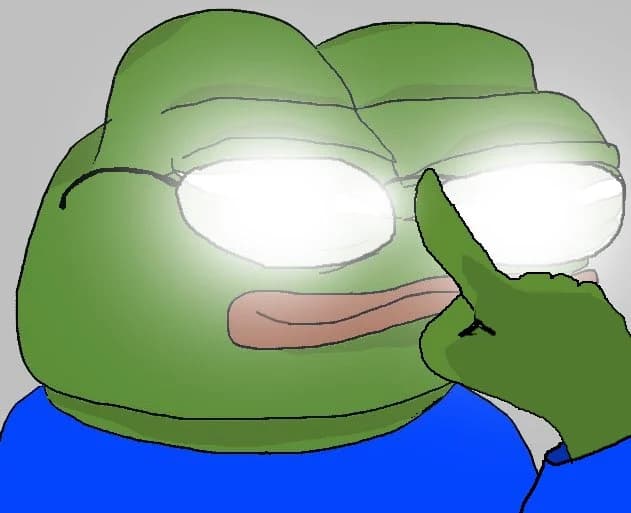
173 wordsCreate a close-up meme-style digital illustration of {argument name="character" default="Pepe the Frog"} from the shoulders up, filling most of the frame. The character has a large green frog head with smooth rounded cheeks, a wide flat face, and a small calm smirk with pale pink lips. He wears oversized oval glasses with thin gray rims; both lenses are extremely bright white with a soft bloom effect, obscuring the eyes as if glowing with intense reflection. One green hand is raised on the right side of the image, with the index finger touching or pushing up the bridge of the glasses in a clever, smug gesture. The character wears a plain {argument name="shirt color" default="bright blue"} shirt visible at the bottom. Use thick uneven black sketch outlines, simple flat cartoon coloring, soft airbrushed green shading on the face and hand, and a low-detail gray {argument name="background color" default="light gray"} background. Composition should be tightly cropped, slightly off-center, with the glasses glow as the brightest focal point, matching an internet meme / reaction image aesthetic.About this prompt
Glowing Glasses Frog Meme is a ready-to-use portrait prompt for GPT Image 2 on Image 2. Copy the 173 words below, paste them into the Create form, and you will get a result close to the preview above. Tweak the Portrait tag if you want to push it somewhere new.
Use it as a starting point, then adjust the subject, lighting, or composition to suit your idea. The credit cost stays the same whether you use it as written or customize it.
Use case
A strong starting point for Portrait
Start here when you want a portrait image inspired by Glowing Glasses Frog Meme. The prompt already sets the look and composition; replace the subject, product, colors, or scene details to match your project.
Easy places to tweak
- Subject Swap in your person, product, place, or object without changing the overall composition.
- Look and mood Tune the lighting, palette, camera angle, or materials so the image fits your brand.
- Final format Set the aspect ratio, background, text, or layout notes before you generate.
More prompt paths to explore
Find more GPT Image 2 prompts with a similar style, use case, or subject.
How to use it
- Step 1
Copy the prompt
Hit the Copy button above to grab the full text.
- Step 2
Open Image 2 Create
Head to the Create form and paste it in.
- Step 3
Generate
Hit Generate. Your version lands in seconds.
Make it yours
Load the prompt into the Create form with one click, then start tweaking.