Prompt
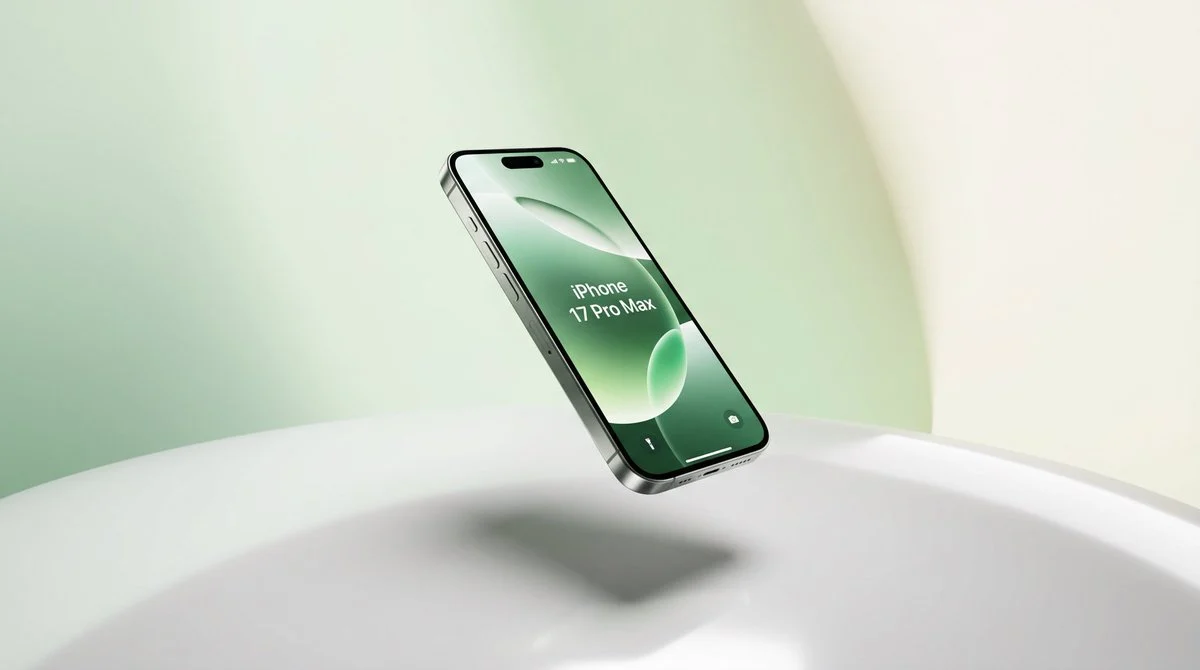
161 wordsPremium product shot of a {argument name="product name" default="iPhone 17 Pro Max"} floating diagonally above a glossy white circular pedestal in a minimal {argument name="background color" default="pale mint green and warm cream"} studio environment. Show exactly one smartphone, front-facing at a three-quarter angle, tilted slightly left, with a slim black bezel, metallic dark side rails, visible side buttons, bottom speaker holes, charging port, and a pill-shaped dynamic-island cutout at the top. The screen displays an elegant green abstract wallpaper with soft translucent oval shapes and centered white text reading “{argument name="screen text" default="iPhone 17 Pro Max"}”; include small lock-screen icons near the bottom. Use soft studio lighting, smooth gradients, a large curved mint backdrop, a creamy vertical light area on the right, realistic glass reflections, subtle highlights along the metal frame, and a diffused shadow directly beneath the floating phone on the glossy surface. Hyper-realistic textures, commercial advertising style, ultra-clean composition, wide landscape crop, no extra objects, no hands, no watermark.About this prompt
Floating iPhone Product Shot is a ready-to-use e-commerce prompt for GPT Image 2 on Image 2. Copy the 161 words below, paste them into the Create form, and you will get a result close to the preview above. Tweak the Product Ad, E-commerce, Product tag if you want to push it somewhere new.
Use it as a starting point, then adjust the subject, lighting, or composition to suit your idea. The credit cost stays the same whether you use it as written or customize it.
Use case
A strong starting point for E-commerce
Start here when you want a e-commerce image inspired by Floating iPhone Product Shot. The prompt already sets the look and composition; replace the subject, product, colors, or scene details to match your project.
Easy places to tweak
- Subject Swap in your person, product, place, or object without changing the overall composition.
- Look and mood Tune the lighting, palette, camera angle, or materials so the image fits your brand.
- Final format Set the aspect ratio, background, text, or layout notes before you generate.
More prompt paths to explore
Find more GPT Image 2 prompts with a similar style, use case, or subject.
How to use it
- Step 1
Copy the prompt
Hit the Copy button above to grab the full text.
- Step 2
Open Image 2 Create
Head to the Create form and paste it in.
- Step 3
Generate
Hit Generate. Your version lands in seconds.
Make it yours
Load the prompt into the Create form with one click, then start tweaking.