Prompt
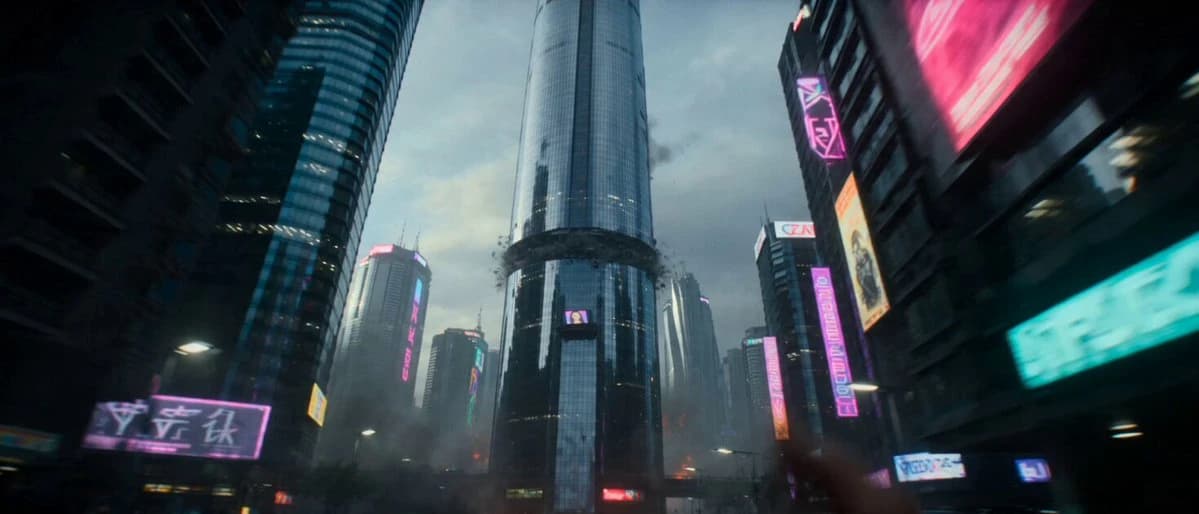
405 words9:16 vertical screen, 24fps, 15 seconds, large-scale sci-fi disaster blockbuster quality, 8K ultra-high definition, HDR, volumetric light, dual tones of cold blue and molten orange, RAW texture, high-impact disaster-film explosion aesthetics. 0-3 seconds: First-person handheld running perspective, violent shaking, passing through a cyberpunk district with neon billboards shattering and falling. A three-hundred-story mirrored skyscraper ahead is torn apart by translucent gravity waves, concrete and steel beams exploding outward like paper, glass curtain wall fragments pouring like rain, and deep red lava fissures opening in the ground. The camera stumbles to avoid a falling giant advertising screen, the last frame flashing before it shatters is the smiling face of an AI news anchor. 4-7 seconds: The camera suddenly looks up for a low-angle shot—the sky is obscured by a massive triangular alien mothership, pulse-like blue tractor beams shooting from the ship's bottom, lifting skyscrapers like toys and suspending them in the air. A military drone whistles past the right side of the camera, hit by the beam and exploding 0.3 seconds later; a fireball erupts in front of the lens, and the camera recoils from the shockwave but continues running. Background sounds are tearing air raid sirens, people screaming, and the low-frequency roar of collapsing buildings. 8-12 seconds: The camera rushes through a collapsed overpass arch into an open central square. Hundreds of hovering cars lose control, colliding and exploding in series, the ground undulating like waves—gravity waves have warped the laws of physics. The giant holographic statue in the center of the square flickers and shatters into data fragments. A young mother carrying a child suddenly falls on the right; the camera reaches out to pull her but is too late—the next second the square's crust is flipped over, the camera becomes weightless and airborne, rotating 360 degrees surrounded by suspended cars, debris, and human bodies. 13-15 seconds: In a rapid descent, the camera finally points to the sky—the alien mothership's underside opens, a giant orange-red energy pillar plunges into the earth's core, and the city is destroyed by a circular shockwave from the center outward. The last frame before the camera hits the ground—the screen freezes on a solitary neon cherry blossom holographic advertisement flickering amidst the flying debris, then hard cuts to black. The sound effects conclude with a massive low-frequency thud followed by vacuum-like silence. Prohibit any text, subtitles, LOGO, or watermark. Subtitles should not appear in any segment of the screen.
About this prompt
Cyberpunk Disaster Blockbuster is a Short Drama Seedance 2.0 prompt with 405 words, structured around shot timing, camera direction, motion cues, and remixable scene details.
Use the visual preview, when available, to understand the composition, then treat the prompt text as a production brief you can adapt for your own subject, brand, or story.
Video prompt structure
Use it for Short Drama videos
Best for Seedance 2.0 generations that need Short Drama, Multi-Shot, Dialogue. Replace the subject, setting, product, dialogue, music, and timing before sending it to the generator.
Customize before generating
- Swap the subject. Keep the camera and timing structure, but change the character, product, or environment.
- Tighten the timeline. Shorten or expand shot blocks so they match the duration you want to render.
- Add reference media. Use first frames, last frames, images, video, or audio when the prompt depends on a specific look or rhythm.
More Seedance paths to explore
Browse adjacent styles and techniques from the same Seedance 2.0 prompt library.
How to use it
- Step 1
Copy or start from this prompt
Use the full prompt as a structured draft rather than rewriting the whole video brief.
- Step 2
Open Seedance 2.0
Send the text into the Seedance generator and choose text, image, or reference mode.
- Step 3
Adapt and render
Tune duration, aspect ratio, reference media, camera notes, and dialogue before generating.
Make it a Seedance video
Start from this prompt in the Seedance 2.0 generator, then adjust the scene, duration, aspect ratio, and reference media.