Prompt
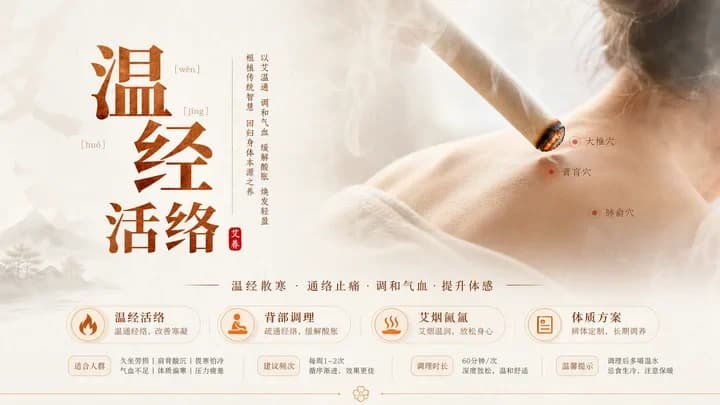
383 wordsGoal: Create a refined Traditional Chinese Medicine wellness event poster about moxibustion and meridian activation, with an elegant classical Chinese aesthetic and warm beige medicinal atmosphere.
Canvas: Horizontal 16:9 poster, 1366×768 style composition, soft cream parchment background with mist, pale ink-wash mountains and a tiny pine tree at the lower left, subtle golden-brown gradients and thin decorative divider lines.
Layout: Left third contains a large vertical Chinese headline with exactly 4 oversized calligraphy characters, arranged in two stacked columns: {argument name="main headline" default="温经活络"}. Add tiny pinyin annotations near the characters, reading “wēn”, “jīng”, and “huó”. Beside the headline, add a slim vertical explanatory Chinese text column about warming meridians, regulating qi and blood, dispelling cold and dampness, and nourishing the body; include a small red seal reading “艾灸”. Center-right shows a close-up photographic back/shoulder therapy scene: a person seen from behind with neck and shoulder exposed, a lit moxa stick angled diagonally toward the upper shoulder, glowing ember and white smoke curling upward. Mark exactly 3 acupuncture points on the shoulder/back with small red dots and labels: “大椎穴”, “肩胛穴”, and “膏肓穴”. Across the lower middle, place a Chinese subtitle separated by thin lines: {argument name="subtitle" default="温经散寒 · 通络止痛 · 调和气血 · 提升体感"}.
Bottom information band: Add exactly 4 rounded rectangular service cards with orange line icons and Chinese headings. Card 1 has a flame icon, heading {argument name="card one heading" default="温经活络"}, description “温通经络,改善寒凝”, and two pill tags: “适合人群” and small text about cold hands/feet, shoulder-neck fatigue, cold-damp constitution, qi-blood deficiency, low immunity, and high pressure. Card 2 has a seated therapy icon, heading “背部调理”, description “疏通经络,缓解酸胀”, and tags “建议频次” plus “每周1–2次,循序渐进,效果更佳”. Card 3 has a steam/waves icon, heading “艾烟闻气”, description “艾草温润,放松身心”, and tags “调理时长” plus “60分钟/次,深度放松,温和舒适”. Card 4 has a clipboard icon, heading {argument name="card four heading" default="体质方案"}, description “辨体定制,长期调养”, and tags “温馨提示” plus “调理后多喝温水,忌食生冷,注意保暖”.
Visual style: High-end TCM product poster, minimal and spacious, sepia-orange typography, traditional calligraphy mixed with clean Song-style Chinese body text, translucent rounded cards, soft shadows, no harsh contrast. Use realistic skin texture and smoke for the therapy photo area, blended into the parchment background.
Constraints: Keep the design calm, premium, and educational; preserve exactly 4 bottom cards, exactly 3 acupuncture-point labels, and exactly 4 main headline characters. Avoid extra logos, QR codes, watermarks, clutter, or modern neon colors.About this prompt
Traditional Chinese Moxibustion Poster is a ready-to-use infographic prompt for GPT Image 2 on Image 2. Copy the 383 words below, paste them into the Create form, and you will get a result close to the preview above. Tweak the Infographic, Product, Watercolor tag if you want to push it somewhere new.
Use it as a starting point, then adjust the subject, lighting, or composition to suit your idea. The credit cost stays the same whether you use it as written or customize it.
Use case
A strong starting point for Infographic
Start here when you want a infographic image inspired by Traditional Chinese Moxibustion Poster. The prompt already sets the look and composition; replace the subject, product, colors, or scene details to match your project.
Easy places to tweak
- Subject Swap in your person, product, place, or object without changing the overall composition.
- Look and mood Tune the lighting, palette, camera angle, or materials so the image fits your brand.
- Final format Set the aspect ratio, background, text, or layout notes before you generate.
More prompt paths to explore
Find more GPT Image 2 prompts with a similar style, use case, or subject.
How to use it
- Step 1
Copy the prompt
Hit the Copy button above to grab the full text.
- Step 2
Open Image 2 Create
Head to the Create form and paste it in.
- Step 3
Generate
Hit Generate. Your version lands in seconds.
Make it yours
Load the prompt into the Create form with one click, then start tweaking.