Prompt
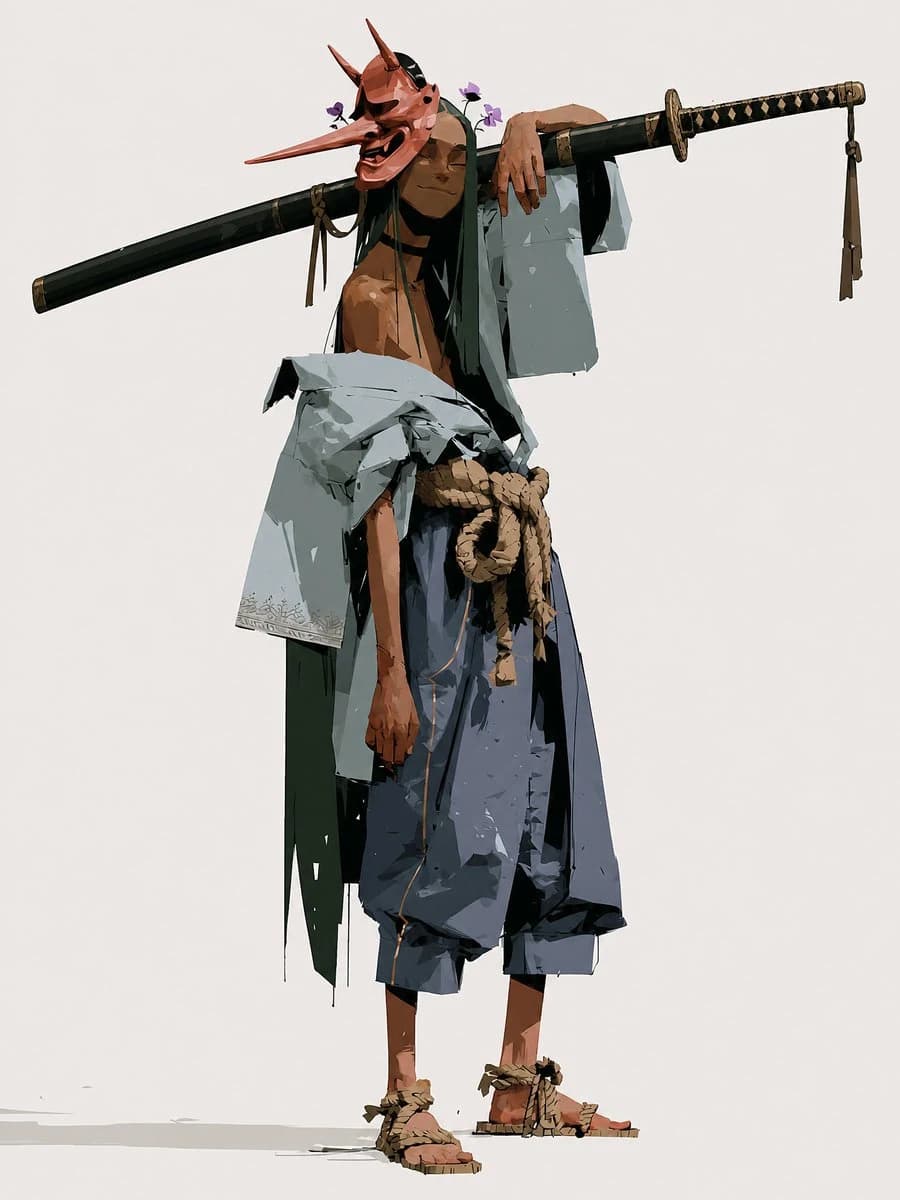
216 wordsCreate a full-body character concept illustration of a {argument name="character name" default="Happy Samurai"}: a tall, lean, shirtless wandering samurai standing relaxed against a plain warm off-white background. He wears a vivid red tengu/oni-style mask with an extremely long pointed nose, two tall horns, dark expressive eye openings, and a wide laughing open mouth, giving him a mischievous happy expression. Small purple flowers are tucked near the mask and hair. Pose him in a casual contrapposto stance, one arm draped lazily over a long black sheathed katana or staff balanced horizontally across his shoulders, the weapon stretching far beyond both sides of his body; the right end has a black-and-gold diamond-wrapped handle and dangling tassel, the left end is a dark scabbard with subtle fittings. Dress him in tattered layered samurai clothing: a loose pale gray-blue haori slipping off one shoulder, dark green inner robe panels hanging raggedly, oversized dark blue hakama pants cropped above the ankles, a thick tan rope belt tied in a large knot at the waist, and straw rope sandals on bare feet. Use angular painterly brushwork, high-fashion character design proportions, sharp cel-shaded planes, rough ink-like edges, visible fabric tears and folds, earthy muted colors with strong black accents, minimal ground shadow, and lots of negative space. No text, no border, no watermark.About this prompt
Happy Tengu Samurai Concept Art is a ready-to-use storyboard prompt for GPT Image 2 on Image 2. Copy the 216 words below, paste them into the Create form, and you will get a result close to the preview above. Tweak the Comic, Storyboard, Fashion tag if you want to push it somewhere new.
Use it as a starting point, then adjust the subject, lighting, or composition to suit your idea. The credit cost stays the same whether you use it as written or customize it.
Use case
A strong starting point for Storyboard
Start here when you want a storyboard image inspired by Happy Tengu Samurai Concept Art. The prompt already sets the look and composition; replace the subject, product, colors, or scene details to match your project.
Easy places to tweak
- Subject Swap in your person, product, place, or object without changing the overall composition.
- Look and mood Tune the lighting, palette, camera angle, or materials so the image fits your brand.
- Final format Set the aspect ratio, background, text, or layout notes before you generate.
More prompt paths to explore
Find more GPT Image 2 prompts with a similar style, use case, or subject.
How to use it
- Step 1
Copy the prompt
Hit the Copy button above to grab the full text.
- Step 2
Open Image 2 Create
Head to the Create form and paste it in.
- Step 3
Generate
Hit Generate. Your version lands in seconds.
Make it yours
Load the prompt into the Create form with one click, then start tweaking.