Prompt
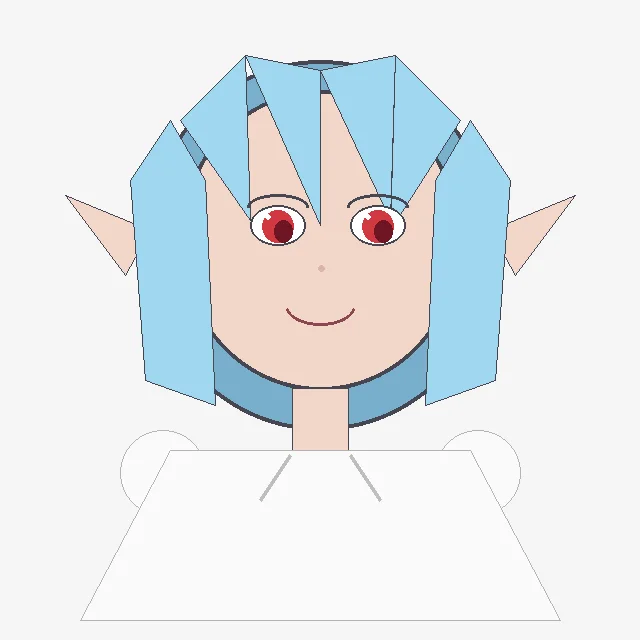
217 wordsCreate a simple flat 2D digital drawing that looks like it was drawn programmatically with basic polygon and line shapes on a plain light gray background. Center a front-facing anime-style girl bust with a large round peach face, pointed elf ears extending left and right, and a small smiling mouth. She has {argument name="hair color" default="light sky blue"} hair made of angular geometric panels: two long rectangular side locks hanging down on both sides, a central split fringe with sharp triangular bangs, and a dark blue curved back-hair shape behind the head. Her eyes are large but simply drawn, with black outlines, white sclera, red irises, dark pupils, and thin gray eyebrows; add a tiny pale pink dot nose. The character wears a plain oversized white trapezoid shirt with very thin gray outlines, a short peach neck, and two faint diagonal gray collar lines; include two simple circular white shoulder or sleeve shapes partially visible behind the shirt. Use minimal shading, thin black/gray outlines, visible polygon edges, and an intentionally crude handmade/Pillow-like aesthetic. Keep the composition symmetrical, with the head occupying the upper center and the shirt filling the lower half. The character should resemble a cute elf-eared anime girl named {argument name="character name" default="a blue-haired elf girl"}, with no text, no watermark, and no detailed background.About this prompt
Crude Geometric Blue-Haired Elf Girl is a ready-to-use portrait prompt for GPT Image 2 on Image 2. Copy the 217 words below, paste them into the Create form, and you will get a result close to the preview above. Tweak the Storyboard, Portrait, Anime tag if you want to push it somewhere new.
Use it as a starting point, then adjust the subject, lighting, or composition to suit your idea. The credit cost stays the same whether you use it as written or customize it.
Use case
A strong starting point for Portrait
Start here when you want a portrait image inspired by Crude Geometric Blue-Haired Elf Girl. The prompt already sets the look and composition; replace the subject, product, colors, or scene details to match your project.
Easy places to tweak
- Subject Swap in your person, product, place, or object without changing the overall composition.
- Look and mood Tune the lighting, palette, camera angle, or materials so the image fits your brand.
- Final format Set the aspect ratio, background, text, or layout notes before you generate.
More prompt paths to explore
Find more GPT Image 2 prompts with a similar style, use case, or subject.
How to use it
- Step 1
Copy the prompt
Hit the Copy button above to grab the full text.
- Step 2
Open Image 2 Create
Head to the Create form and paste it in.
- Step 3
Generate
Hit Generate. Your version lands in seconds.
Make it yours
Load the prompt into the Create form with one click, then start tweaking.