Prompt
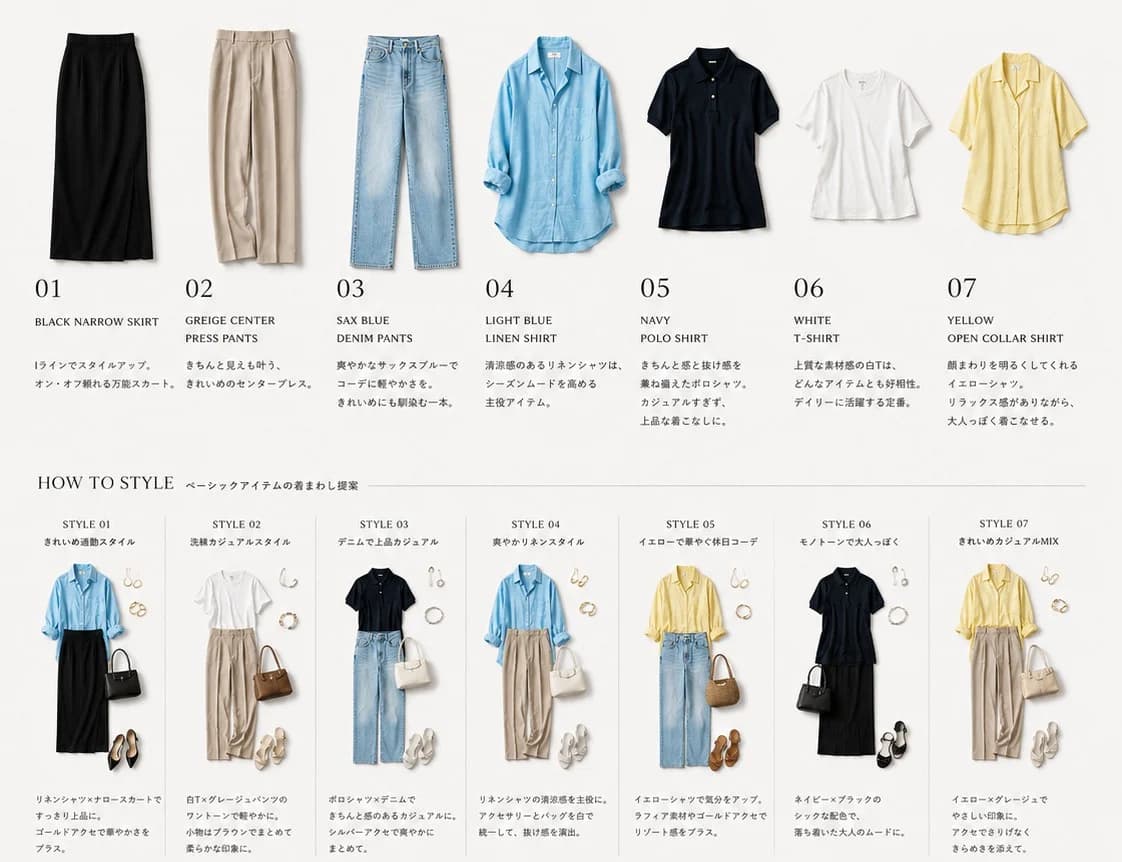
493 wordsGoal: Create a clean wardrobe-management fashion catalog board for {argument name="season and theme" default="basic item outfit rotation for early summer"}, showing individual clothing pieces at the top and styled outfit combinations at the bottom.
Canvas: Wide horizontal 4:3 editorial layout on a warm off-white background, minimal Japanese magazine aesthetic, soft natural shadows, high-resolution product photography cutouts, lots of white space, thin gray divider lines, elegant serif numbering, small neat captions.
Top wardrobe row: Show exactly 7 isolated clothing items evenly spaced from left to right, each photographed flat or lightly hanging, with a large two-digit number, an English item name, and a short small Japanese-style descriptive paragraph beneath it. The 7 items are: 01 black narrow skirt, 02 greige center press pants, 03 sax blue denim pants, 04 light blue linen shirt with sleeves casually rolled, 05 navy polo shirt, 06 white T-shirt, 07 yellow open-collar shirt. Keep the item names in uppercase English and the numbers large and refined.
Middle heading: Add the heading "HOW TO STYLE" on the left, followed by a small Japanese subtitle using {argument name="styling subtitle" default="ベーシックアイテムの着まわし提案"}, with a thin horizontal rule extending across the page.
Bottom styling section: Create exactly 7 narrow vertical outfit cards separated by thin light-gray lines. Each card has a small title "STYLE 01" through "STYLE 07", a short Japanese-style subtitle, a complete outfit arrangement using pieces from the top wardrobe row, small accessories, and a compact caption below. The 7 outfit cards are: Style 01 clean commuting outfit with light blue linen shirt tucked into black narrow skirt, black handbag, gold jewelry, black pointed heels; Style 02 relaxed casual outfit with white T-shirt, greige center press pants, brown handbag, sandals, pearl or gold accessories; Style 03 denim polished casual outfit with navy polo shirt, sax blue denim pants, white handbag, white sneakers, delicate jewelry; Style 04 fresh linen style with light blue linen shirt, greige center press pants, white handbag, white sneakers, gold accessories; Style 05 bright holiday outfit with yellow open-collar shirt, sax blue denim pants, straw basket bag, brown sandals, hoop earrings; Style 06 monochrome adult outfit with navy polo shirt, black narrow skirt, black handbag, black sandals, silver or pearl accessories; Style 07 clean casual mix with yellow open-collar shirt, greige center press pants, cream handbag, white sneakers, small gold accessories.
Visual style: Premium minimalist fashion lookbook, realistic clothing texture, soft studio lighting, perfectly aligned grid, muted neutral palette with accents of sax blue and pale yellow, crisp typography combining classic serif numbers with small sans-serif labels. Make the layout feel like an organized wardrobe app export or capsule wardrobe recommendation sheet for {argument name="target wearer" default="an adult woman with a simple elegant wardrobe"}.
Constraints: Use exactly 7 wardrobe items and exactly 7 styled outfit cards. Do not add models or faces; show only clothing and accessories. Avoid logos, watermarks, extra garments, clutter, or bright colored backgrounds. Keep all text small and tasteful, with English item names clearly readable.About this prompt
Capsule Wardrobe Styling Board is a ready-to-use ad creative prompt for GPT Image 2 on Image 2. Copy the 493 words below, paste them into the Create form, and you will get a result close to the preview above. Tweak the Product Ad, Ad Creative, Product tag if you want to push it somewhere new.
Use it as a starting point, then adjust the subject, lighting, or composition to suit your idea. The credit cost stays the same whether you use it as written or customize it.
Use case
A strong starting point for Ad Creative
Start here when you want a ad creative image inspired by Capsule Wardrobe Styling Board. The prompt already sets the look and composition; replace the subject, product, colors, or scene details to match your project.
Easy places to tweak
- Subject Swap in your person, product, place, or object without changing the overall composition.
- Look and mood Tune the lighting, palette, camera angle, or materials so the image fits your brand.
- Final format Set the aspect ratio, background, text, or layout notes before you generate.
More prompt paths to explore
Find more GPT Image 2 prompts with a similar style, use case, or subject.
How to use it
- Step 1
Copy the prompt
Hit the Copy button above to grab the full text.
- Step 2
Open Image 2 Create
Head to the Create form and paste it in.
- Step 3
Generate
Hit Generate. Your version lands in seconds.
Make it yours
Load the prompt into the Create form with one click, then start tweaking.