Prompt
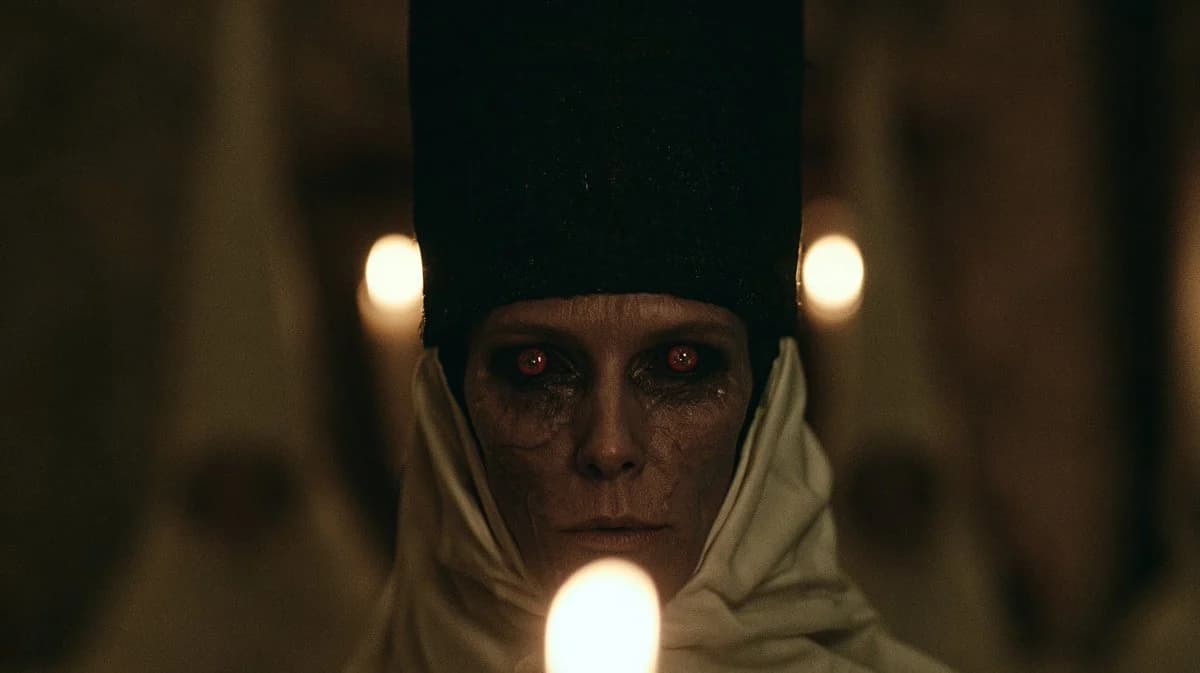
171 wordsCreate a dark cinematic horror close-up of {argument name="character name" default="an ominous priestess"} staring directly into the camera inside a dim cathedral or crypt. The subject is centered and symmetrical, an elderly pale woman with gaunt features, cracked dry skin, deep shadowed eye sockets, and glowing red eyes with small eerie reflections. She wears a tall black rectangular headdress rising out of frame and an off-white wrapped hood or veil around her head and shoulders, with heavy folds of fabric framing her face. Place three visible candle flames: one large blurred flame in the extreme foreground at the bottom center partially obscuring her chin, and two smaller blurred flames behind her on the left and right at eye height, creating a ritualistic triangular composition. Use {argument name="lighting style" default="very low-key warm candlelight"}, shallow depth of field, strong background blur, heavy film grain, muted brown-black shadows, and a tense occult atmosphere. Frame as a widescreen 16:9 movie still, face centered, intimate and unsettling, photorealistic, with anamorphic cinematic softness, no text, no watermark.About this prompt
Candlelit Occult Priestess Close-Up is a ready-to-use social media prompt for GPT Image 2 on Image 2. Copy the 171 words below, paste them into the Create form, and you will get a result close to the preview above. Tweak the Social Media, Portrait, Cinematic tag if you want to push it somewhere new.
Use it as a starting point, then adjust the subject, lighting, or composition to suit your idea. The credit cost stays the same whether you use it as written or customize it.
Use case
A strong starting point for Social Media
Start here when you want a social media image inspired by Candlelit Occult Priestess Close-Up. The prompt already sets the look and composition; replace the subject, product, colors, or scene details to match your project.
Easy places to tweak
- Subject Swap in your person, product, place, or object without changing the overall composition.
- Look and mood Tune the lighting, palette, camera angle, or materials so the image fits your brand.
- Final format Set the aspect ratio, background, text, or layout notes before you generate.
More prompt paths to explore
Find more GPT Image 2 prompts with a similar style, use case, or subject.
How to use it
- Step 1
Copy the prompt
Hit the Copy button above to grab the full text.
- Step 2
Open Image 2 Create
Head to the Create form and paste it in.
- Step 3
Generate
Hit Generate. Your version lands in seconds.
Make it yours
Load the prompt into the Create form with one click, then start tweaking.