프롬프트
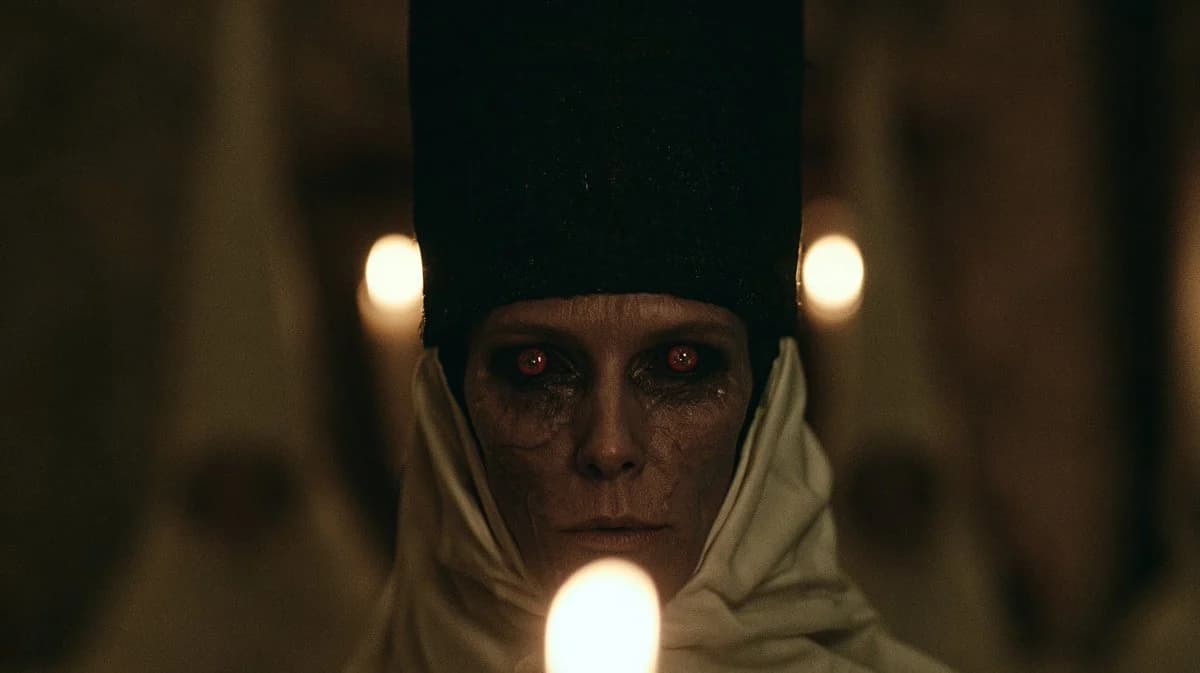
980자Create a dark cinematic horror close-up of {argument name="character name" default="an ominous priestess"} staring directly into the camera inside a dim cathedral or crypt. The subject is centered and symmetrical, an elderly pale woman with gaunt features, cracked dry skin, deep shadowed eye sockets, and glowing red eyes with small eerie reflections. She wears a tall black rectangular headdress rising out of frame and an off-white wrapped hood or veil around her head and shoulders, with heavy folds of fabric framing her face. Place three visible candle flames: one large blurred flame in the extreme foreground at the bottom center partially obscuring her chin, and two smaller blurred flames behind her on the left and right at eye height, creating a ritualistic triangular composition. Use {argument name="lighting style" default="very low-key warm candlelight"}, shallow depth of field, strong background blur, heavy film grain, muted brown-black shadows, and a tense occult atmosphere. Frame as a widescreen 16:9 movie still, face centered, intimate and unsettling, photorealistic, with anamorphic cinematic softness, no text, no watermark.이 프롬프트 소개
Image 2에서 GPT Image 2에 바로 사용할 수 있는 소셜 미디어 프롬프트 ‘촛불 아래의 오컬트 여사제 클로즈업’입니다. 아래 980자를 복사해 Create 폼에 붙여 넣으면 위 미리보기와 비슷한 이미지를 만들 수 있습니다. 소셜 미디어, 인물, 시네마틱 태그를 조정하면 새로운 방향으로 확장할 수 있습니다.
먼저 그대로 사용해 본 뒤 피사체, 조명, 구도를 작업에 맞게 조정해 보세요. 원문을 그대로 쓰거나 수정해도 생성 비용은 같습니다.
사용 사례
소셜 미디어 작업의 좋은 출발점
‘촛불 아래의 오컬트 여사제 클로즈업’처럼 표현한 소셜 미디어 이미지를 만들고 싶다면 이 GPT Image 2 프롬프트로 시작해 보세요. 스타일과 구도는 이미 잡혀 있으므로 인물, 제품, 색상, 장면 요소만 작업에 맞게 바꾸면 됩니다.
먼저 손보기 좋은 부분
- 피사체 인물, 제품, 장소, 오브젝트를 내 내용으로 바꾸고 전체 구도는 유지합니다.
- 분위기 조명, 색감, 카메라 각도, 소재 디테일을 브랜드나 용도에 맞춥니다.
- 결과 형식 생성 전에 비율, 배경, 텍스트, 레이아웃 지시를 정리합니다.
사용 방법
- 1단계
프롬프트 복사
위의 복사 버튼을 눌러 전체 텍스트를 가져옵니다.
- 2단계
Image 2 Create 열기
Create 폼으로 이동해 붙여 넣습니다.
- 3단계
생성
Generate를 누르면 몇 초 안에 내 버전이 완성됩니다.
내 버전으로 만들기
한 번의 클릭으로 Create 폼에 불러오고 바로 조정하세요.