Prompt
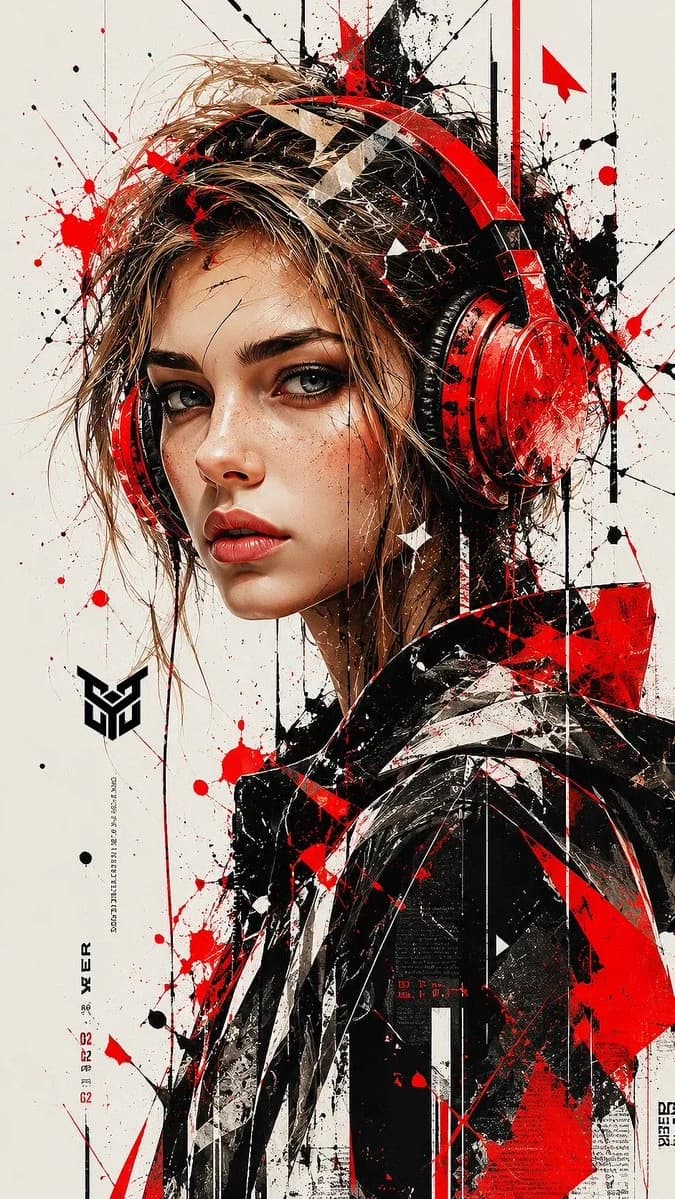
203 wordsA high-detail digital painting of a young woman wearing large, vibrant red over-ear headphones, looking directly at the viewer with a piercing gaze. The art style is a fusion of stylized realism and urban abstract expressionism. Her hair is messy, light brown/blonde with loose strands and sharp, geometric shards integrated into the locks. The composition features heavy ink splatters, paint drips, and chaotic red and black brushstrokes reminiscent of 'trash polka' art. The background is a clean, minimalist off-white, making the bold red accents and fine linework pop. High contrast, sharp focus on the eyes, cinematic lighting, 8k resolution, trendy street art aesthetic. Key Technical Elements to Capture Color Palette: Dominated by Red, Black, and White. This high-contrast triad is essential for that aggressive, modern look. Artistic Influence: Mentioning "Trash Polka" or "Ink Drip Art" helps the AI understand the messy, splatter-heavy background and the "shattered" look of the hair. Character Features: Use terms like "piercing gaze" and "stylized realism" to ensure the face isn't too cartoonish or too photographic, hitting that perfect "concept art" middle ground. Graphic Elements: The image uses geometric shards and abstract textures overlapping the subject, which creates a sense of depth and digital glitchiness. Aspect ratio is 9:16
About this prompt
Trash Polka Headphones Portrait is a ready-to-use portrait prompt for GPT Image 2 on Image 2. Copy the 203 words below, paste them into the Create form, and you will get a result close to the preview above. Tweak the Portrait, Watercolor, Minimalist tag if you want to push it somewhere new.
Use it as a starting point, then adjust the subject, lighting, or composition to suit your idea. The credit cost stays the same whether you use it as written or customize it.
Use case
A strong starting point for Portrait
Start here when you want a portrait image inspired by Trash Polka Headphones Portrait. The prompt already sets the look and composition; replace the subject, product, colors, or scene details to match your project.
Easy places to tweak
- Subject Swap in your person, product, place, or object without changing the overall composition.
- Look and mood Tune the lighting, palette, camera angle, or materials so the image fits your brand.
- Final format Set the aspect ratio, background, text, or layout notes before you generate.
More prompt paths to explore
Find more GPT Image 2 prompts with a similar style, use case, or subject.
How to use it
- Step 1
Copy the prompt
Hit the Copy button above to grab the full text.
- Step 2
Open Image 2 Create
Head to the Create form and paste it in.
- Step 3
Generate
Hit Generate. Your version lands in seconds.
Make it yours
Load the prompt into the Create form with one click, then start tweaking.