Prompt
465 wordsTheme:
{argument name="theme" default="Blue Unraveling"}
Subject:
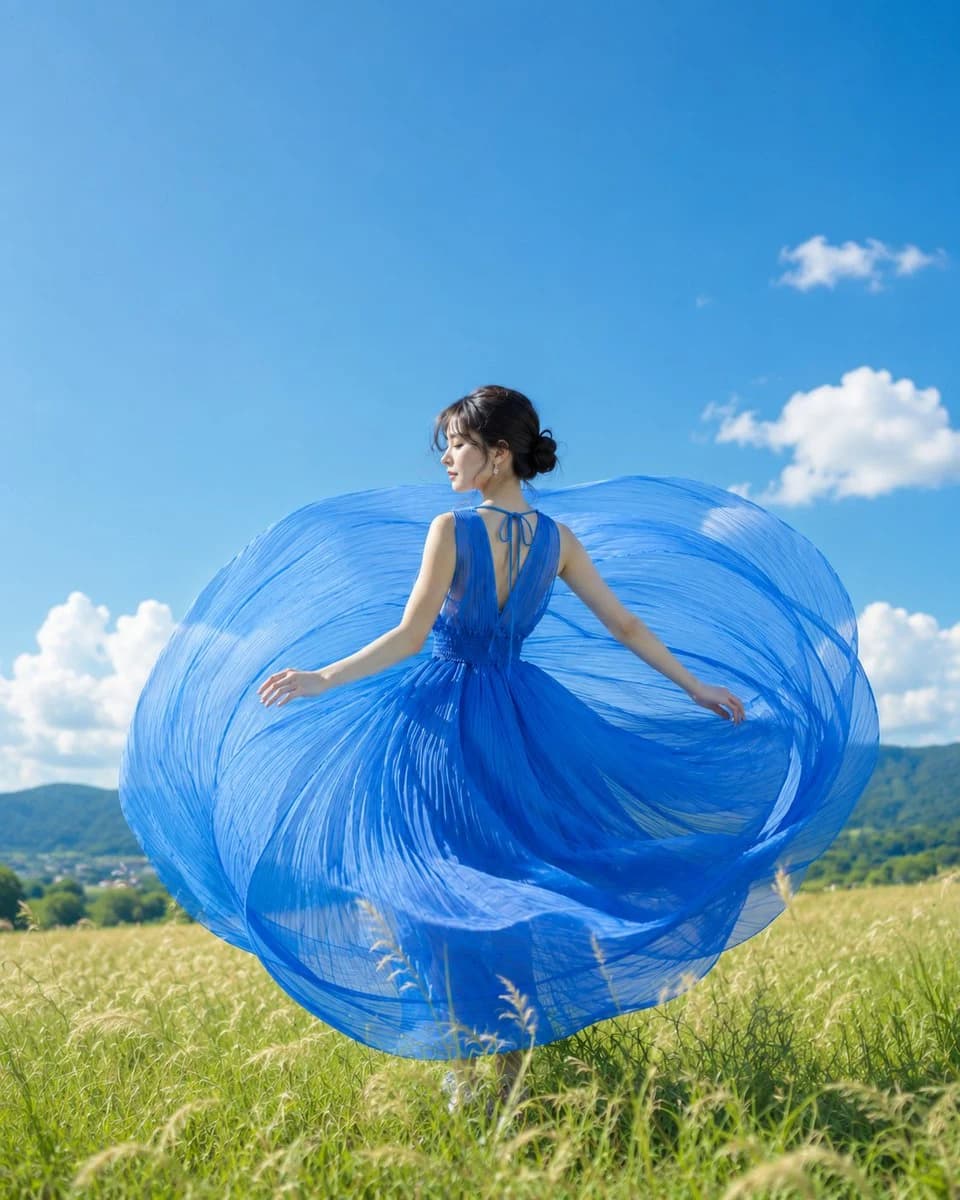
A realistic photo with a vertical {argument name="aspect ratio" default="4:5"}. A single woman standing on a summer highland is placed slightly to the right of the center, showing a large portion of her body from head to below the knees. The thin pleated fabric of a vibrant blue long dress draws a large circle to the left and right with the momentum of her spin, spreading to wrap around the bottom half of the screen.
Person/Expression:
A natural and realistic {argument name="ethnicity" default="Japanese"} woman. Transparent skin, soft brown hair close to black tied in a low, rough bun, with thin loose hairs swaying slightly around her face. Looking to the left in a profile view, casting her gaze down at the distant sky. The expression is quiet and cool, with the mouth in a natural, relaxed shape.
Clothing/Pose:
A summery sleeveless blue one-piece dress. The back is deeply open, with thin ribbons tied at the neck and back. The waist is lightly cinched, and fine pleats radiate from the waist. The person's own left arm is loosely extended to the left of the screen, and the right arm flows to the back right. Fingertips are lightly open, at a natural distance barely touching the edge of the fabric. The body half-rotates while showing the back, with the center of gravity on one foot.
Background/Light:
A bright summer meadow. Green and pale golden grass swaying in the wind in the foreground, gentle hills in the middle ground, and low mountain ranges with the presence of a small town in the background. The sky is a clear blue with several white cumulonimbus clouds floating. The sun shines somewhat strongly from the upper left, creating bright highlights on the shoulders, arms, cheeks, and the ridges of the dress pleats. Shadows fall to the lower right, and soft reflected light from the meadow enters the blue fabric.
Composition/Camera:
A composition looking slightly up at the person from a low-angle eye level. Leaving a large part of the wide blue sky at the top, the circular movement of the dress becomes the protagonist in the center of the screen. Focus is on the person's face and the area around the ribbon on the back, while the foreground grass and distant mountains are softly blurred with a shallow depth of field. Equivalent to 85mm, natural compression, clear shots that feel the summer sun.
Texture/Style:
A real photo like it was taken with a professional camera. The thin blue fabric is semi-transparent, showing fine pleated lines, shading in overlapping parts, and lightness containing the wind. Skin is not excessively corrected, leaving natural texture. Colors leverage the contrast of the blue sky, blue dress, green meadow, and white clouds for a refreshing and clean summer photographic expression.About this prompt
Summer Sky Portrait with Blue Dress is a ready-to-use social media prompt for GPT Image 2 on Image 2. Copy the 465 words below, paste them into the Create form, and you will get a result close to the preview above. Tweak the Social Media, Fashion tag if you want to push it somewhere new.
Use it as a starting point, then adjust the subject, lighting, or composition to suit your idea. The credit cost stays the same whether you use it as written or customize it.
Use case
A strong starting point for Social Media
Start here when you want a social media image inspired by Summer Sky Portrait with Blue Dress. The prompt already sets the look and composition; replace the subject, product, colors, or scene details to match your project.
Easy places to tweak
- Subject Swap in your person, product, place, or object without changing the overall composition.
- Look and mood Tune the lighting, palette, camera angle, or materials so the image fits your brand.
- Final format Set the aspect ratio, background, text, or layout notes before you generate.
More prompt paths to explore
Find more GPT Image 2 prompts with a similar style, use case, or subject.
How to use it
- Step 1
Copy the prompt
Hit the Copy button above to grab the full text.
- Step 2
Open Image 2 Create
Head to the Create form and paste it in.
- Step 3
Generate
Hit Generate. Your version lands in seconds.
Make it yours
Load the prompt into the Create form with one click, then start tweaking.