Prompt
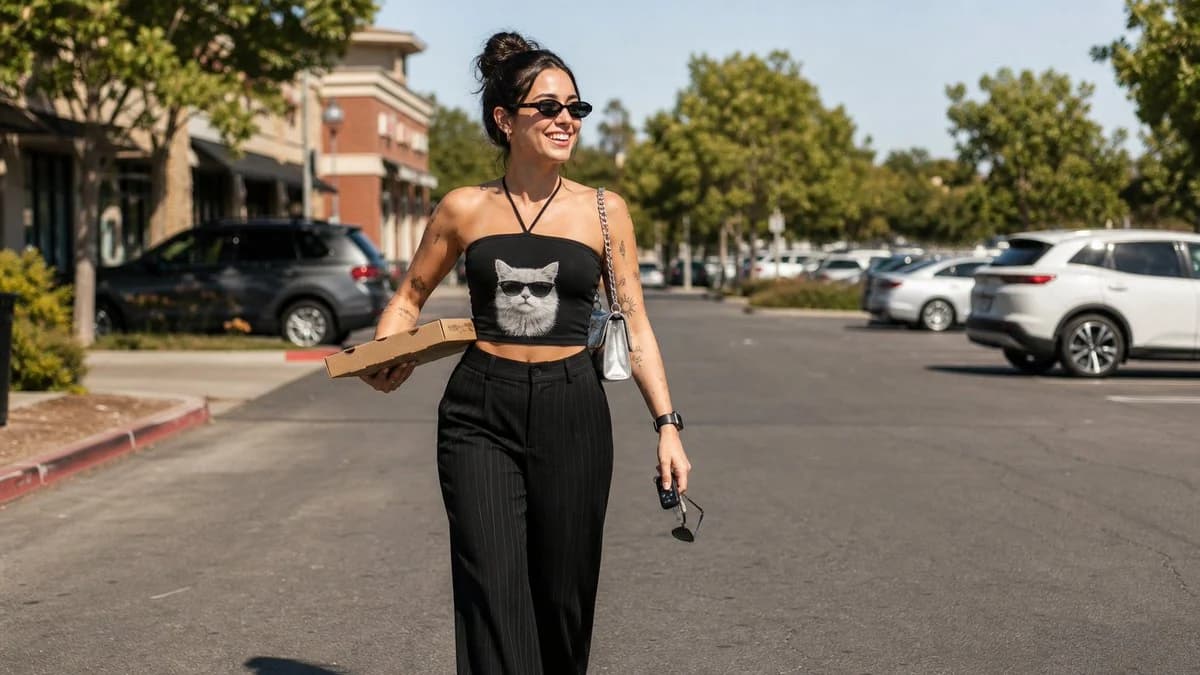
163 wordsA candid full-body street-style photo of a {argument name="subject" default="smiling young woman"} walking confidently through a sunlit parking lot. She has dark hair tied in a high bun and wears narrow oval black sunglasses. She is dressed in a {argument name="top style" default="fitted black halter tube top featuring a large graphic print of a white cat wearing black sunglasses"}, paired with high-waisted black pinstripe wide-leg trousers. A small {argument name="accessory" default="metallic silver shoulder bag with a chain strap"} hangs from one shoulder. She carries a flat cardboard pizza box under one arm while holding a pair of sunglasses and a small black key fob in her other hand. She has subtle tattoos on her arms, a smartwatch on one wrist, and a bright, cheerful expression. The background shows parked cars, green trees, and a roadside with storefronts under clear afternoon sunlight. Natural lighting, realistic colors, casual fashion photography, eye-level perspective, sharp focus, high detail, photorealistic, DSLR quality, 35mm lens, shallow depth of field.About this prompt
Street Style Fashion Portrait is a ready-to-use social media prompt for GPT Image 2 on Image 2. Copy the 163 words below, paste them into the Create form, and you will get a result close to the preview above. Tweak the Social Media, Food, Fashion tag if you want to push it somewhere new.
Use it as a starting point, then adjust the subject, lighting, or composition to suit your idea. The credit cost stays the same whether you use it as written or customize it.
Use case
A strong starting point for Social Media
Start here when you want a social media image inspired by Street Style Fashion Portrait. The prompt already sets the look and composition; replace the subject, product, colors, or scene details to match your project.
Easy places to tweak
- Subject Swap in your person, product, place, or object without changing the overall composition.
- Look and mood Tune the lighting, palette, camera angle, or materials so the image fits your brand.
- Final format Set the aspect ratio, background, text, or layout notes before you generate.
More prompt paths to explore
Find more GPT Image 2 prompts with a similar style, use case, or subject.
How to use it
- Step 1
Copy the prompt
Hit the Copy button above to grab the full text.
- Step 2
Open Image 2 Create
Head to the Create form and paste it in.
- Step 3
Generate
Hit Generate. Your version lands in seconds.
Make it yours
Load the prompt into the Create form with one click, then start tweaking.