Prompt
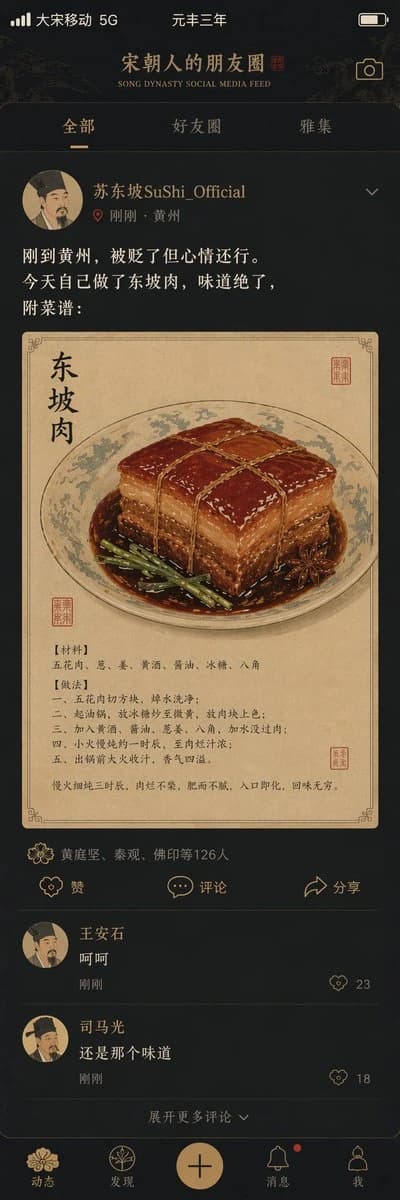
6 words"宋朝人的朋友圈"/"SONG DYNASTY SOCIAL MEDIA FEED",古今穿越幽默融合界面设计风格,画面模拟手机社交媒体界面,但内容全部是宋朝场景头像是宋代文人画像,用户名"苏东坡SuShi_Official",发布内容"刚到黄州,被贬了但心情还行。今天自己做了东坡肉,味道绝了,附菜谱:",配图为工笔画风格的东坡肉特写,点赞列表"黄庭坚、秦观、佛印等126人",评论区"王安石:呵呵""司马光:还是那个味道",界面元素如点赞图标用宋代花纹替代,状态栏显示"大宋移动 5G"和"元丰三年",配色为手机深色模式搭配宋代雅致色调,历史与社交媒体的趣味碰撞杰作
About this prompt
Song Dynasty Social Media Feed is a ready-to-use ui mockup prompt for GPT Image 2 on Image 2. Copy the 6 words below, paste them into the Create form, and you will get a result close to the preview above. Tweak the Social Media, UI, Mockup tag if you want to push it somewhere new.
Use it as a starting point and keep iterating: change the subject, lighting, or composition until it looks right. The credit cost stays the same whether you run it as-is or remix it.
Use case
A strong starting point for UI Mockup
Start here when you want a ui mockup image in the same direction as Song Dynasty Social Media Feed. The prompt already sets the look and structure; swap in your own subject, product, colors, or scene details for the brief you have in mind.
Easy places to tweak
- Subject Swap in your person, product, place, or object without changing the overall composition.
- Look and mood Tune the lighting, palette, camera angle, or materials so the image fits your brand.
- Final format Set the aspect ratio, background, text, or layout notes before you generate.
More prompt paths to explore
Find more GPT Image 2 prompts with a similar style, use case, or subject.
How to use it
- Step 1
Copy the prompt
Hit the Copy button above to grab the full text.
- Step 2
Open Image 2 Create
Head to the Create form and paste it in.
- Step 3
Generate
Hit Generate. Your version lands in seconds.
Make it yours
Load the prompt into the Create form with one click, then start tweaking.