Prompt
494 wordsSubject: Skin Glow in the Evening Calm
Subject:
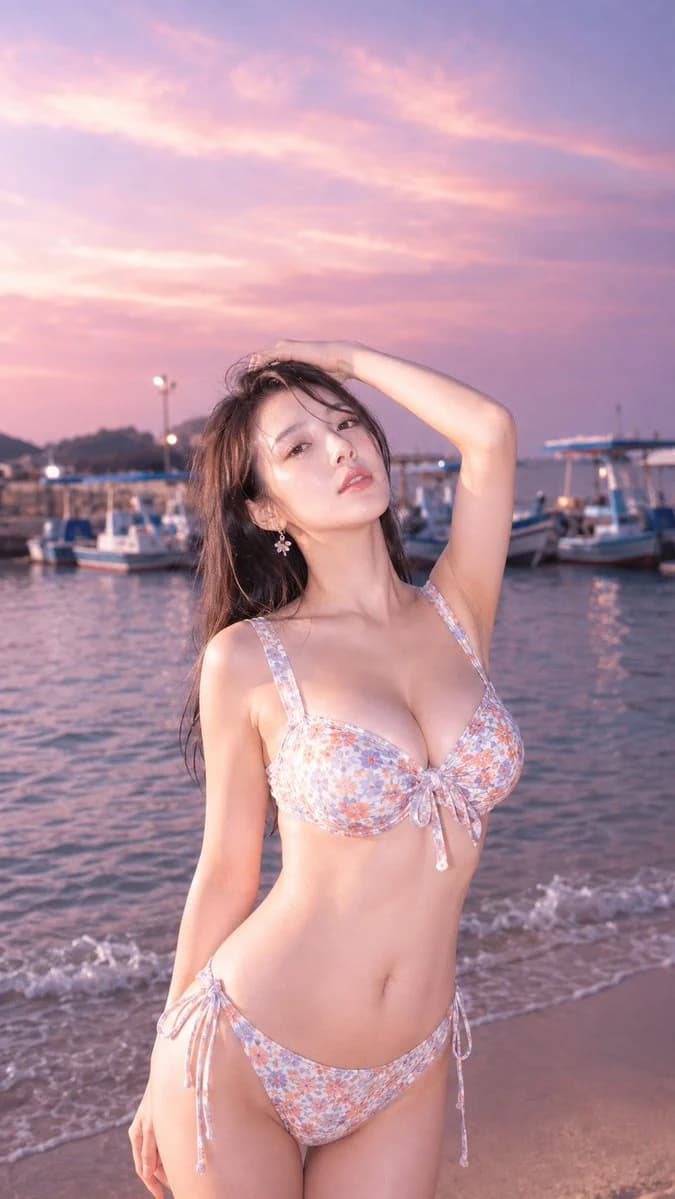
Vertical 9:16 photo-style portrait. An {argument name="person attributes" default="adult-looking woman"} stands slightly to the left of the center of the screen by the seaside near a harbor at twilight. The person is largely included from above the thighs to above the head, occupying about 70% of the lower part of the screen. In the upper half, leave a wide expanse of pale purple and pink sky, and softly blur the ships and sea in the background.
Character/Expression:
A natural and realistic adult woman. She has a somewhat Japanese-style well-proportioned face, and her long black hair is slightly ruffled by the sea breeze. Her gaze is towards the camera, her lips are lightly parted, and she has an expression with a calm lingering aftertaste. The evening light hits her face, neck, shoulders, and arms a little more strongly, making only her skin appear slightly brightly exposed.
Clothing/Pose:
{argument name="swimwear design" default="Pale lavender and orange small floral pattern bikini"}. The top has a ribbon tie at the chest, and the bottom has side ribbons, a design that balances cuteness and maturity. Raise the right arm above the head and touch the hair with the fingertips. The left arm is naturally lowered by the side of the body, and the waist is slightly twisted diagonally. The weight is shifted to one leg, creating a pose for a portrait that looks like it was naturally taken at the seaside.
Background/Light:
{argument name="location" default="Quiet harbor town seaside"}. In the background, several small fishing boats and excursion boats are lined up, and the sunset colors are reflected on the water surface. Small waves wash up on the sandy beach, and the distant harbor lights are softly blurred. The sky is a gradient of lavender, pink, and pale orange. Soft evening light enters from the upper left, creating slightly stronger highlights on the person's face and upper body, and thin purple shadows on the opposite side of the body.
Composition/Camera:
Medium telephoto lens portrait. The camera is slightly lower than chest height, at a slightly upward angle. Focus is on the person, and the background ships and waves are blurred with a shallow depth of field. Leave a wide empty space for the sky above the person's head, and include a little of the water's edge and sandy beach at the bottom. The harbor, sea, and sky are divided into foreground, middle ground, and background, and depth appears naturally.
Texture/Style:
Realistic photographic expression. Soft skin texture, highlights that are slightly blown out, and pale film-like tones. The contrast is low, with a transparent finish that utilizes the pink-purple evening landscape. Avoid excessive processing and make it a seaside portrait taken with natural light.
Negative:
Unnatural face, unnatural gaze, extra fingers, missing fingers, fusion of hands and feet, broken joints, poor contact between hair and hands, unnatural gravity, wrong perspective, shadows inconsistent with the light source, excessive blowout, plastic-like skin, garbled text, logos, watermarks.About this prompt
Seaside Sunset Harbor Portrait is a ready-to-use portrait prompt for GPT Image 2 on Image 2. Copy the 494 words below, paste them into the Create form, and you will get a result close to the preview above. Tweak the Portrait, Fashion, Travel tag if you want to push it somewhere new.
Use it as a starting point, then adjust the subject, lighting, or composition to suit your idea. The credit cost stays the same whether you use it as written or customize it.
Use case
A strong starting point for Portrait
Start here when you want a portrait image inspired by Seaside Sunset Harbor Portrait. The prompt already sets the look and composition; replace the subject, product, colors, or scene details to match your project.
Easy places to tweak
- Subject Swap in your person, product, place, or object without changing the overall composition.
- Look and mood Tune the lighting, palette, camera angle, or materials so the image fits your brand.
- Final format Set the aspect ratio, background, text, or layout notes before you generate.
More prompt paths to explore
Find more GPT Image 2 prompts with a similar style, use case, or subject.
How to use it
- Step 1
Copy the prompt
Hit the Copy button above to grab the full text.
- Step 2
Open Image 2 Create
Head to the Create form and paste it in.
- Step 3
Generate
Hit Generate. Your version lands in seconds.
Make it yours
Load the prompt into the Create form with one click, then start tweaking.