Prompt
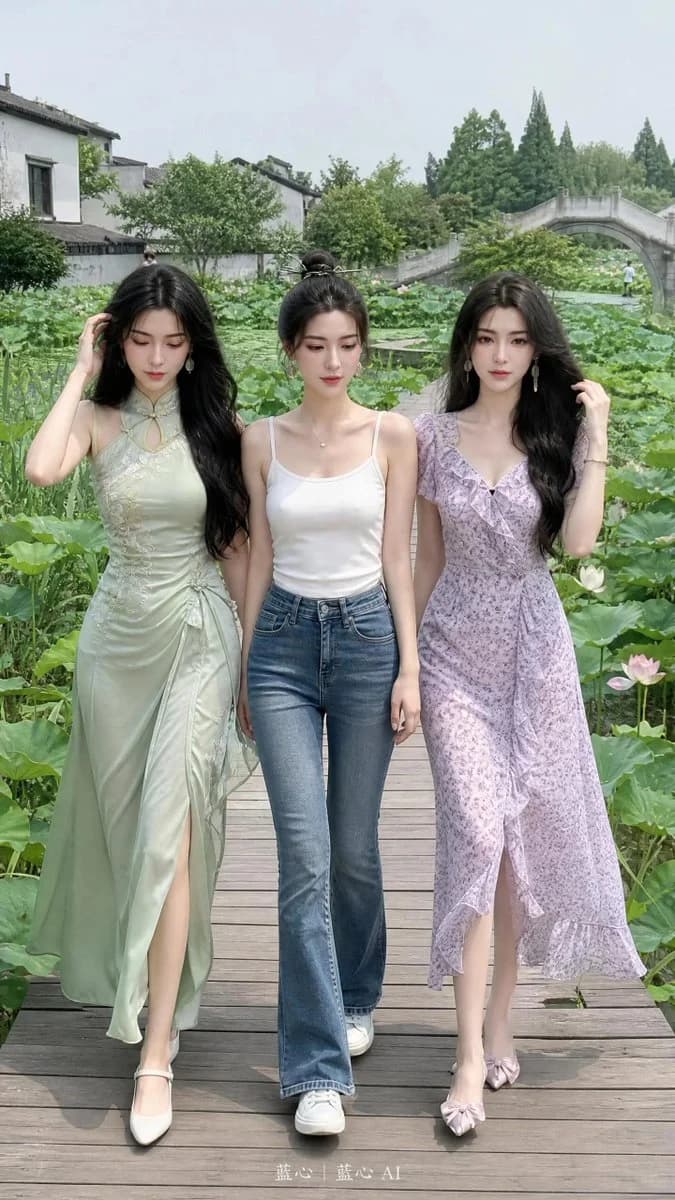
175 wordsUsing the facial features of the people in the reference photos as the sole identity anchor: three adult Asian women (Woman 1 on the left refers to Photos 1, 2, and 3; Woman 2 in the middle refers to Photos 4, 5, and 6; Woman 3 on the right refers to Photos 7, 8, 9, and 10). A {argument name="phone model" default="iPhone 17 Pro"} mobile snapshot without any design sense. Very realistic style, without any artistic processing, no cinematic feel, no influencer filters, no deliberate composition, no photography techniques, restoring the real life record as seen by the naked eye. Three young women strolling by a rural lotus pond. {argument name="outfits" default="The girl on the left is wearing a light green modified qipao skirt. The girl in the middle is wearing a white camisole and jeans. The girl on the right is wearing a light purple floral dress."} The background is a large lotus pond in a Jiangnan village, wooden plank paths, small bridges, and white-walled farmhouses. Natural lighting presents a sense of real-life recording.About this prompt
Realistic Countryside Lotus Pond Snapshots is a ready-to-use social media prompt for GPT Image 2 on Image 2. Copy the 175 words below, paste them into the Create form, and you will get a result close to the preview above. Tweak the Social Media, Fashion tag if you want to push it somewhere new.
Use it as a starting point, then adjust the subject, lighting, or composition to suit your idea. The credit cost stays the same whether you use it as written or customize it.
Use case
A strong starting point for Social Media
Start here when you want a social media image inspired by Realistic Countryside Lotus Pond Snapshots. The prompt already sets the look and composition; replace the subject, product, colors, or scene details to match your project.
Easy places to tweak
- Subject Swap in your person, product, place, or object without changing the overall composition.
- Look and mood Tune the lighting, palette, camera angle, or materials so the image fits your brand.
- Final format Set the aspect ratio, background, text, or layout notes before you generate.
More prompt paths to explore
Find more GPT Image 2 prompts with a similar style, use case, or subject.
How to use it
- Step 1
Copy the prompt
Hit the Copy button above to grab the full text.
- Step 2
Open Image 2 Create
Head to the Create form and paste it in.
- Step 3
Generate
Hit Generate. Your version lands in seconds.
Make it yours
Load the prompt into the Create form with one click, then start tweaking.