Prompt
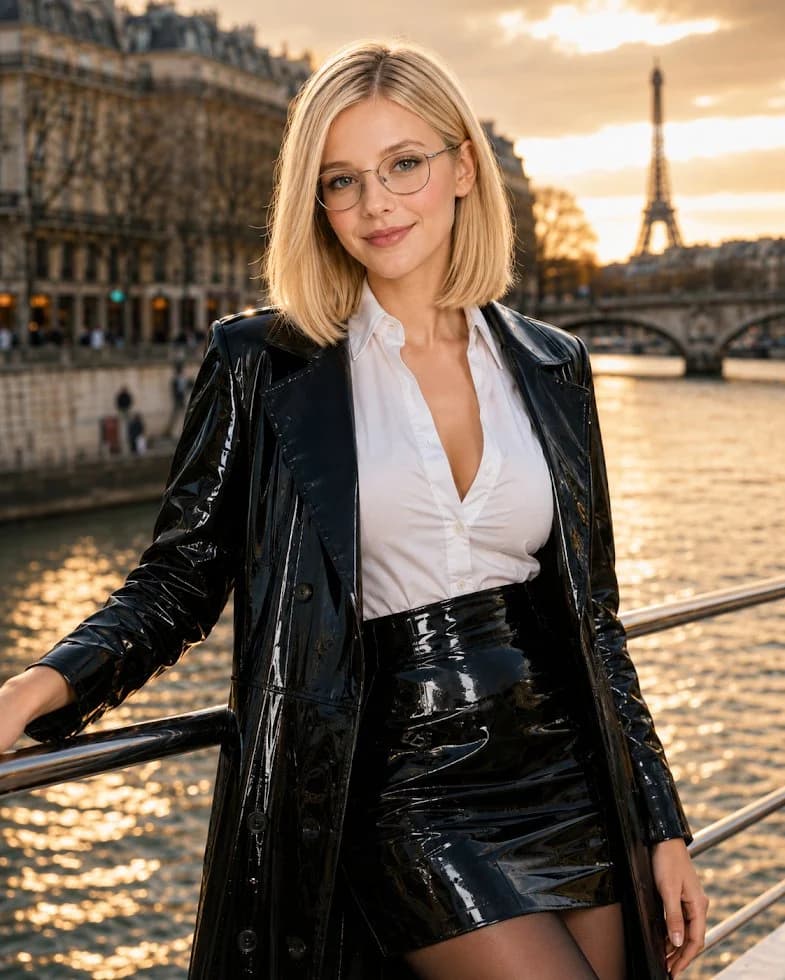
155 wordsCreate a photorealistic fashion portrait of a young {argument name="woman description" default="blonde woman with a shoulder-length bob"} standing on a bridge or riverside railing in Paris at golden hour. She faces the camera with a soft confident smile, wearing thin round eyeglasses, a crisp white button-down blouse with a slightly open collar, a glossy black patent leather trench coat, a high-waisted glossy black patent leather mini skirt, and sheer black tights. Her left arm rests casually on a metal railing while her right arm hangs naturally, upper-body three-quarter framing from mid-thigh upward. The background shows the Seine river with shimmering sunset reflections, classic Haussmann buildings on the left, an arched bridge, and the Eiffel Tower softly blurred in the distance on the right. Use warm sunset backlighting, realistic skin texture, shallow depth of field, cinematic bokeh, high-fashion editorial styling, sharp focus on the face and shiny black vinyl textures, natural proportions, no text, no watermark.About this prompt
Paris Patent Leather Fashion Portrait is a ready-to-use social media prompt for GPT Image 2 on Image 2. Copy the 155 words below, paste them into the Create form, and you will get a result close to the preview above. Tweak the Social Media, Fashion, Travel tag if you want to push it somewhere new.
Use it as a starting point, then adjust the subject, lighting, or composition to suit your idea. The credit cost stays the same whether you use it as written or customize it.
Use case
A strong starting point for Social Media
Start here when you want a social media image inspired by Paris Patent Leather Fashion Portrait. The prompt already sets the look and composition; replace the subject, product, colors, or scene details to match your project.
Easy places to tweak
- Subject Swap in your person, product, place, or object without changing the overall composition.
- Look and mood Tune the lighting, palette, camera angle, or materials so the image fits your brand.
- Final format Set the aspect ratio, background, text, or layout notes before you generate.
More prompt paths to explore
Find more GPT Image 2 prompts with a similar style, use case, or subject.
How to use it
- Step 1
Copy the prompt
Hit the Copy button above to grab the full text.
- Step 2
Open Image 2 Create
Head to the Create form and paste it in.
- Step 3
Generate
Hit Generate. Your version lands in seconds.
Make it yours
Load the prompt into the Create form with one click, then start tweaking.