Prompt
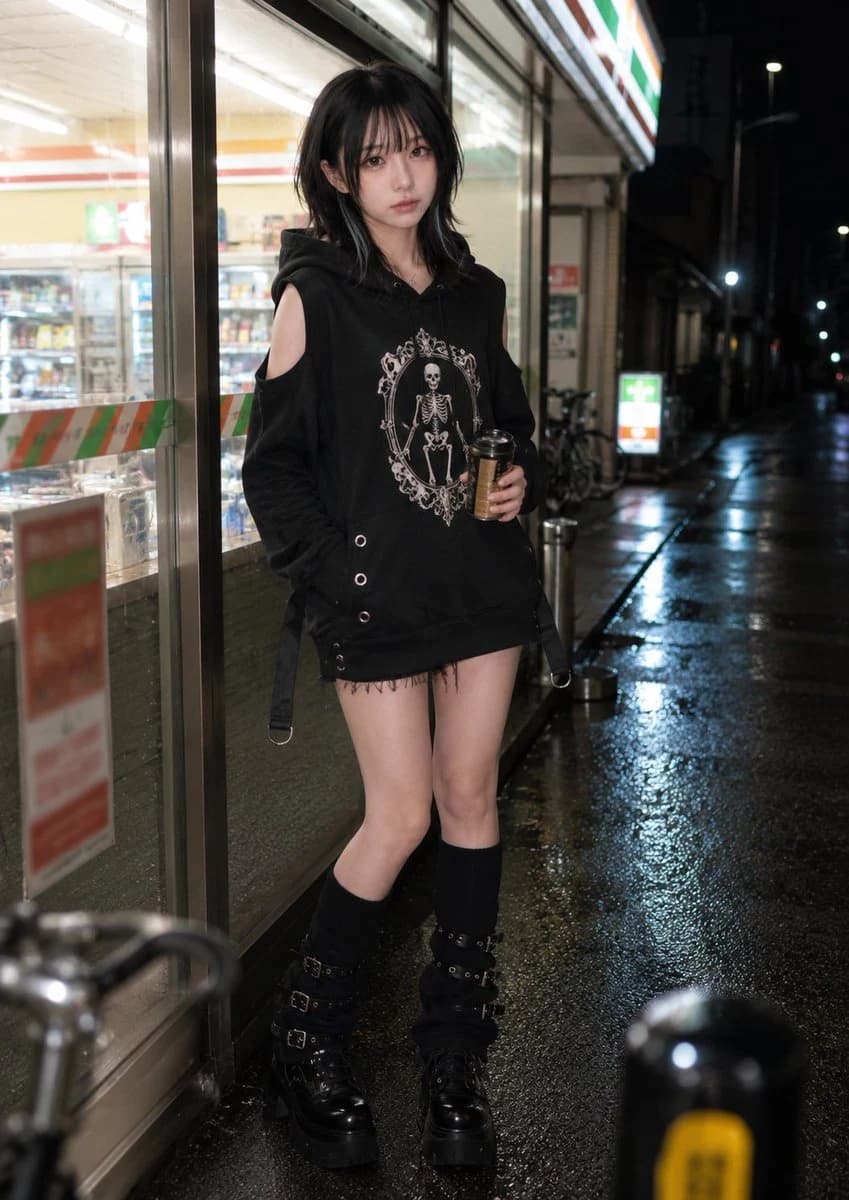
367 wordsPhotorealistic everyday background-and-pose set featuring an {argument name="subject" default="adult woman"} at night. Background identity: a brightly lit neighborhood convenience-store exterior at night, with a glowing storefront, fluorescent interior light spilling through large glass windows, refrigerated display glow, poster-like non-readable color blocks, a small outdoor ashtray or stand, bicycle silhouettes, wet asphalt, reflected white-green-orange storefront light, and layered city darkness beyond. The setting should feel ordinary, urban, and unmistakably shaped by artificial light at night. Depth lock: create a clear three-layer composition. In the foreground, a softly blurred bollard, bicycle handlebar, or wet pavement reflection enters near the lens. In the middle ground, the subject stands just outside the storefront near the window or entrance edge. In the background, the convenience-store interior glow, shelf depth, glass reflections, and darker street beyond recede naturally. Use the window reflections and pavement sheen to create depth instead of a flat lit wall. Composition lock: vertical 4:5 lifestyle crop from around waist height, framed from mid-thigh or waist to head. The subject fills about 65–75% of the frame. Keep the glowing glass, part of the entrance frame, some wet pavement reflection, and layered store depth visible. The image should feel like a natural nighttime street moment. Action and pose lock: the subject stands casually with both feet on the ground, body angled slightly toward the storefront. One hand holds a {argument name="prop" default="small warm drink cup or bottle"} at lower-chest or waist height. The other hand rests naturally near the pocket area, the side of the body, or lightly against the storefront edge. Shoulders remain lowered, posture relaxed, and weight distribution natural, as if she has just stepped out and paused for a moment. Camera and gaze lock: her head remains mostly aligned with the storefront-side angle rather than turning fully toward the camera. The camera is positioned near the glass edge within her natural forward field. Only her eyes shift briefly toward the lens, with minimal head movement, preserving a natural three-quarter face angle and a quiet candid feeling. Avoid: facing the camera square-on, hard posed stance, dramatic lean, raised knee, drink presented toward the viewer, full-body street snapshot, empty dark background, readable commercial text or real logos dominating the frame.About this prompt
Nighttime Convenience Store Street Photography is a ready-to-use social media prompt for GPT Image 2 on Image 2. Copy the 367 words below, paste them into the Create form, and you will get a result close to the preview above. Tweak the Product Ad, Social Media, Product tag if you want to push it somewhere new.
Use it as a starting point, then adjust the subject, lighting, or composition to suit your idea. The credit cost stays the same whether you use it as written or customize it.
Use case
A strong starting point for Social Media
Start here when you want a social media image inspired by Nighttime Convenience Store Street Photography. The prompt already sets the look and composition; replace the subject, product, colors, or scene details to match your project.
Easy places to tweak
- Subject Swap in your person, product, place, or object without changing the overall composition.
- Look and mood Tune the lighting, palette, camera angle, or materials so the image fits your brand.
- Final format Set the aspect ratio, background, text, or layout notes before you generate.
More prompt paths to explore
Find more GPT Image 2 prompts with a similar style, use case, or subject.
How to use it
- Step 1
Copy the prompt
Hit the Copy button above to grab the full text.
- Step 2
Open Image 2 Create
Head to the Create form and paste it in.
- Step 3
Generate
Hit Generate. Your version lands in seconds.
Make it yours
Load the prompt into the Create form with one click, then start tweaking.