Prompt
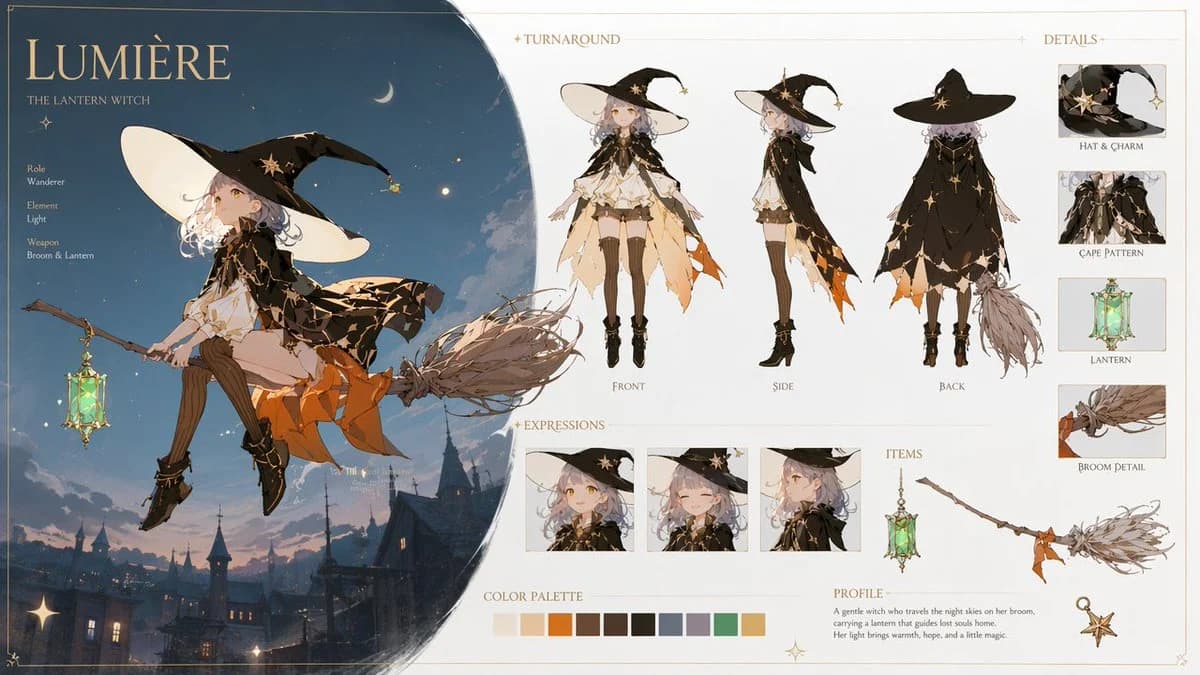
420 wordsGoal: Create an ultra-detailed 16:9 fantasy anime character design sheet for a magical witch girl named {argument name="character name" default="Lumière"}, subtitled "The Lantern Witch," with a cinematic magical atmosphere and a polished professional game character bible layout.
Canvas: Wide landscape character sheet, clean cream parchment background with thin gold ornamental border and delicate star accents. Left third is a large dark-blue circular night-sky vignette containing the main illustration; right two-thirds are an organized editorial reference sheet on an off-white background.
Main illustration: Show the witch girl riding sidesaddle on a twig broom above a dusky European fantasy town with rooftops, towers, warm window lights, clouds, stars, and a crescent moon. She has pale skin, golden eyes, short wavy silver-lavender hair, and a calm magical expression. Outfit: oversized black witch hat with huge cream underside, star charm and small dangling lantern charm; black cropped cape with gold constellation lines and star motifs; layered cream blouse and skirt; orange jagged underskirt; brown thigh-high stockings; black ankle boots with gold details. She holds or carries a glowing green glass lantern hanging from the broom. Lighting is soft moonlight plus warm lantern glow, painterly anime rendering, elegant high-end fantasy concept art.
Text content: Large title "{argument name="character name" default="Lumière"}" at top left, subtitle "THE LANTERN WITCH." Add a small profile list on the left: Role: Wanderer; Element: {argument name="element" default="Light"}; Weapon: {argument name="weapon" default="Broom & Lantern"}. Add section headers: "TURNAROUND," "DETAILS," "EXPRESSIONS," "ITEMS," "COLOR PALETTE," and "PROFILE." Profile paragraph: "A gentle witch who travels the night skies on her broom, carrying a lantern that guides lost souls home. Her light brings warmth, hope, and a little magic."
Layout details: Include exactly 3 turnaround full-body views labeled Front, Side, Back across the upper middle/right. Include exactly 4 detail cards in a right vertical column labeled Hat & Charm, Cape Pattern, Lantern, Broom Detail. Include exactly 3 expression portrait boxes along the lower middle: neutral gentle smile, eyes-closed happy smile, and side-facing thoughtful profile. Include exactly 3 item drawings in the lower-right item area: the glowing lantern, the broom, and a small star charm. Include exactly 11 rectangular color palette swatches: ivory, peach, orange, dark brown, warm brown, near-black, slate blue, lavender gray, mint green, gold, and pale cream.
Visual style: High-end fantasy anime illustration, soft painterly rendering, delicate linework, warm gold accents, cinematic magical lighting, refined UI spacing, artbook-quality character sheet. Use {argument name="accent color" default="gold"} decorative typography and fine rules. Keep the design clean, readable, and elegant, with no watermark and no extra characters.About this prompt
Lumière Lantern Witch Character Sheet is a ready-to-use character design prompt for GPT Image 2 on Image 2. Copy the 420 words below, paste them into the Create form, and you will get a result close to the preview above. Tweak the Infographic, Character Design, Fashion tag if you want to push it somewhere new.
Use it as a starting point, then adjust the subject, lighting, or composition to suit your idea. The credit cost stays the same whether you use it as written or customize it.
Use case
A strong starting point for Character Design
Start here when you want a character design image inspired by Lumière Lantern Witch Character Sheet. The prompt already sets the look and composition; replace the subject, product, colors, or scene details to match your project.
Easy places to tweak
- Subject Swap in your person, product, place, or object without changing the overall composition.
- Look and mood Tune the lighting, palette, camera angle, or materials so the image fits your brand.
- Final format Set the aspect ratio, background, text, or layout notes before you generate.
More prompt paths to explore
Find more GPT Image 2 prompts with a similar style, use case, or subject.
How to use it
- Step 1
Copy the prompt
Hit the Copy button above to grab the full text.
- Step 2
Open Image 2 Create
Head to the Create form and paste it in.
- Step 3
Generate
Hit Generate. Your version lands in seconds.
Make it yours
Load the prompt into the Create form with one click, then start tweaking.