Prompt
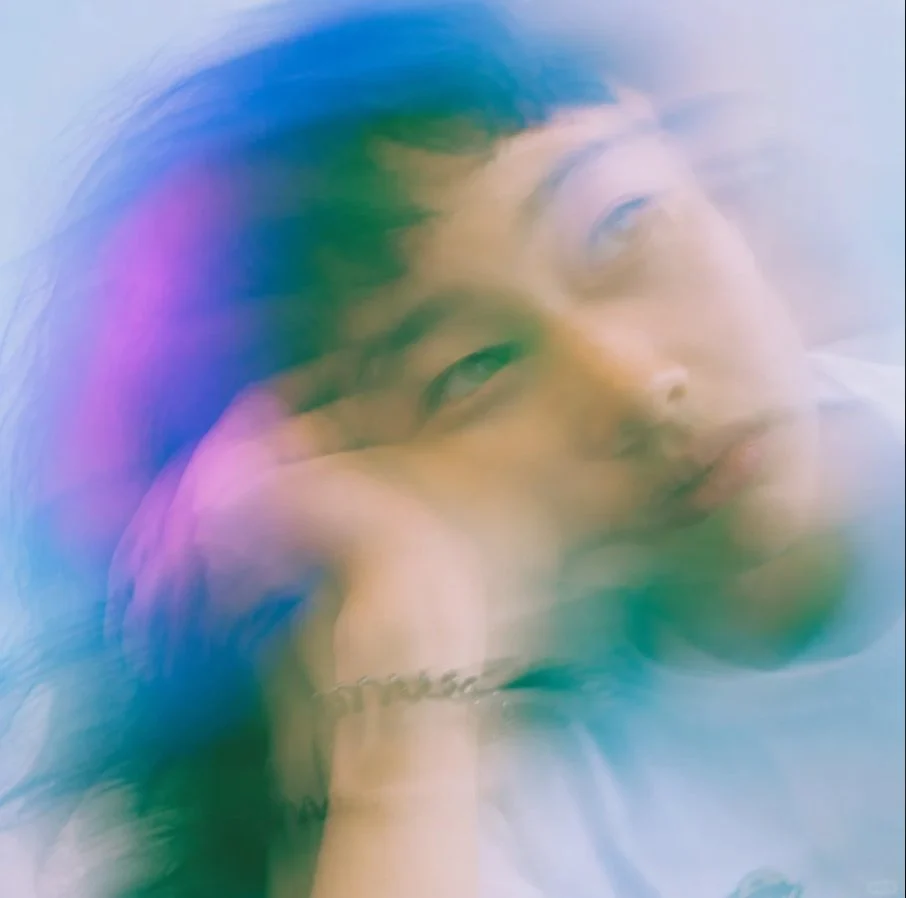
195 wordsCreate a square, close-up editorial portrait of {argument name="subject" default="a young East Asian man"} in a dreamy high-fashion style, with his head tilted and resting on a bent arm near the bottom of the frame. Use extreme soft focus, long-exposure motion blur, and double/triple exposure ghosting so the face appears repeated and smeared diagonally across the image, with one clearer eye near the center-left and another translucent face shifted toward the upper right. The expression is calm, distant, and introspective, lips relaxed, gaze slightly off-camera. Show dark tousled hair blending into the blur, pale skin, a white shirt at the lower right, and a small silver chain bracelet on the wrist near the lower center. Lighting should be ethereal and overexposed, with a cool misty background in pale blue and white. Add translucent color washes of {argument name="accent colors" default="cyan, teal, deep blue, and magenta-pink"} across the hair and face, like prism flare or light leaks. Make the image feel analog, romantic, hazy, and painterly, with no sharp edges except faint facial features; use shallow depth of field, airy glow, and smooth pastel gradients. No text, no logos, no hard outlines, no realistic studio crispness.About this prompt
Dreamy Motion Blur Portrait is a ready-to-use social media prompt for GPT Image 2 on Image 2. Copy the 195 words below, paste them into the Create form, and you will get a result close to the preview above. Tweak the Social Media, Fashion, Vintage tag if you want to push it somewhere new.
Use it as a starting point, then adjust the subject, lighting, or composition to suit your idea. The credit cost stays the same whether you use it as written or customize it.
Use case
A strong starting point for Social Media
Start here when you want a social media image inspired by Dreamy Motion Blur Portrait. The prompt already sets the look and composition; replace the subject, product, colors, or scene details to match your project.
Easy places to tweak
- Subject Swap in your person, product, place, or object without changing the overall composition.
- Look and mood Tune the lighting, palette, camera angle, or materials so the image fits your brand.
- Final format Set the aspect ratio, background, text, or layout notes before you generate.
More prompt paths to explore
Find more GPT Image 2 prompts with a similar style, use case, or subject.
How to use it
- Step 1
Copy the prompt
Hit the Copy button above to grab the full text.
- Step 2
Open Image 2 Create
Head to the Create form and paste it in.
- Step 3
Generate
Hit Generate. Your version lands in seconds.
Make it yours
Load the prompt into the Create form with one click, then start tweaking.