Prompt
389 wordsSubject: Profile in Blue
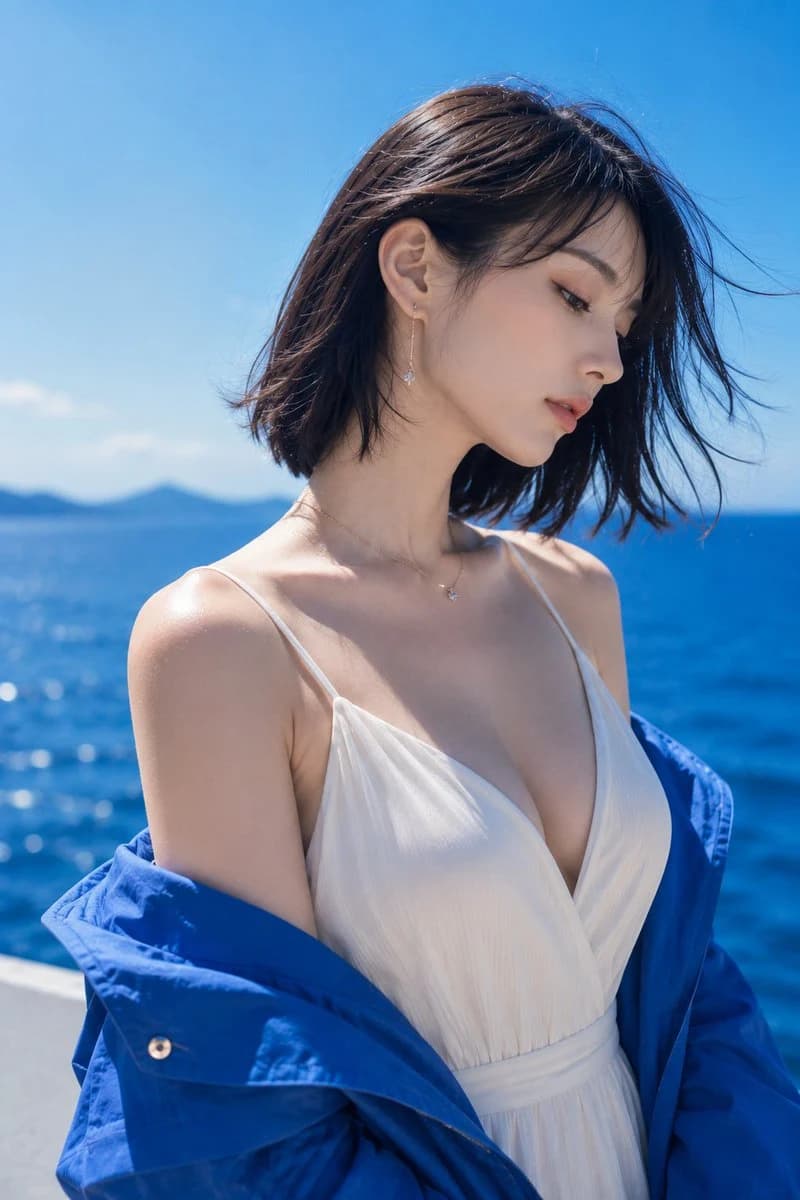
Main Subject: {argument name="main subject" default="A single adult woman standing on a sunny seaside"}. A 2:3 vertical fashion portrait positioned slightly left of center, focusing on the area from the chest to the top of the head. She wears a vibrant blue outer garment dropped low from both shoulders, creating a striking contrast between the white V-neck clothing and the blue sea.
Character/Expression: A natural Japanese woman with a calm, mature atmosphere. A blunt bob in dark brown, almost black, that neatly shows the neckline. Sea breeze lightly blows the bangs and ends toward the right. Head tilted slightly forward, face in a diagonal profile facing right. Gaze lowered diagonally with a quiet, composed expression and slightly parted lips. Translucent light beige skin, coral lips, delicate eyeliner, and natural eyelashes.
Clothing/Pose: {argument name="clothing" default="Ivory white V-neck dress with thin shoulder straps"}. Deep but elegant chest line with thin, vertically ribbed fabric that naturally follows the curves of a mature body. A bright cobalt blue light jacket is lowered to the elbows, exposing wide shoulders and collarbones. Shoulders relaxed, upper body slightly twisted to the left. Delicate drop earrings with small transparent stones hanging from thin gold chains.
Background/Light: {argument name="background" default="Deep blue sea and clear sky stretching to the horizon"}. A blurred small island silhouette in the far left and a white seaside railing at the bottom. Strong natural light from around noon shines from the upper left, creating bright highlights on the hair surface, left shoulder, collarbone, and cheeks. Soft blue reflected light on the right side of the face, with natural thin shadows under the nose and chin.
Composition/Camera: Vertical 2:3, medium close-up focusing on the bust. The person occupies about 75% of the screen, leaving a small amount of sky above and sea margin on the right. Camera is at a near eye-level slightly higher than the chest. 85mm-equivalent medium telephoto lens, shallow depth of field precisely focusing on the eyes and profile, smoothly blurring the sea and island in the background.
Texture/Style: High-quality summer fashion photography. Natural skin showing slight texture and vellus hair without excessive retouching. Precise depiction of fine fabric weave, light wrinkles on the blue jacket, and small metallic reflections on jewelry. High-saturation yet clean color tones focused on blue and white, refreshing contrast, and delicate film grain.About this prompt
Blue Seaside Fashion Portrait is a ready-to-use social media prompt for GPT Image 2 on Image 2. Copy the 389 words below, paste them into the Create form, and you will get a result close to the preview above. Tweak the Social Media, Fashion, Travel tag if you want to push it somewhere new.
Use it as a starting point, then adjust the subject, lighting, or composition to suit your idea. The credit cost stays the same whether you use it as written or customize it.
Use case
A strong starting point for Social Media
Start here when you want a social media image inspired by Blue Seaside Fashion Portrait. The prompt already sets the look and composition; replace the subject, product, colors, or scene details to match your project.
Easy places to tweak
- Subject Swap in your person, product, place, or object without changing the overall composition.
- Look and mood Tune the lighting, palette, camera angle, or materials so the image fits your brand.
- Final format Set the aspect ratio, background, text, or layout notes before you generate.
More prompt paths to explore
Find more GPT Image 2 prompts with a similar style, use case, or subject.
How to use it
- Step 1
Copy the prompt
Hit the Copy button above to grab the full text.
- Step 2
Open Image 2 Create
Head to the Create form and paste it in.
- Step 3
Generate
Hit Generate. Your version lands in seconds.
Make it yours
Load the prompt into the Create form with one click, then start tweaking.