Prompt
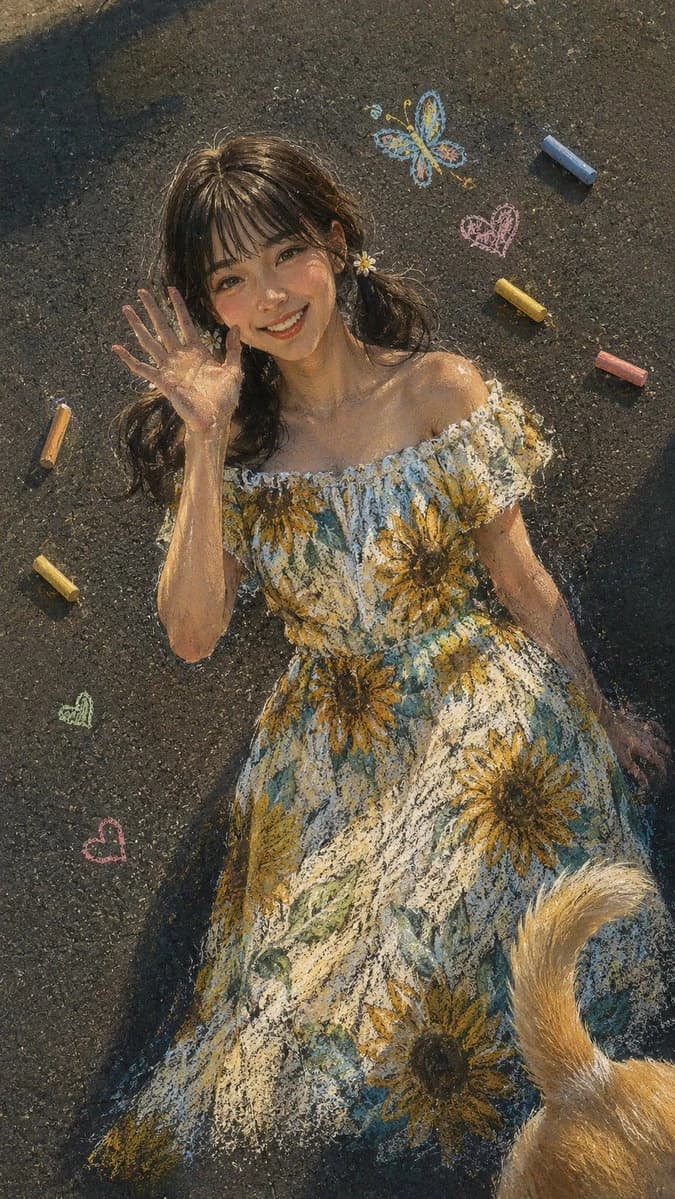
169 wordsA stunning, hyper-realistic chalk art masterpiece on a textured dark asphalt street surface, captured from a high-angle shot. The same beautiful young {argument name="subject ethnicity" default="East Asian"} woman with neat, stylish bangs is drawn in a cheerful waving pose, her hand raised near her cheek. She wears a chalk-drawn, off-shoulder summer dress with a vibrant sunflower pattern. Her hair is styled in two low, cute pigtails with chalk-drawn daisy clips. Around her on the asphalt, pastel chalk sticks in yellow, orange, and blue are scattered, along with a small, chalk-drawn butterfly and a few chalk hearts. The dusty pastel strokes create realistic skin tones and soft hair texture. Soft, natural golden hour sunlight highlights the dress and casts faint, realistic shadows. The rough pavement grain is visible. Slight film grain, subtle chromatic aberration at the edges, bright and clean white balance. A stray dog tail is drawn in chalk, wagging from the bottom right corner. Artistic, whimsical, highly detailed street art aesthetic.
dutch angle, stray dog tail --ar 9:16About this prompt
Asphalt Chalk Art Portrait is a ready-to-use social media prompt for GPT Image 2 on Image 2. Copy the 169 words below, paste them into the Create form, and you will get a result close to the preview above. Tweak the Social Media, Portrait, Fashion tag if you want to push it somewhere new.
Use it as a starting point, then adjust the subject, lighting, or composition to suit your idea. The credit cost stays the same whether you use it as written or customize it.
Use case
A strong starting point for Social Media
Start here when you want a social media image inspired by Asphalt Chalk Art Portrait. The prompt already sets the look and composition; replace the subject, product, colors, or scene details to match your project.
Easy places to tweak
- Subject Swap in your person, product, place, or object without changing the overall composition.
- Look and mood Tune the lighting, palette, camera angle, or materials so the image fits your brand.
- Final format Set the aspect ratio, background, text, or layout notes before you generate.
More prompt paths to explore
Find more GPT Image 2 prompts with a similar style, use case, or subject.
How to use it
- Step 1
Copy the prompt
Hit the Copy button above to grab the full text.
- Step 2
Open Image 2 Create
Head to the Create form and paste it in.
- Step 3
Generate
Hit Generate. Your version lands in seconds.
Make it yours
Load the prompt into the Create form with one click, then start tweaking.