Prompt
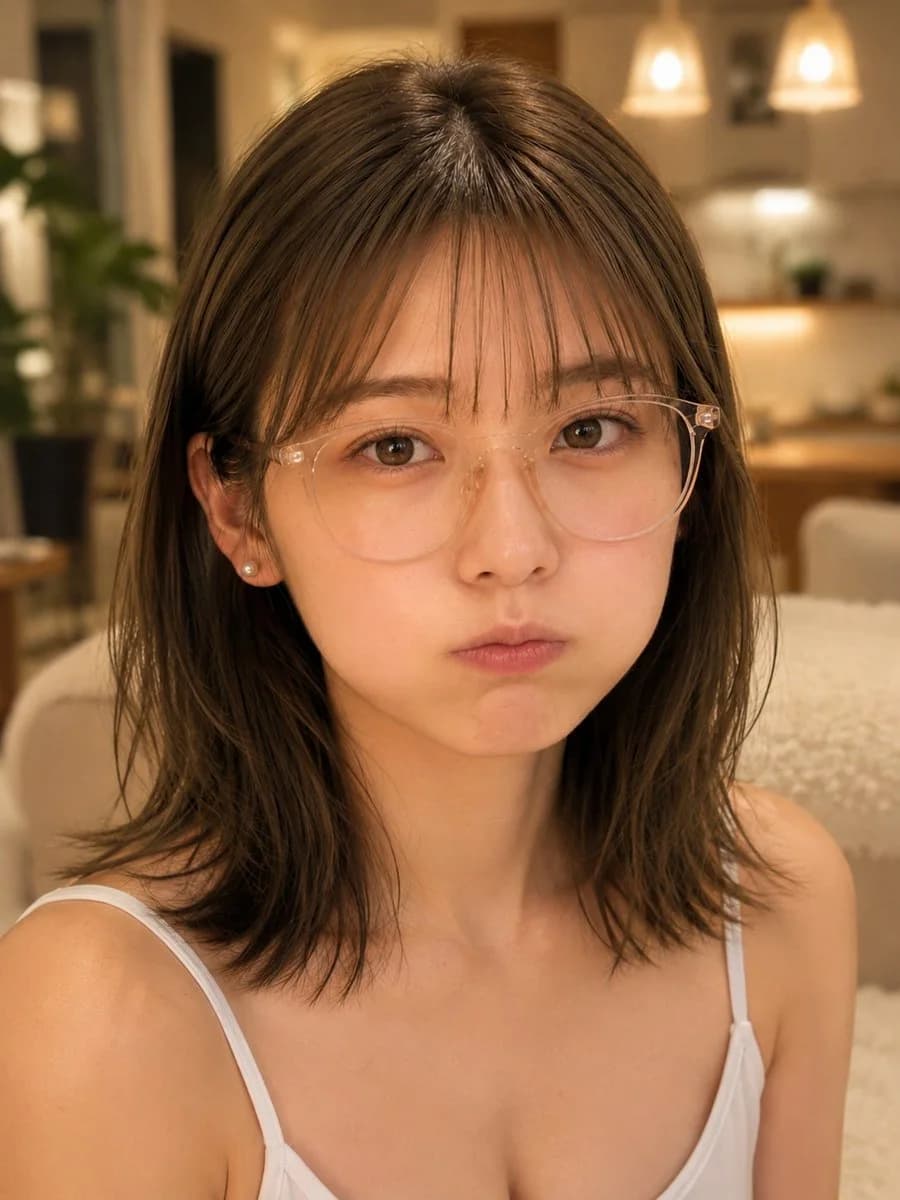
167 wordsCreate a realistic vertical close-up selfie portrait of a young East Asian woman with {argument name="hair color" default="dark brown"} shoulder-length slightly messy layered hair and thin wispy bangs, wearing transparent round eyeglasses, small pearl stud earrings, and a simple white camisole with thin straps. She faces the camera directly from a slightly high selfie angle, centered tightly from upper chest to top of head, with soft natural skin texture, large brown eyes, and a cute mildly pouting expression with puffed cheeks and closed lips, looking a little worried or sulky. Use warm cozy indoor lighting in a modern apartment or café-like kitchen/living room at night, with creamy beige tones, blurred pendant lights glowing in the background, a soft sofa or chair, wood cabinetry, and a leafy green plant on the left. Make the background strongly defocused with shallow depth of field, while the face and glasses are sharply detailed. Style should be photorealistic smartphone portrait, warm color grading, soft bokeh, intimate casual mood, no text, no watermark.About this prompt
Warm Indoor Pouting Selfie Portrait is a ready-to-use portrait prompt for GPT Image 2 on Image 2. Copy the 167 words below, paste them into the Create form, and you will get a result close to the preview above. Tweak the Portrait, Food, Travel tag if you want to push it somewhere new.
Use it as a starting point, then adjust the subject, lighting, or composition to suit your idea. The credit cost stays the same whether you use it as written or customize it.
Use case
A strong starting point for Portrait
Start here when you want a portrait image inspired by Warm Indoor Pouting Selfie Portrait. The prompt already sets the look and composition; replace the subject, product, colors, or scene details to match your project.
Easy places to tweak
- Subject Swap in your person, product, place, or object without changing the overall composition.
- Look and mood Tune the lighting, palette, camera angle, or materials so the image fits your brand.
- Final format Set the aspect ratio, background, text, or layout notes before you generate.
More prompt paths to explore
Find more GPT Image 2 prompts with a similar style, use case, or subject.
How to use it
- Step 1
Copy the prompt
Hit the Copy button above to grab the full text.
- Step 2
Open Image 2 Create
Head to the Create form and paste it in.
- Step 3
Generate
Hit Generate. Your version lands in seconds.
Make it yours
Load the prompt into the Create form with one click, then start tweaking.