Prompt
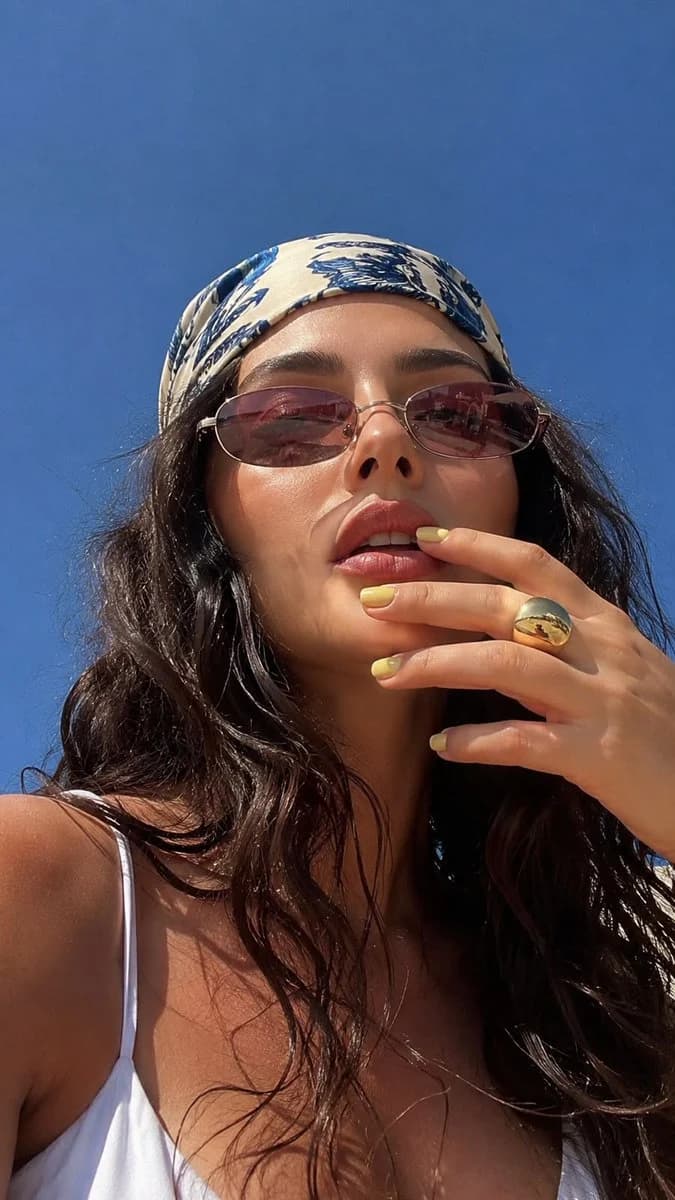
187 wordsWithout changing your facial features, create an ultra-realistic macro selfie shot from below to above. The woman holding the camera from below captures the bright summer atmosphere in the frame, along with the sunlight and the cloudless blue sky. A woman looks at the camera with a slight challenge, slightly lifting her chin and tilting her head forward. Her gaze is hidden behind narrow chic {argument name="sunglasses color" default="pink-brown"} lensed sunglasses that reflect her surroundings. She has flawless makeup, sun-tanned skin, and dusty pink lips.
On her head, there is a bandana with stylish blue and white patterns that contrasts with the smooth skin of her shoulders and face, creating a relaxed summer style. You can see the straps from her white top. Very long, {argument name="hair style" default="wet wavy hair"}. Her right hand is touching her lips, her nails show short square {argument name="nail color" default="yellow"} manicure and a large gold ring. The open shadow hat emphasizes the skin texture, while the warm natural light increases the depth and saturation of the colors.
Photorealism, photo taken on iPhone, film grain, no 'staged' feeling, graininess, photo 9:16About this prompt
Summer Low-Angle Macro Selfie is a ready-to-use portrait prompt for GPT Image 2 on Image 2. Copy the 187 words below, paste them into the Create form, and you will get a result close to the preview above. Tweak the Portrait, Beauty, Cinematic tag if you want to push it somewhere new.
Use it as a starting point, then adjust the subject, lighting, or composition to suit your idea. The credit cost stays the same whether you use it as written or customize it.
Use case
A strong starting point for Portrait
Start here when you want a portrait image inspired by Summer Low-Angle Macro Selfie. The prompt already sets the look and composition; replace the subject, product, colors, or scene details to match your project.
Easy places to tweak
- Subject Swap in your person, product, place, or object without changing the overall composition.
- Look and mood Tune the lighting, palette, camera angle, or materials so the image fits your brand.
- Final format Set the aspect ratio, background, text, or layout notes before you generate.
More prompt paths to explore
Find more GPT Image 2 prompts with a similar style, use case, or subject.
How to use it
- Step 1
Copy the prompt
Hit the Copy button above to grab the full text.
- Step 2
Open Image 2 Create
Head to the Create form and paste it in.
- Step 3
Generate
Hit Generate. Your version lands in seconds.
Make it yours
Load the prompt into the Create form with one click, then start tweaking.