Prompt
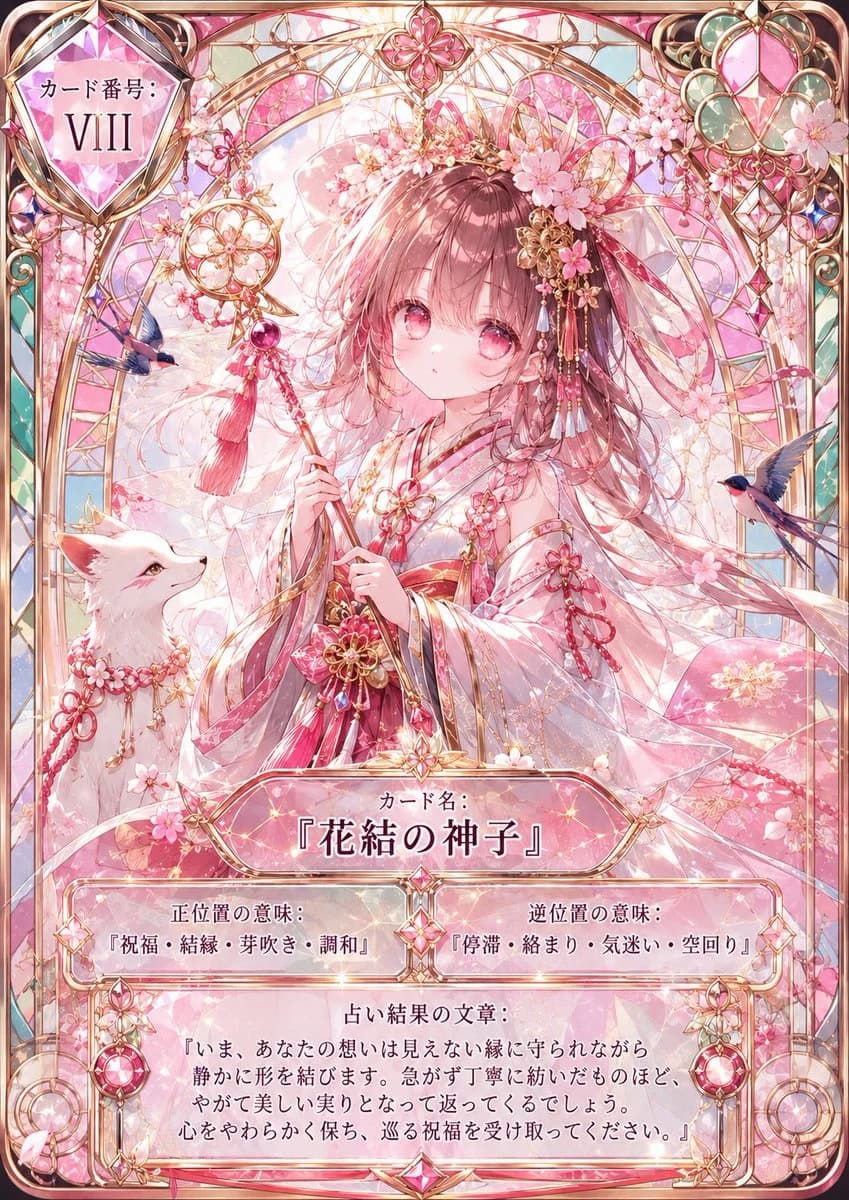
416 wordsGoal: Create a modern high-rarity digital divinity tarot-style character card for {argument name="character name" default="花結の神子"}, not an old paper tarot card. The card should feel like an ornate collectible game card with luminous glass, gold filigree, pink gemstones, cherry blossoms, and a sacred shrine-fantasy atmosphere.
Canvas: Vertical portrait card, 2:3 ratio, full-bleed illustration with rounded corners. Use a delicate pastel palette dominated by sakura pink, rose gold, soft white, pale teal, and translucent crystal highlights. Add glossy holographic shine, prismatic refractions, tiny sparkles, and high-detail anime illustration rendering.
Main subject: Center a young shrine-maiden-like anime girl with {argument name="hair color" default="soft rose-brown"} long flowing hair and large pink eyes. She wears an elegant white and pink kimono with red cords, floral gold ornaments, translucent layered sleeves, and many sakura hairpieces. She holds a ceremonial wand or staff decorated with gold rings, pink gems, tassels, and cherry blossom motifs. Her expression is gentle, quiet, and slightly solemn, looking forward.
Companion and symbolic elements: Include exactly 1 white fox companion at the lower left, looking up at the girl, wearing a pink sakura garland and red-gold cords. Include exactly 2 small blue-and-pink birds in flight, one on the left side near the wand and one on the right side near the border. Fill the background with stained-glass arches, golden latticework, suspended jewel charms, sakura petals, and a radiant circular halo behind the character.
Card frame and layout: Use an ornate rose-gold fantasy card border with layered filigree, faceted gems, curved corner decorations, and translucent jewel panels. Top-left: a large faceted diamond-shaped plaque containing the Japanese label and roman numeral, with the visible text set as {argument name="card number text" default="カード番号: VIII"}. Top-center: a small pink floral crest. Top-right: a large hanging gemstone ornament with circular teal accents and pink crystal facets. Bottom area: five distinct text panels, all integrated into the card frame with glassy pink-white panels and gold trim.
Text content: Use Japanese text exactly as follows where visible. Main name plaque at lower center: label "カード名:" and large title {argument name="card title" default="『花結の神子』"}. Left meaning box: "正位置の意味:" followed by "『祝福・結縁・芽吹き・調和』". Right meaning box: "逆位置の意味:" followed by "『停滞・絡まり・気迷い・空回り』". Bottom prophecy box: heading "占い結果の文章:" followed by {argument name="prophecy text" default="『いま、あなたの想いは見えない縁に守られながら\n静かに形を結びます。急がず丁寧に紡いだものほど、\nやがて美しい実りとなって返ってくるでしょう。\n心をやわらかく保ち、巡る祝福を受け取ってください。』"}.
Constraints: Keep the composition symmetrical and luxurious, with the character occupying the center and the text clearly readable. Do not use a vintage aged-paper look; make it a polished digital premium card. Avoid extra characters, extra animals, extra text panels, watermarks, logos, or UI elements outside the card.About this prompt
Sakura Divinity Tarot Card is a ready-to-use character design prompt for GPT Image 2 on Image 2. Copy the 416 words below, paste them into the Create form, and you will get a result close to the preview above. Tweak the Storyboard, Character, Character Design tag if you want to push it somewhere new.
Use it as a starting point, then adjust the subject, lighting, or composition to suit your idea. The credit cost stays the same whether you use it as written or customize it.
Use case
A strong starting point for Character Design
Start here when you want a character design image inspired by Sakura Divinity Tarot Card. The prompt already sets the look and composition; replace the subject, product, colors, or scene details to match your project.
Easy places to tweak
- Subject Swap in your person, product, place, or object without changing the overall composition.
- Look and mood Tune the lighting, palette, camera angle, or materials so the image fits your brand.
- Final format Set the aspect ratio, background, text, or layout notes before you generate.
More prompt paths to explore
Find more GPT Image 2 prompts with a similar style, use case, or subject.
How to use it
- Step 1
Copy the prompt
Hit the Copy button above to grab the full text.
- Step 2
Open Image 2 Create
Head to the Create form and paste it in.
- Step 3
Generate
Hit Generate. Your version lands in seconds.
Make it yours
Load the prompt into the Create form with one click, then start tweaking.