Prompt
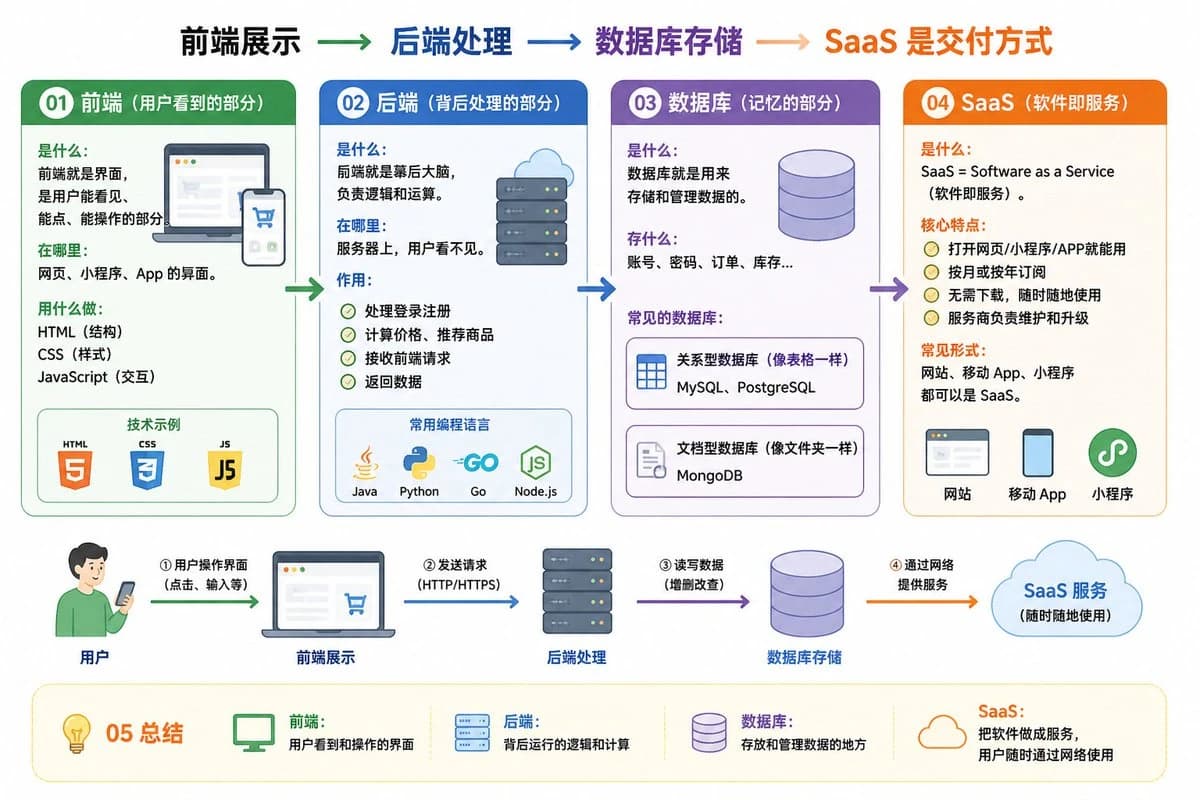
54 wordsgpt image 2生图能力真的恐怖啊,这是我的提示词: 01 前端(用户看到的部分) 是什么:前端就是界面,是用户能看见、能点、能操作的部分。 在哪里:网页、小程序、App 的界面。 用什么做:HTML(结构)、CSS(样式)、JavaScript(交互)。 02 后端(背后处理的部分) 是什么:后端就是幕后大脑,负责逻辑和运算。 在哪里:服务器上,用户看不见。 作用: 处理登录注册 计算价格、推荐商品 接收前端请求、返回数据 常用的编程语言:Java、Python、Go、JavaScript(Node.js) 03 数据库(记忆的部分) 是什么:数据库就是用来存储和管理数据的。 存什么:账号、密码、订单、库存… 常见的数据库: MySQL、PostgreSQL(关系型,像表格一样) MongoDB(文档型,像文件夹一样) 04 SaaS(软件即服务) 是什么:SaaS = Software as a Service(软件即服务)。 核心特点: 打开网页/小程序/APP就能用 按月或按年订阅 常见形式:网站、移动 App、小程序都可以是 SaaS。 05 总结 前端:用户看到和操作的界面 后端:背后运行的逻辑和计算 数据库:存放和管理数据的地方 SaaS:把软件做成服务,用户随时通过网络使用 前端展示 → 后端处理 → 数据库存储 → SaaS 是交付方式 帮我针对上面的内容画一张易于理解的图
About this prompt
前后端数据库 SaaS 信息图 is a ready-to-use ui mockup prompt for GPT Image 2 on Image 2. Copy the 54 words below, paste them into the Create form, and you will get a result close to the preview above. Tweak the UI, Mockup tag if you want to push it somewhere new.
Use it as a starting point and keep iterating: change the subject, lighting, or composition until it looks right. The credit cost stays the same whether you run it as-is or remix it.
Use case
A strong starting point for UI Mockup
Start here when you want a ui mockup image in the same direction as 前后端数据库 SaaS 信息图. The prompt already sets the look and structure; swap in your own subject, product, colors, or scene details for the brief you have in mind.
Easy places to tweak
- Subject Swap in your person, product, place, or object without changing the overall composition.
- Look and mood Tune the lighting, palette, camera angle, or materials so the image fits your brand.
- Final format Set the aspect ratio, background, text, or layout notes before you generate.
More prompt paths to explore
Find more GPT Image 2 prompts with a similar style, use case, or subject.
How to use it
- Step 1
Copy the prompt
Hit the Copy button above to grab the full text.
- Step 2
Open Image 2 Create
Head to the Create form and paste it in.
- Step 3
Generate
Hit Generate. Your version lands in seconds.
Make it yours
Load the prompt into the Create form with one click, then start tweaking.