Prompt
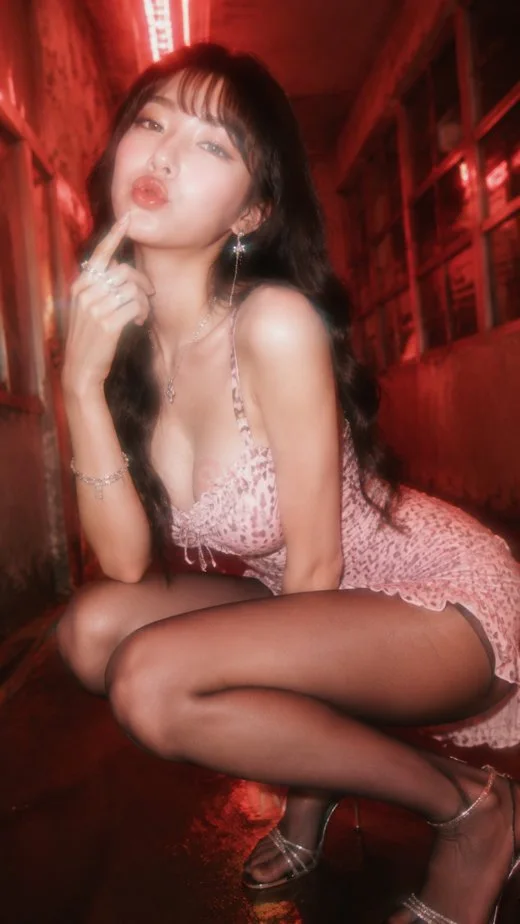
183 wordsCreate a vertical full-body fashion editorial photo of an adult East Asian woman posing in a narrow urban alley at night, bathed in intense red neon light. She has {argument name="hair color" default="long wavy black hair with soft bangs"}, glossy makeup, dewy skin, and a playful kissy expression while crouching low and touching one finger to her lips. She wears a {argument name="dress style" default="short pink leopard-print slip mini dress with thin straps and lace trim"}, sheer dark tights, delicate silver jewelry, dangling earrings, bracelets, rings, and strappy high-heeled sandals. The setting is a cramped corridor with gritty walls, windows, reflections on wet pavement, and a bright red fluorescent tube overhead creating cinematic backlight. Use a dreamy 1990s glam-photography look with soft focus, bloom, slight motion blur, shallow depth of field, warm red haze, high contrast, and glossy skin highlights. Shoot from a low wide-angle perspective close to the subject so her crouched pose dominates the foreground, with the alley receding behind her. Keep the mood sultry but fashion-oriented, like a neon nightlife magazine cover, with no visible text, watermark, or extra people.About this prompt
Red Neon Alley Fashion Portrait is a ready-to-use ad creative prompt for GPT Image 2 on Image 2. Copy the 183 words below, paste them into the Create form, and you will get a result close to the preview above. Tweak the Product Ad, Ad Creative, Fashion tag if you want to push it somewhere new.
Use it as a starting point, then adjust the subject, lighting, or composition to suit your idea. The credit cost stays the same whether you use it as written or customize it.
Use case
A strong starting point for Ad Creative
Start here when you want a ad creative image inspired by Red Neon Alley Fashion Portrait. The prompt already sets the look and composition; replace the subject, product, colors, or scene details to match your project.
Easy places to tweak
- Subject Swap in your person, product, place, or object without changing the overall composition.
- Look and mood Tune the lighting, palette, camera angle, or materials so the image fits your brand.
- Final format Set the aspect ratio, background, text, or layout notes before you generate.
More prompt paths to explore
Find more GPT Image 2 prompts with a similar style, use case, or subject.
How to use it
- Step 1
Copy the prompt
Hit the Copy button above to grab the full text.
- Step 2
Open Image 2 Create
Head to the Create form and paste it in.
- Step 3
Generate
Hit Generate. Your version lands in seconds.
Make it yours
Load the prompt into the Create form with one click, then start tweaking.