Prompt
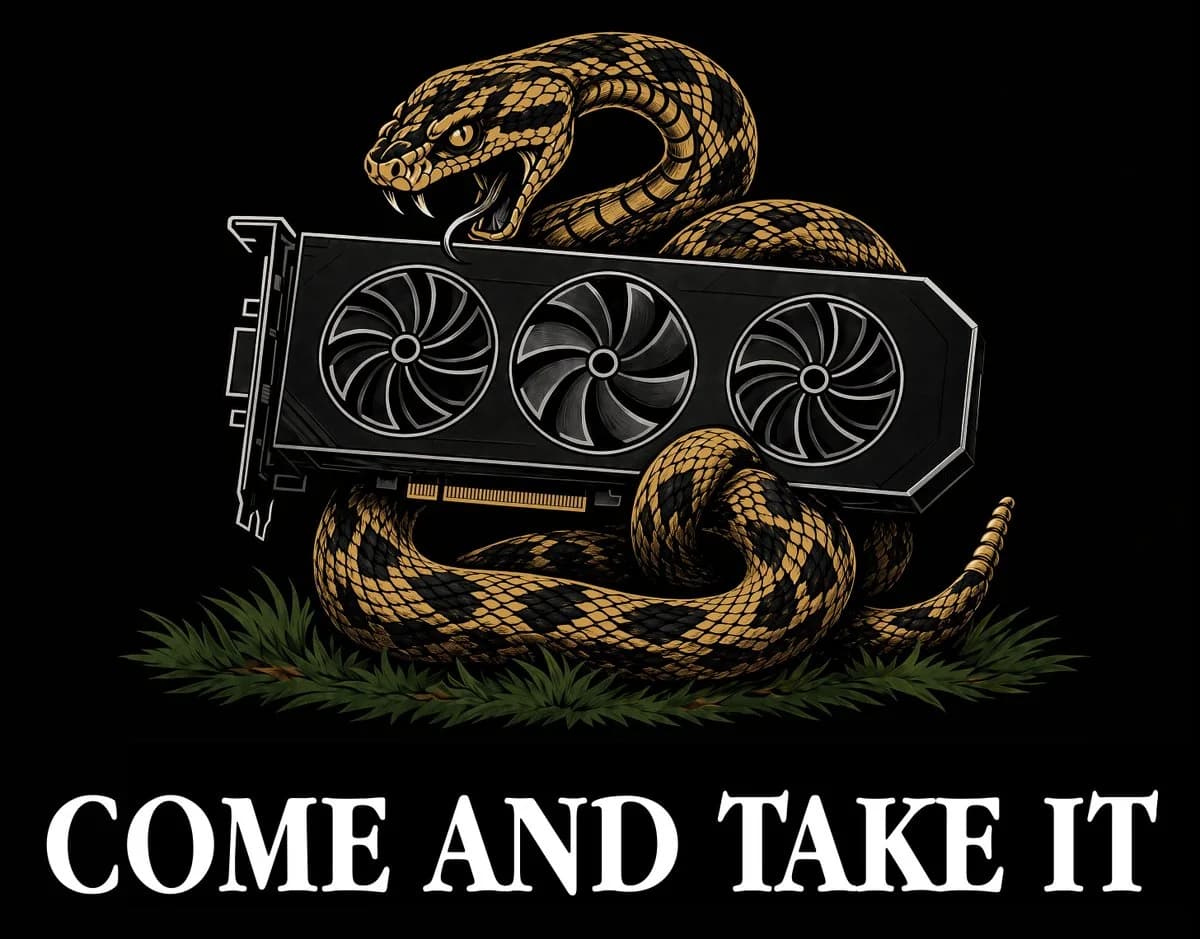
199 wordsCreate a bold black-background graphic in the style of a vintage political flag / screen-printed T-shirt design. Center a large coiled rattlesnake in gold, tan, and black, with detailed diamond scales, raised head, open mouth, visible fangs, and an aggressive expression. The snake is wrapped around and behind a modern black desktop graphics card, replacing the usual historical weapon motif with a GPU. The graphics card should be horizontal across the center, slightly angled flat-on, with exactly 3 large circular cooling fans, a visible PCI connector along the bottom edge, angular shroud edges, and thin white/gray line highlights. The snake’s body forms multiple coils: one raised loop behind the GPU near the head, one thick lower coil beneath it, one front coil curling on the right, and a tail extending to the far right with small rattles. Add a low bed of dark green pine needles or grass beneath the snake. At the bottom, place large white all-caps serif text reading {argument name="slogan text" default="COME AND TAKE IT"}, spanning nearly the full width, with distressed colonial-style letterforms. Keep the composition symmetrical and emblem-like, high contrast, crisp vector-illustration look with subtle engraved texture, no extra text, no border, no watermark.About this prompt
Rattlesnake GPU Come and Take It Graphic is a ready-to-use ad creative prompt for GPT Image 2 on Image 2. Copy the 199 words below, paste them into the Create form, and you will get a result close to the preview above. Tweak the Product Ad, Ad Creative, UI tag if you want to push it somewhere new.
Use it as a starting point, then adjust the subject, lighting, or composition to suit your idea. The credit cost stays the same whether you use it as written or customize it.
Use case
A strong starting point for Ad Creative
Start here when you want a ad creative image inspired by Rattlesnake GPU Come and Take It Graphic. The prompt already sets the look and composition; replace the subject, product, colors, or scene details to match your project.
Easy places to tweak
- Subject Swap in your person, product, place, or object without changing the overall composition.
- Look and mood Tune the lighting, palette, camera angle, or materials so the image fits your brand.
- Final format Set the aspect ratio, background, text, or layout notes before you generate.
More prompt paths to explore
Find more GPT Image 2 prompts with a similar style, use case, or subject.
How to use it
- Step 1
Copy the prompt
Hit the Copy button above to grab the full text.
- Step 2
Open Image 2 Create
Head to the Create form and paste it in.
- Step 3
Generate
Hit Generate. Your version lands in seconds.
Make it yours
Load the prompt into the Create form with one click, then start tweaking.