Prompt
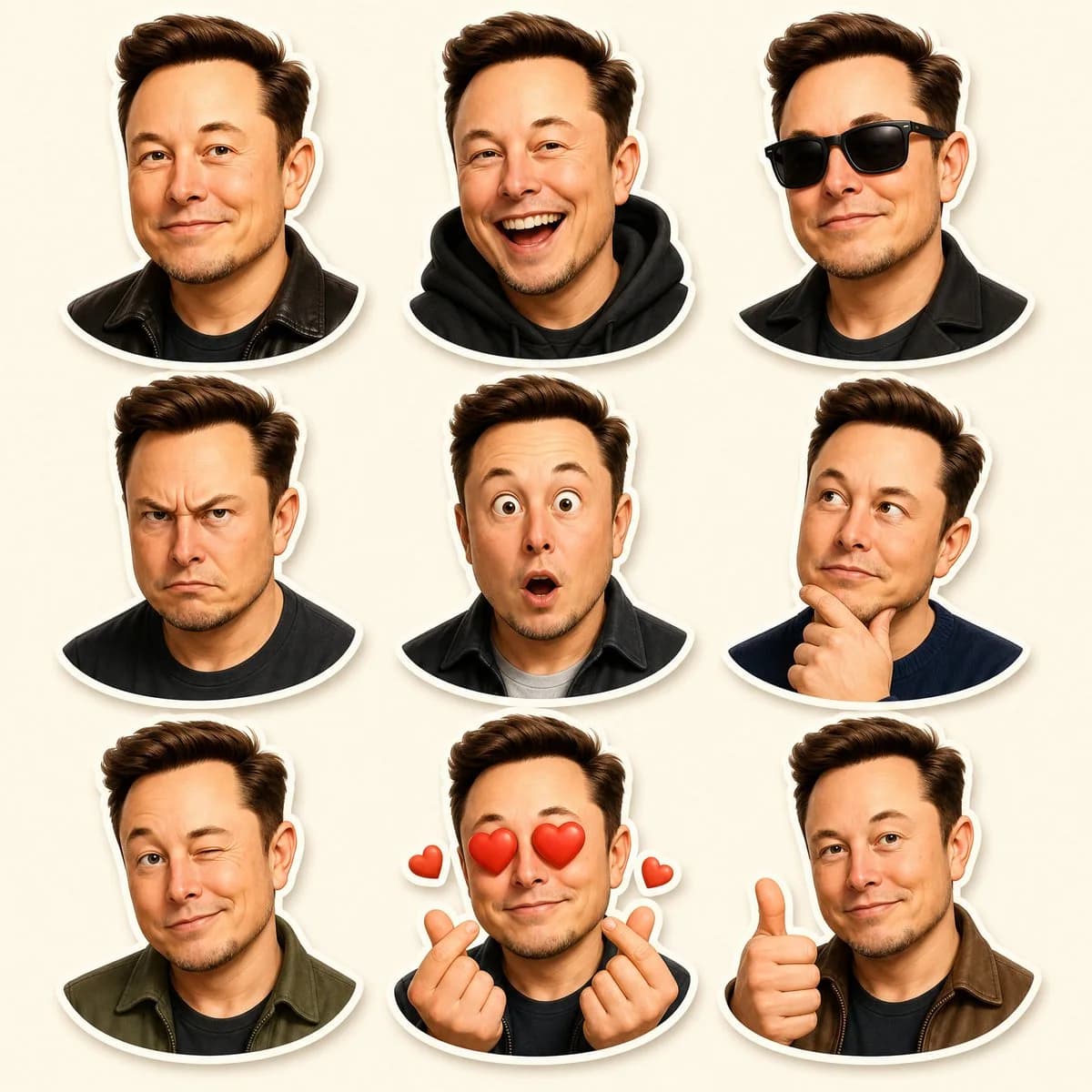
342 wordsGoal: Create a premium Pixar-inspired 3D character sticker sheet of the same recognizable adult male character, designed like high-quality messaging app stickers.
Canvas: Vertical 4:5 composition, ultra high resolution, clean warm cream background, soft studio lighting, no text, no watermark.
Layout: Arrange exactly 9 separate bust-up stickers in a clean 3×3 grid with even spacing. Each sticker has a thick white die-cut outline and a subtle soft drop shadow, as if printed vinyl stickers placed on the cream background.
Character details: The character is {argument name="character identity" default="a recognizable Elon Musk-like middle-aged man"}, with fair skin, short voluminous swept-back {argument name="hair color" default="dark brown hair"}, rounded face, light stubble, expressive eyebrows, and a friendly Pixar-style 3D caricature look. Keep the same facial structure, hairstyle, age, and identity consistent across all 9 stickers.
Sticker count and expressions: Include exactly 9 stickers, one per grid cell:
1. Top left: relaxed closed-mouth smile, wearing a black leather jacket.
2. Top center: big open-mouth laughing expression, wearing a black hoodie.
3. Top right: cool confident expression with black sunglasses, wearing a black coat.
4. Middle left: angry frowning expression with furrowed brows, wearing a dark shirt.
5. Middle center: surprised shocked face with wide eyes and small open mouth, wearing a dark jacket over a light shirt.
6. Middle right: thoughtful pose looking upward to the side, one hand on chin, wearing a navy sweater.
7. Bottom left: playful wink with slight smirk, wearing an olive-green jacket.
8. Bottom center: love-struck expression with red heart eyes, both hands making finger-heart gestures, plus exactly 2 small floating red heart icons, one on each side.
9. Bottom right: friendly thumbs-up gesture with a mild smile, wearing a brown jacket.
Visual style: Premium polished 3D cartoon rendering, Pixar-like proportions, smooth skin shading, realistic but stylized hair, glossy eyes, warm highlights, crisp sticker edges, soft shadows, charming emoji-like personality.
Constraints: Maintain a consistent head size and crop style across the grid; use bust portraits only; keep the background uncluttered; do not add captions, labels, logos, extra characters, or additional stickers.About this prompt
Pixar-Style 3D Character Sticker Grid is a ready-to-use portrait prompt for GPT Image 2 on Image 2. Copy the 342 words below, paste them into the Create form, and you will get a result close to the preview above. Tweak the UI, Portrait, Beauty tag if you want to push it somewhere new.
Use it as a starting point, then adjust the subject, lighting, or composition to suit your idea. The credit cost stays the same whether you use it as written or customize it.
Use case
A strong starting point for Portrait
Start here when you want a portrait image inspired by Pixar-Style 3D Character Sticker Grid. The prompt already sets the look and composition; replace the subject, product, colors, or scene details to match your project.
Easy places to tweak
- Subject Swap in your person, product, place, or object without changing the overall composition.
- Look and mood Tune the lighting, palette, camera angle, or materials so the image fits your brand.
- Final format Set the aspect ratio, background, text, or layout notes before you generate.
More prompt paths to explore
Find more GPT Image 2 prompts with a similar style, use case, or subject.
How to use it
- Step 1
Copy the prompt
Hit the Copy button above to grab the full text.
- Step 2
Open Image 2 Create
Head to the Create form and paste it in.
- Step 3
Generate
Hit Generate. Your version lands in seconds.
Make it yours
Load the prompt into the Create form with one click, then start tweaking.