Prompt
463 wordsSubject: Gaze catching the light
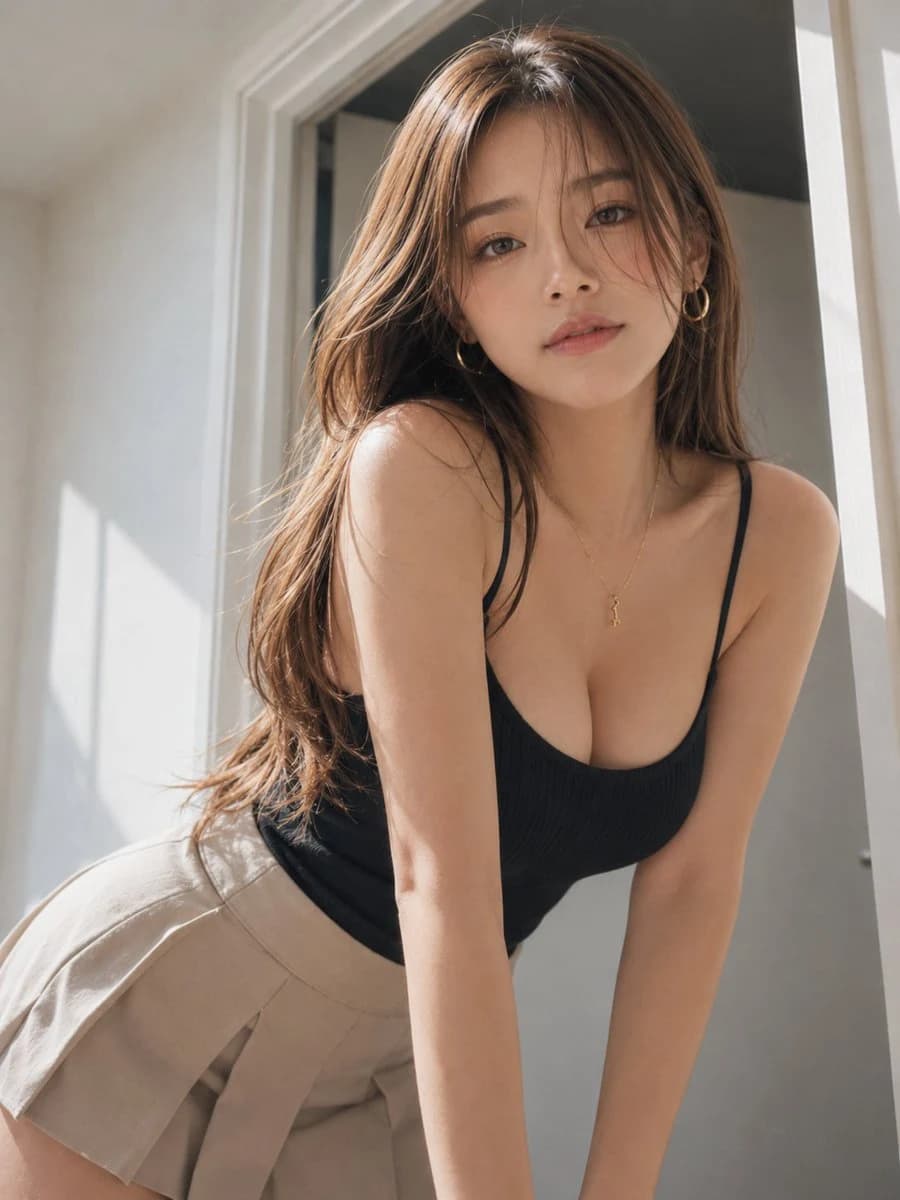
Main: A vertical 3:4 indoor portrait. A woman in her {argument name="age" default="20s"} stands slightly right of center, leaning her upper body loosely toward the camera. Captures from head to upper thighs, with the person occupying about 80% of the screen. A natural forward-leaning posture with both arms extended forward for support and hips pulled slightly to the left.
Person/Expression: A young woman with a calm atmosphere. {argument name="hairstyle" default="Bright brown long hair"} in natural layers, with bangs and fine strands falling over her cheeks. Head tilted slightly right, chin slightly raised, looking straight at the camera. Soft eyes and a gentle expression with lips lightly closed. Light brown eye makeup, natural flush on cheeks, and matte pink-beige lips. Small gold hoop earrings and a thin necklace.
Outfit/Pose: {argument name="outfit" default="A charcoal fine-ribbed camisole close to black"}. The neckline is a soft rounded square neck with thin straps and a clean silhouette that follows the body. Bottoms are light greige high-waisted pleated shorts. Fine tucks on one side, made of soft-textured linen-blend material. Hands placed on an unseen surface at the bottom of the screen to support her weight, with relaxed shoulders. Upper body slightly twisted, creating a height difference between the left and right shoulders.
Background/Light: A simple indoor room unified in white and light gray. Behind is a white door frame and a half-open door, with a slightly darker gray space beyond. Natural morning light shines diagonally from the left, creating soft highlights on the hair surface, cheeks, collarbones, shoulders, and arms. A faint rectangular shadow on the wall suggestive of a window frame. A thin shadow on the right side of the person, with dark areas naturally lifted by weak reflections from the floor and white walls.
Composition/Camera: Vertical 3:4, camera position close to a slightly low eye level. Medium close-up, with the face at the top center and hips at the bottom left. White wall space on the left and a thin door frame on the right edge. Natural perspective equivalent to 35-50mm. Precise focus on the face and eyes, with the background lightly blurred. Avoids excessive wide-angle distortion, maintaining natural body proportions even in a forward-leaning posture.
Texture/Style: Realistic fashion portrait photography. Skin has natural textures with pores and fine shadows. Detailed depiction of fine hair strands, rib material, and linen-blend weave. Based on low-saturation beige, white, and charcoal, with sunlight made slightly warmer. Medium contrast, soft highlights, balancing the intimacy of a natural smartphone shot with the polished quality of magazine photography.
Negative: Underage-looking individuals, unnatural faces, unnatural gaze, excessively exaggerated bodies, extra fingers, missing fingers, fused limbs, joint breakdowns, unnatural forward-leaning posture, clothing breakdowns, floating, incorrect perspective, shadows inconsistent with light source, excessive skin smoothing, plastic-like skin, garbled text, logos, watermarks.About this prompt
Indoor Natural Light Fashion Portrait is a ready-to-use portrait prompt for GPT Image 2 on Image 2. Copy the 463 words below, paste them into the Create form, and you will get a result close to the preview above. Tweak the Portrait, Fashion, Architecture tag if you want to push it somewhere new.
Use it as a starting point, then adjust the subject, lighting, or composition to suit your idea. The credit cost stays the same whether you use it as written or customize it.
Use case
A strong starting point for Portrait
Start here when you want a portrait image inspired by Indoor Natural Light Fashion Portrait. The prompt already sets the look and composition; replace the subject, product, colors, or scene details to match your project.
Easy places to tweak
- Subject Swap in your person, product, place, or object without changing the overall composition.
- Look and mood Tune the lighting, palette, camera angle, or materials so the image fits your brand.
- Final format Set the aspect ratio, background, text, or layout notes before you generate.
More prompt paths to explore
Find more GPT Image 2 prompts with a similar style, use case, or subject.
How to use it
- Step 1
Copy the prompt
Hit the Copy button above to grab the full text.
- Step 2
Open Image 2 Create
Head to the Create form and paste it in.
- Step 3
Generate
Hit Generate. Your version lands in seconds.
Make it yours
Load the prompt into the Create form with one click, then start tweaking.