Prompt
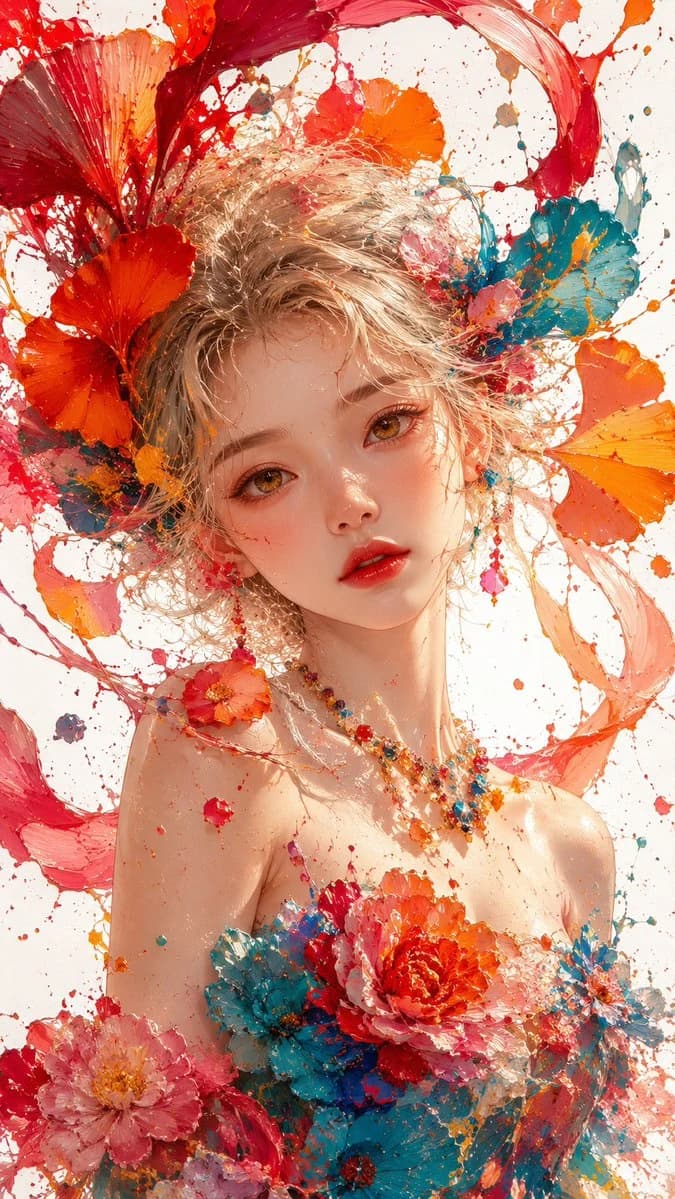
145 wordsMasterpiece, best quality, 8K ultra detailed, thick impasto oil painting, splashing paint texture, close-up bust portrait of a {argument name="subject" default="beautiful young East Asian girl"}, soft fluffy {argument name="hair color" default="pale blonde"} messy curly hair, hair blended with flowing fiery red orange paint ribbons and giant {argument name="accent flowers" default="ginkgo flowers"}, huge vibrant red, cyan, magenta, orange petals surrounding her head, warm amber gentle eyes, soft peach blush, glossy red lips, fair luminous dewy skin, strapless floral gown with thick paint texture, dress decorated with layered peony flowers, colorful gem bead necklace, countless splashed red orange teal paint splatters floating around, pure clean white background, soft bright diffused studio lighting, glowing warm rim light, vivid saturated candy bold color palette, dreamy romantic floral fairy atmosphere, transparent flowing paint petal particles, sharp facial details, cinematic soft glow, painterly brush strokes --ar 9:16 --style raw --v 6.0About this prompt
Impasto Oil Portrait of an East Asian Girl is a ready-to-use portrait prompt for GPT Image 2 on Image 2. Copy the 145 words below, paste them into the Create form, and you will get a result close to the preview above. Tweak the Portrait, Fashion, Watercolor tag if you want to push it somewhere new.
Use it as a starting point, then adjust the subject, lighting, or composition to suit your idea. The credit cost stays the same whether you use it as written or customize it.
Use case
A strong starting point for Portrait
Start here when you want a portrait image inspired by Impasto Oil Portrait of an East Asian Girl. The prompt already sets the look and composition; replace the subject, product, colors, or scene details to match your project.
Easy places to tweak
- Subject Swap in your person, product, place, or object without changing the overall composition.
- Look and mood Tune the lighting, palette, camera angle, or materials so the image fits your brand.
- Final format Set the aspect ratio, background, text, or layout notes before you generate.
More prompt paths to explore
Find more GPT Image 2 prompts with a similar style, use case, or subject.
How to use it
- Step 1
Copy the prompt
Hit the Copy button above to grab the full text.
- Step 2
Open Image 2 Create
Head to the Create form and paste it in.
- Step 3
Generate
Hit Generate. Your version lands in seconds.
Make it yours
Load the prompt into the Create form with one click, then start tweaking.