Prompt
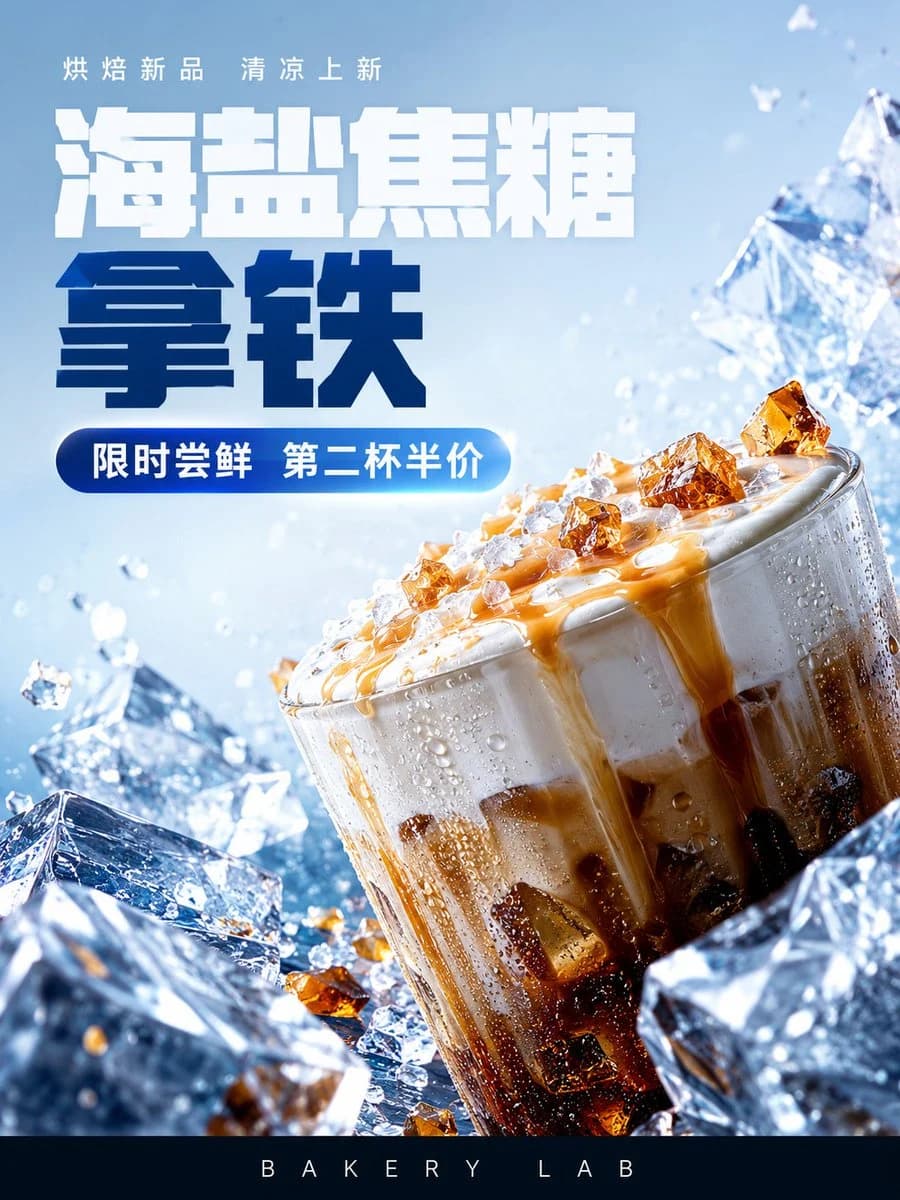
415 wordsGoal: Create a premium vertical e-commerce beverage poster for an iced caramel sea-salt latte / dessert drink, with a cool crystalline summer aesthetic and bold Chinese typography.
Canvas: Vertical 3:4 poster, high-resolution commercial product photography style. Use an icy pale-blue background with bright daylight, sparkling highlights, water droplets, and flying ice fragments. The composition should feel refreshing, cold, glossy, and high-end.
Layout: Place the main product glass in the lower-right half, tilted slightly to the right and cropped close for impact. Surround it with large transparent blue ice cubes in the foreground and background, including exactly 5 prominent ice blocks: one large block at bottom left, one large block at bottom right, one medium block behind the cup on the right, one medium block behind the cup on the left, and one small floating cube near the left side. Add small ice shards and droplets scattered through the air. Reserve the upper-left area for typography. Add a black bottom footer bar occupying about 7% of the canvas height.
Subject details: The drink is a clear cylindrical glass filled with dark coffee at the bottom, milk and cream swirling above, topped with thick white foam. Golden caramel sauce drips down the foam and glass. Add amber sugar crystals on top of the foam and around the ice; show exactly 9 clearly visible amber crystal chunks on the foam and rim area. The glass surface has condensation beads and cold mist. Use strong macro product lighting, crisp reflections, and shallow depth of field.
Text content: At the very top-left, add a small thin white slogan: {argument name="top slogan" default="烘焙新品 清凉上新"}. Below it, create a huge bold block-style Chinese headline in two lines: first line in white, {argument name="main headline" default="海盐焦糖"}; second line in deep navy blue, {argument name="product name" default="拿铁"}. Under the headline, add a rounded blue gradient pill button with white text: {argument name="promotion text" default="限时尝鲜 第二杯半价"}. In the bottom black footer bar, center widely spaced white uppercase text: {argument name="brand text" default="BAKERY LAB"}.
Typography style: Use heavy geometric sans-serif Chinese characters with a chunky, squared, slightly futuristic look. The headline should be very large, clean, tightly kerned, and slightly shadowed for separation. The promotional pill should have a glossy blue-to-cyan gradient and rounded corners.
Visual style: Hyper-realistic commercial food photography mixed with graphic advertising design; icy crystal aesthetics, high contrast between deep coffee browns, caramel amber, bright whites, and cool blues. No watermark, no extra logos, no additional text beyond the specified four text areas.About this prompt
Iced Caramel Latte Poster is a ready-to-use ad creative prompt for GPT Image 2 on Image 2. Copy the 415 words below, paste them into the Create form, and you will get a result close to the preview above. Tweak the Product Ad, Ad Creative, Product tag if you want to push it somewhere new.
Use it as a starting point, then adjust the subject, lighting, or composition to suit your idea. The credit cost stays the same whether you use it as written or customize it.
Use case
A strong starting point for Ad Creative
Start here when you want a ad creative image inspired by Iced Caramel Latte Poster. The prompt already sets the look and composition; replace the subject, product, colors, or scene details to match your project.
Easy places to tweak
- Subject Swap in your person, product, place, or object without changing the overall composition.
- Look and mood Tune the lighting, palette, camera angle, or materials so the image fits your brand.
- Final format Set the aspect ratio, background, text, or layout notes before you generate.
More prompt paths to explore
Find more GPT Image 2 prompts with a similar style, use case, or subject.
How to use it
- Step 1
Copy the prompt
Hit the Copy button above to grab the full text.
- Step 2
Open Image 2 Create
Head to the Create form and paste it in.
- Step 3
Generate
Hit Generate. Your version lands in seconds.
Make it yours
Load the prompt into the Create form with one click, then start tweaking.