Prompt
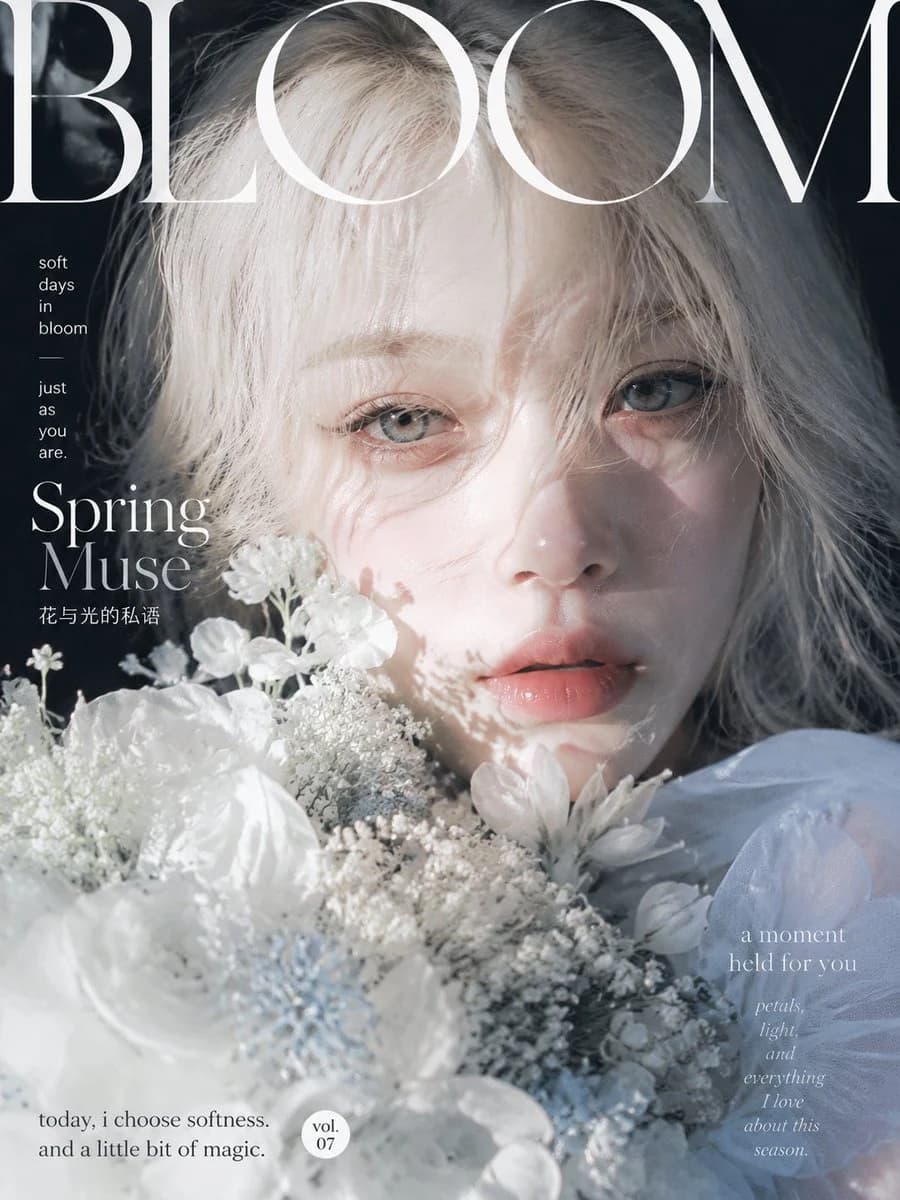
407 wordsGoal: Create an editorial fashion magazine cover featuring a dreamy close-up portrait of {argument name="character name" default="a young woman"} as a spring muse, surrounded by white flowers, with elegant high-fashion typography and soft cinematic light.
Canvas: Vertical magazine cover, 3:4 aspect ratio, full-bleed portrait photography style, cool pale blue-white palette with deep shadowed background edges.
Subject details: Extreme close-up of a delicate young woman with {argument name="hair color" default="platinum blonde"} tousled wispy hair falling across her forehead and partly over one eye, pale luminous skin, large glassy blue-gray eyes looking directly at the viewer, subtle peach-pink glossy lips slightly parted, minimal natural makeup, ethereal and melancholic expression. Her face fills the upper and center-right area of the cover, partly veiled by strands of hair and flower shadows.
Floral styling: Use exactly 5 visible flower groups in the foreground: 1 large soft white flower at bottom left, 1 large pale flower near the lower center, 1 cluster of tiny baby's-breath blossoms across the middle, 1 cluster of small white blossoms near the left cheek, and 1 pale daisy-like bloom near the lower right cheek. Flowers should overlap the lower half of the face and create translucent petal texture.
Lighting and mood: Soft spring sunlight from the upper left, high-key highlights on hair and flowers, gentle dappled flower shadows across the nose, cheek, and lips, muted contrast, airy haze, romantic quiet mood, refined art-magazine aesthetic.
Layout and typography: Place a huge white Didot/Bodoni-style serif masthead reading {argument name="magazine title" default="BLOOM"} across the very top, oversized and partially cropped by the canvas edges. Keep the masthead behind or visually integrated with the hair, but still readable. Use elegant white serif and small sans-serif text blocks.
Text content: Include exactly 6 discrete text elements: 1) masthead: “BLOOM” at the top; 2) small vertical tagline on upper left: “soft days in bloom — just as you are.”; 3) main feature title on left: {argument name="feature title" default="Spring Muse"}; 4) small Chinese subtitle below it: “花与光的私语”; 5) lower-left caption: {argument name="bottom caption" default="today, i choose softness. and a little bit of magic."}; 6) right-side poetic blurb: “a moment held for you petals, light, and everything I love about this season.” Add a small circular badge near the bottom center-left reading “vol. 07”.
Constraints: Fashion magazine cover only, no barcode, no extra logos, no additional text beyond the specified 6 text elements and the volume badge, no harsh retouching, no cartoon style, no watermark.About this prompt
Ethereal Spring Magazine Cover is a ready-to-use social media prompt for GPT Image 2 on Image 2. Copy the 407 words below, paste them into the Create form, and you will get a result close to the preview above. Tweak the Social Media, Fashion, Beauty tag if you want to push it somewhere new.
Use it as a starting point, then adjust the subject, lighting, or composition to suit your idea. The credit cost stays the same whether you use it as written or customize it.
Use case
A strong starting point for Social Media
Start here when you want a social media image inspired by Ethereal Spring Magazine Cover. The prompt already sets the look and composition; replace the subject, product, colors, or scene details to match your project.
Easy places to tweak
- Subject Swap in your person, product, place, or object without changing the overall composition.
- Look and mood Tune the lighting, palette, camera angle, or materials so the image fits your brand.
- Final format Set the aspect ratio, background, text, or layout notes before you generate.
More prompt paths to explore
Find more GPT Image 2 prompts with a similar style, use case, or subject.
How to use it
- Step 1
Copy the prompt
Hit the Copy button above to grab the full text.
- Step 2
Open Image 2 Create
Head to the Create form and paste it in.
- Step 3
Generate
Hit Generate. Your version lands in seconds.
Make it yours
Load the prompt into the Create form with one click, then start tweaking.