Prompt
480 wordsTheme: Night unravelling in light
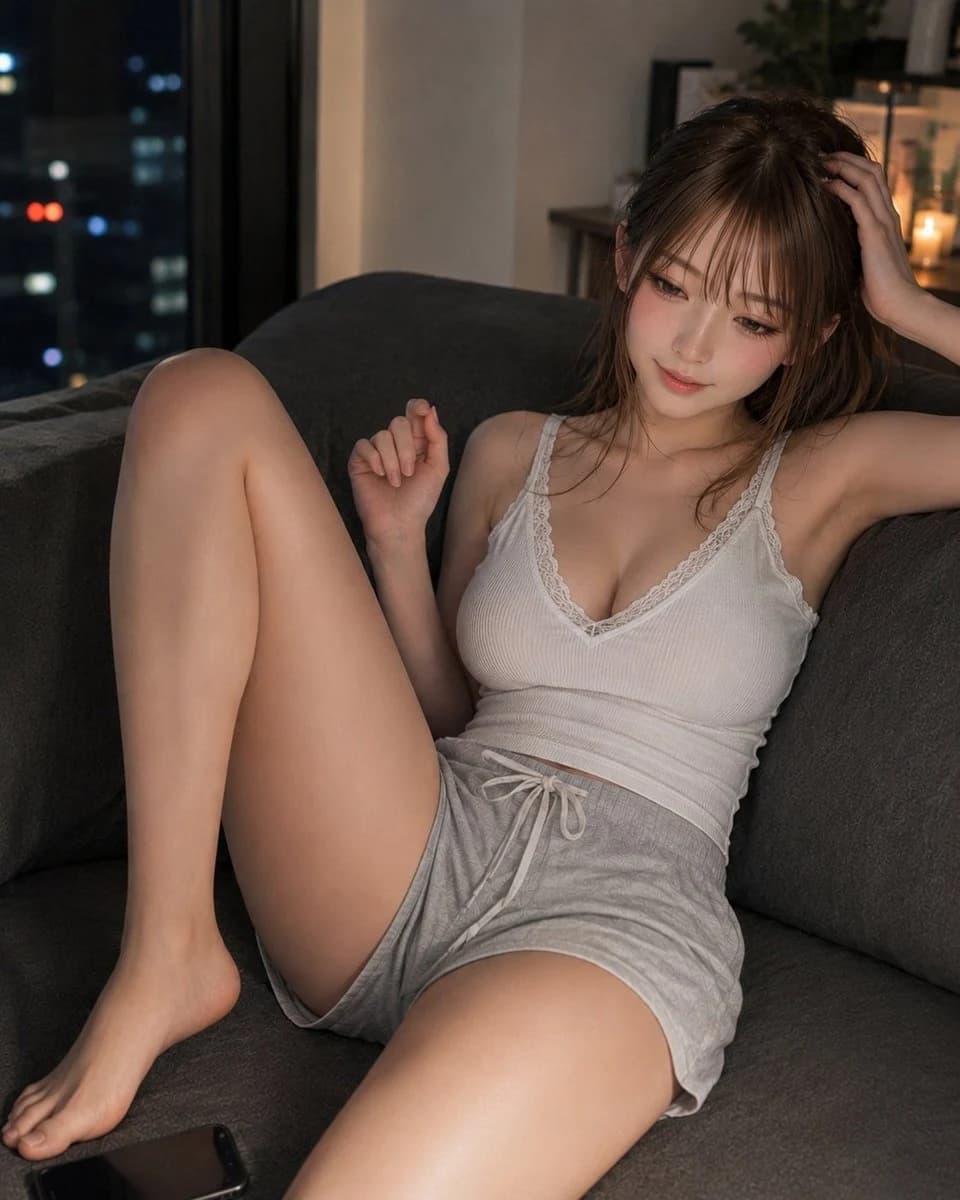
Subject: In a living room of an apartment at night, a woman in her {argument name="age" default="20s"} is leaning back comfortably on a dark gray sofa. The person enters the screen largely from the center toward the right, capturing from the upper body to bare feet. The leg stretched forward is shown prominently, and a black smartphone is placed at the lower left of the sofa.
Character/Expression: A natural, friendly feminine oval contour. Small chin, soft cheeks, modest nose bridge. Realistic texture showing pores and fine skin grain, leaving a faint pink complexion on bright ivory beige skin. Rose pink blush, pink-brown eye makeup, thin eyelashes, natural tear bags, translucent pink-beige lips. Gaze directed toward the lower left of the screen, with a very small smile on the mouth. Hair is a medium-long {argument name="hair color" default="milk tea ash brown"}. Features thin see-through bangs, layers around the face, natural flyaways, and fine hair flow.
Clothing/Pose: {argument name="outfit" default="White to pale ivory ribbed V-neck camisole"}. Thin lace at the neckline, soft fabric that naturally follows the body. Bottoms are short light gray room shorts with a white drawstring at the center waist. Right arm resting on the sofa back, right hand lightly touching the hair. Left hand relaxed next to the chest with fingers naturally bent. Left leg with knee up, right leg extended toward the camera. Accurately express the stretch of clothing, wrinkles around the waist, and the weight of the body sinking into the sofa.
Background/Light: A calm indoor night scene. In the window at the far left, pale blue city lights appear largely blurred. In the far right, a small indirect light, a houseplant, and a shelf with a minimal sense of daily life. Main light is a warm indoor light coming from the upper right, softly illuminating the cheeks, shoulders, collarbone, and the top of the thighs. Weak blue reflected light from the window is added to the left side, creating a natural contrast between warm and cold tones. Shadows fall gently toward the lower left of the sofa.
Composition/Camera: Portrait 2:3. A relaxed portrait shot of the sofa seat and the person from a short distance. Camera shot from a position slightly lower than the waist with a 35mm equivalent lens. The raised leg is placed prominently in the foreground, with precise focus on the face. Background naturally blurred with a shallow depth of field. Do not cut the top of the head, hands, or toes, leaving appropriate margins for the cushion on the right and the night view on the left.
Texture/Style: A natural indoor photo taken with a high-sensitivity full-frame camera. Delicately depicts fine skin irregularities, vellus hair, individual hair strands, ribbed fabric, lace, and sofa fabric fibers. Avoid excessive HDR or skin beautification, leaving slight high-sensitivity noise and gentle contrast. Warm and quiet night tones, realistic photographic expression.About this prompt
Cozy Nighttime Living Room Portrait is a ready-to-use portrait prompt for GPT Image 2 on Image 2. Copy the 480 words below, paste them into the Create form, and you will get a result close to the preview above. Tweak the Portrait, Fashion, Architecture tag if you want to push it somewhere new.
Use it as a starting point, then adjust the subject, lighting, or composition to suit your idea. The credit cost stays the same whether you use it as written or customize it.
Use case
A strong starting point for Portrait
Start here when you want a portrait image inspired by Cozy Nighttime Living Room Portrait. The prompt already sets the look and composition; replace the subject, product, colors, or scene details to match your project.
Easy places to tweak
- Subject Swap in your person, product, place, or object without changing the overall composition.
- Look and mood Tune the lighting, palette, camera angle, or materials so the image fits your brand.
- Final format Set the aspect ratio, background, text, or layout notes before you generate.
More prompt paths to explore
Find more GPT Image 2 prompts with a similar style, use case, or subject.
How to use it
- Step 1
Copy the prompt
Hit the Copy button above to grab the full text.
- Step 2
Open Image 2 Create
Head to the Create form and paste it in.
- Step 3
Generate
Hit Generate. Your version lands in seconds.
Make it yours
Load the prompt into the Create form with one click, then start tweaking.