Prompt
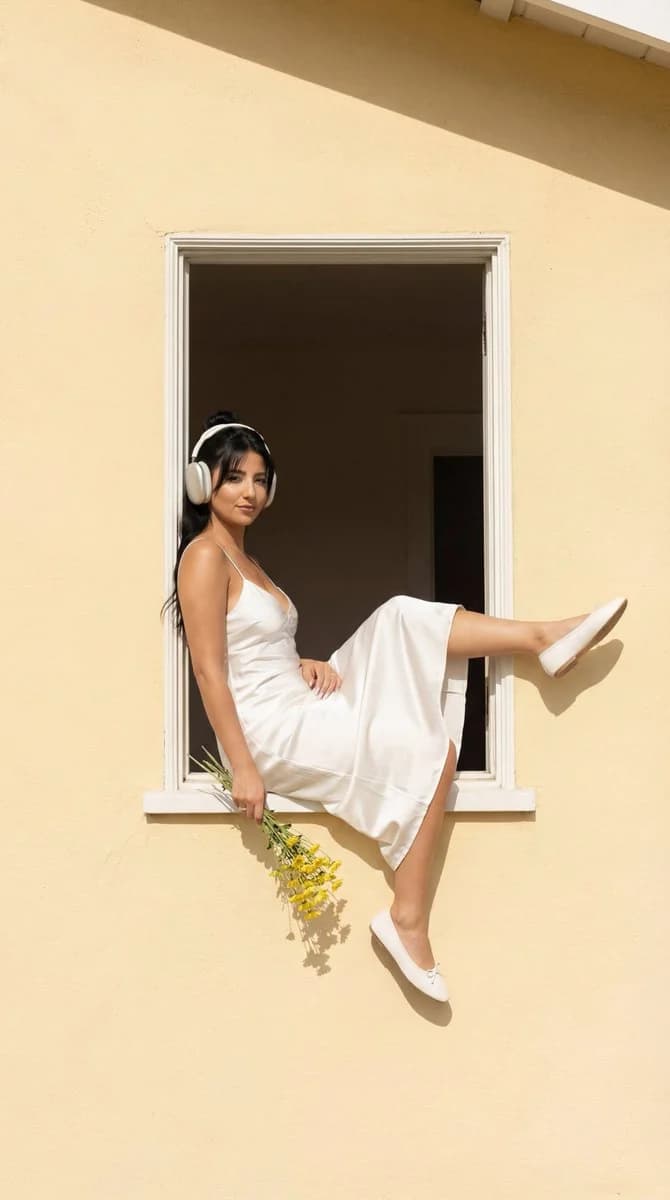
131 wordsUltra-photoreal fashion editorial. A young woman sits casually inside the open window of a soft warm yellow house, one leg extended outward and raised, the other relaxed, one arm hanging freely. She wears a white satin midi slip dress with thin straps and fluid fabric, clean white over-ear headphones, and simple white flat shoes. She holds a loose bouquet of fresh yellow flowers in one hand. Expression: calm, relaxed confidence, gaze forward or slightly to the side. Architecture: simple rectangular window, white interior walls, clean uncluttered sunlit facade. Midday direct natural sunlight, crisp shadows. Camera: 35mm lens, centered full-body framing within the window frame, moderate depth of field with sharp background. Color grade: warm yellows, clean whites, natural skin tones. Aspect ratio 4:5. No text, no watermark. Ultra-high-res, ultra-photoreal editorial render.
About this prompt
Window Girl Fashion Editorial is a ready-to-use poster prompt for GPT Image 2 on Image 2. Copy the 131 words below, paste them into the Create form, and you will get a result close to the preview above. Tweak the Poster, Product, Fashion tag if you want to push it somewhere new.
Use it as a starting point and keep iterating: change the subject, lighting, or composition until it looks right. The credit cost stays the same whether you run it as-is or remix it.
Use case
A strong starting point for Poster
Start here when you want a poster image in the same direction as Window Girl Fashion Editorial. The prompt already sets the look and structure; swap in your own subject, product, colors, or scene details for the brief you have in mind.
Easy places to tweak
- Subject Swap in your person, product, place, or object without changing the overall composition.
- Look and mood Tune the lighting, palette, camera angle, or materials so the image fits your brand.
- Final format Set the aspect ratio, background, text, or layout notes before you generate.
More prompt paths to explore
Find more GPT Image 2 prompts with a similar style, use case, or subject.
How to use it
- Step 1
Copy the prompt
Hit the Copy button above to grab the full text.
- Step 2
Open Image 2 Create
Head to the Create form and paste it in.
- Step 3
Generate
Hit Generate. Your version lands in seconds.
Make it yours
Load the prompt into the Create form with one click, then start tweaking.