Prompt
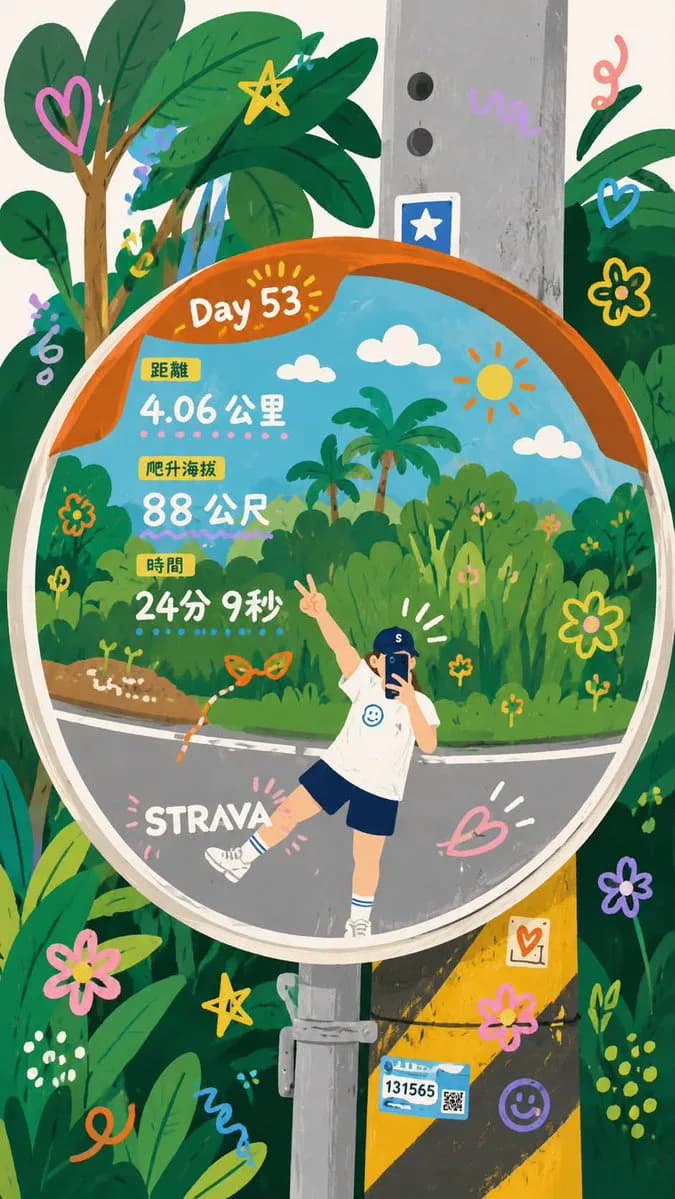
150 wordsTransform the uploaded photo into a whimsical hand-painted storybook illustration. Keep the exact pose, perspective, convex traffic mirror reflection, road, utility pole, and surrounding tropical greenery. Reimagine the mirror reflection as a vibrant illustrated world with lush jungle plants, palm trees, flowers, butterflies, doodle hearts, stars, swirls, smiling sun, fluffy clouds, and colorful hand-drawn decorations. The person is transformed into a cute cartoon character wearing a white t-shirt, navy shorts, white socks, and a blue cap, posing playfully with one leg raised and a peace sign. Integrate fitness-tracker statistics inside the mirror in a charming infographic style: “Day 53”, “4.06 km”, “88 m”, “24 min 9 sec”. Bright pastel colors, textured gouache paint, children's book aesthetic, whimsical doodles, clean outlines, cozy and cheerful mood, highly detailed foliage, playful travel journal style, Strava-inspired adventure artwork, vibrant greens, oranges, blues, and pinks, ultra-detailed illustration, masterpiece, kawaii aesthetic, editorial quality, vertical composition, 4k.
About this prompt
Whimsical Mirror Travel Journal is a ready-to-use poster prompt for GPT Image 2 on Image 2. Copy the 150 words below, paste them into the Create form, and you will get a result close to the preview above. Tweak the Infographic, Poster, Travel tag if you want to push it somewhere new.
Use it as a starting point and keep iterating: change the subject, lighting, or composition until it looks right. The credit cost stays the same whether you run it as-is or remix it.
Use case
A strong starting point for Poster
Start here when you want a poster image in the same direction as Whimsical Mirror Travel Journal. The prompt already sets the look and structure; swap in your own subject, product, colors, or scene details for the brief you have in mind.
Easy places to tweak
- Subject Swap in your person, product, place, or object without changing the overall composition.
- Look and mood Tune the lighting, palette, camera angle, or materials so the image fits your brand.
- Final format Set the aspect ratio, background, text, or layout notes before you generate.
More prompt paths to explore
Find more GPT Image 2 prompts with a similar style, use case, or subject.
How to use it
- Step 1
Copy the prompt
Hit the Copy button above to grab the full text.
- Step 2
Open Image 2 Create
Head to the Create form and paste it in.
- Step 3
Generate
Hit Generate. Your version lands in seconds.
Make it yours
Load the prompt into the Create form with one click, then start tweaking.