Prompt
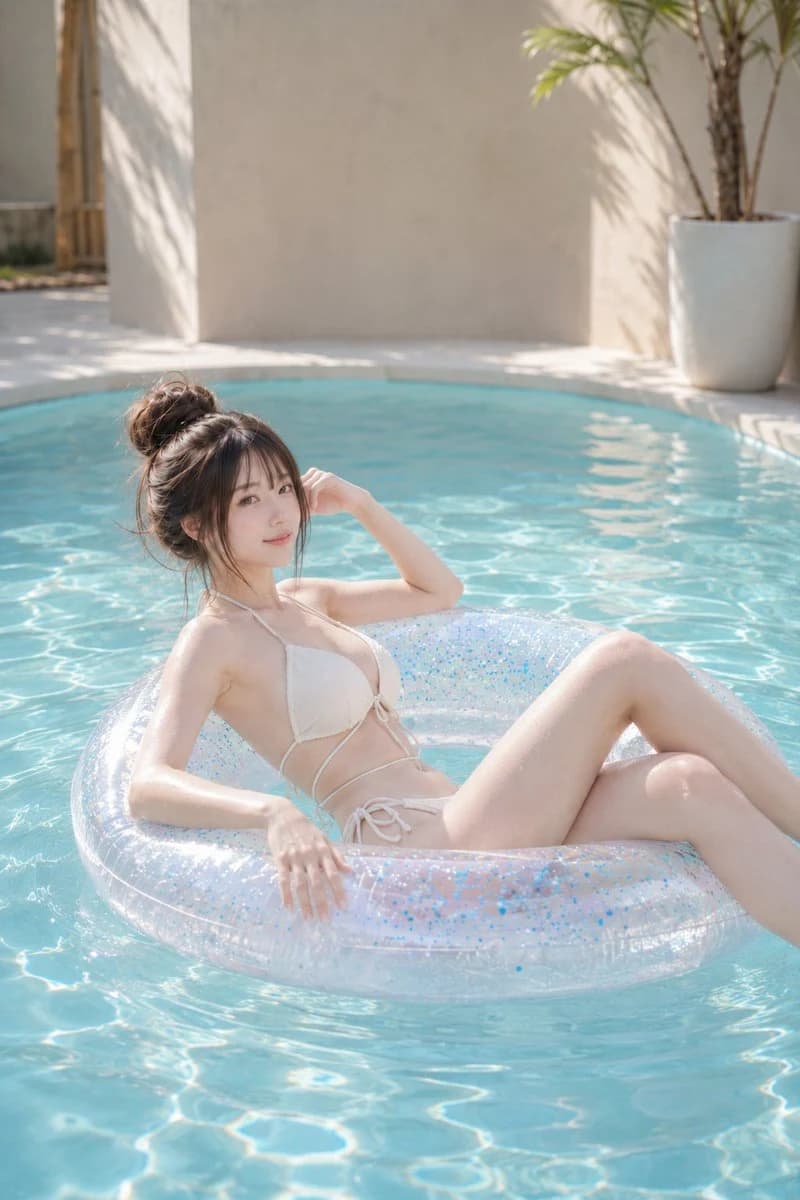
504 wordsTheme: {argument name="theme" default="Dissolving on the water surface"}\n\nSubject: A vertical {argument name="aspect ratio" default="2:3"} photograph. An adult woman in a {argument name="outfit" default="white bikini"} is relaxing on a large, transparent, glittery floatie. The person is positioned slightly to the left of the center, occupying about half of the frame, with a cool composition utilizing the turquoise blue water surface and wide upper margin.\n\nPerson/Expression: Natural and realistic refined facial features. Dark brown hair tied in a high, rough bun, with thin bangs and loose strands around the face. Transparent natural makeup, pale coral pink cheeks and lips. Face turned slightly to the right of the screen, looking at the camera with a gentle smile. Shoulders and expression relaxed, creating a calm holiday atmosphere.\n\nClothing/Pose: An ivory white string bikini with thin straps and subtle gathers. The upper body is tilted diagonally towards the back of the floatie, with the back and waist softly supported. The person's right elbow is on the edge of the floatie, with the right hand lightly touching near the temple. The left arm is naturally lowered along the front floatie, with fingertips relaxed. Both legs are lightly bent, with one leg in front and the other layered behind, extending so that from the knees down they are naturally cropped at the right edge of the screen. Accurately express the sinking of the floatie, contact with the body, and water droplets on wet skin.\n\nBackground/Light: Bright, minimal outdoor pool. Foreground features a transparent floatie reflecting light and fine water ripples, middle ground is clear blue water, and background consists of cream-beige plastered walls and a white poolside. A white large planter and slender palm are placed in the upper right, with leaf shadows cast on the wall. Warm sunlight enters from the top left of the screen, brightly illuminating the hair, shoulders, arms, and top of the thighs. Pale blue reflected light from the water surface wraps around to the shaded side of the skin, with shadows flowing softly to the bottom right.\n\nComposition/Camera: Vertical position, medium-long shot from a slightly high eye level. The person's face is toward the top left of the screen, and the floatie crosses the bottom half of the screen significantly. Leave wide margins for the wall and water at the top, creating stability with the diagonal body lines and the circle of the floatie. Natural compression feel of around 85mm, focusing on the face and upper body, with the background slightly and softly blurred.\n\nTexture/Style: A clean, realistic resort portrait. Bright high-key tone, low contrast, refreshing color scheme centered on ivory and aqua blue. Maintain natural skin texture, delicately depicting fine water droplets on wet skin, reflections on transparent vinyl, blue glitter, and water ripples. Avoid excessive skin correction, aiming for an elegant and light finish like a magazine photo.\n\nNegative: Underage-looking persons, unnatural faces, unnatural gaze, extra fingers, missing fingers, fused limbs, broken joints, twisted legs, poor contact with the floatie, floating body, unnatural gravity, incorrect perspective, shadows inconsistent with light source, overexposure, transparent swimwear, text, logo, watermark, plastic-like skin.About this prompt
Sunlit Poolside Relaxation Portrait is a ready-to-use social media prompt for GPT Image 2 on Image 2. Copy the 504 words below, paste them into the Create form, and you will get a result close to the preview above. Tweak the Social Media, Fashion, Beauty tag if you want to push it somewhere new.
Use it as a starting point, then adjust the subject, lighting, or composition to suit your idea. The credit cost stays the same whether you use it as written or customize it.
Use case
A strong starting point for Social Media
Start here when you want a social media image inspired by Sunlit Poolside Relaxation Portrait. The prompt already sets the look and composition; replace the subject, product, colors, or scene details to match your project.
Easy places to tweak
- Subject Swap in your person, product, place, or object without changing the overall composition.
- Look and mood Tune the lighting, palette, camera angle, or materials so the image fits your brand.
- Final format Set the aspect ratio, background, text, or layout notes before you generate.
More prompt paths to explore
Find more GPT Image 2 prompts with a similar style, use case, or subject.
How to use it
- Step 1
Copy the prompt
Hit the Copy button above to grab the full text.
- Step 2
Open Image 2 Create
Head to the Create form and paste it in.
- Step 3
Generate
Hit Generate. Your version lands in seconds.
Make it yours
Load the prompt into the Create form with one click, then start tweaking.