Prompt
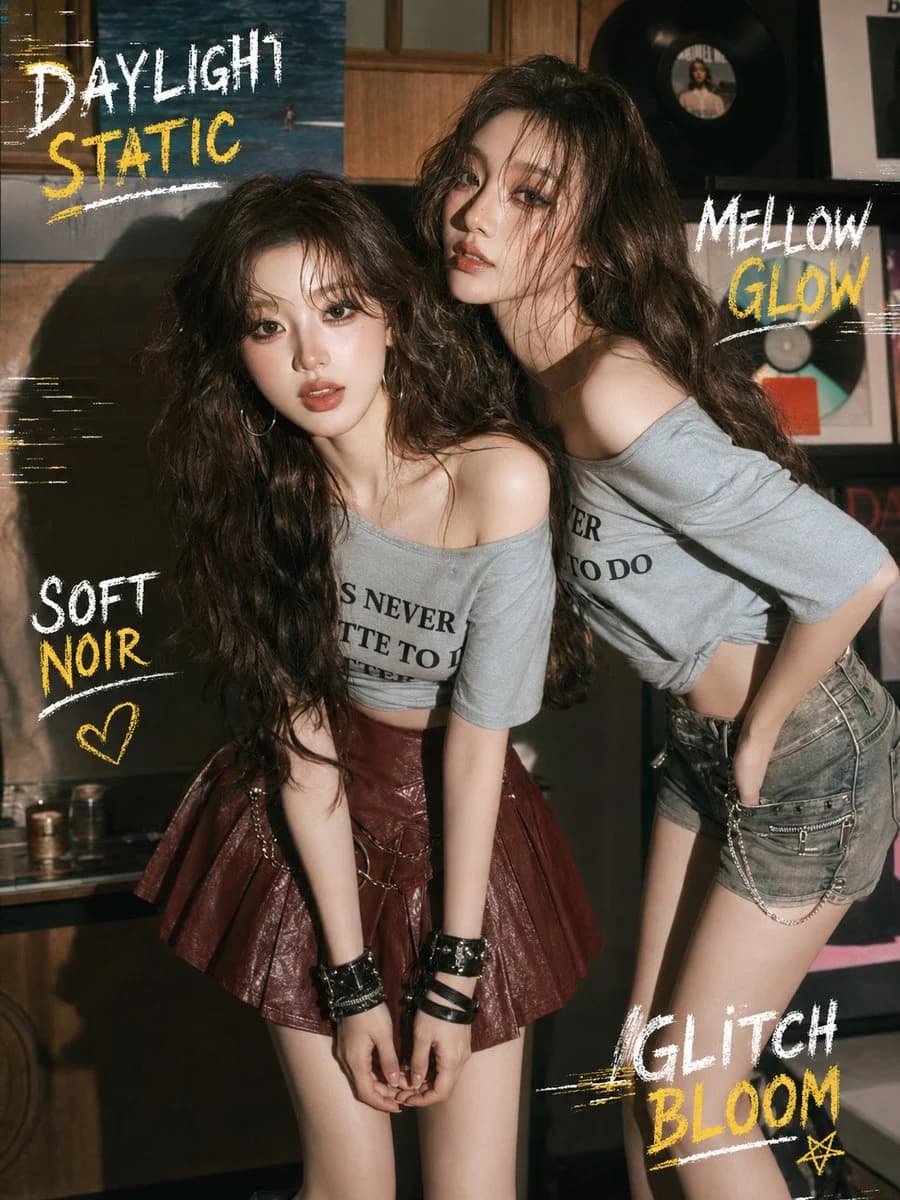
464 wordsGoal: Create a vertical editorial fashion poster in a moody retro record-shop interior, featuring two glamorous young women posing close together with a tipsy, soft-noir, glitch-aesthetic mood.
Canvas: Vertical 3:4 portrait composition, like a magazine cover or social media poster, warm low-key lighting, subtle film grain, slightly desaturated browns and muted grays, high-detail realistic photography with stylized chalk handwriting overlays.
Main subjects: Exactly 2 young women with pale luminous skin, glossy makeup, large expressive eyes, soft reddish lips, and long messy wavy dark-brown hair. Both wear loose off-shoulder cropped gray T-shirts with partially visible black printed lettering. The left woman stands slightly forward and lower, leaning toward the camera with hands clasped down in front; she wears a burgundy glossy pleated mini skirt, black stacked wrist cuffs, and a delicate chain detail at the waist. The right woman stands slightly behind and taller, leaning in with one shoulder exposed, head tilted confidently toward the viewer; she wears gray denim shorts with metal chain accessories and one hand tucked at her waist. Their expressions should feel intimate, dazed, alluring, and cinematic, as if caught in warm daylight after a night out.
Setting: A cozy vintage music room or vinyl record store with dark wood paneling, shelves, framed album covers, visible vinyl records on the wall, and small cans or objects on a low shelf. Use dramatic side lighting that creates strong shadows on the left wall and warm highlights on skin and hair.
Graphic text overlays: Add exactly 4 hand-drawn chalk/crayon slogan clusters in distressed uppercase lettering, alternating white and mustard yellow, with rough underline strokes and small glitch streaks. The 4 visible text clusters are: 1) top left: "DAYLIGHT" in white above "STATIC" in yellow, with white/yellow horizontal scratch marks; 2) upper right: "MELLOW" in white above "GLOW" in yellow, with a white underline; 3) lower left: "SOFT" in white above "NOIR" in yellow, with a white underline and one small yellow heart doodle below; 4) lower right: "GLITCH" in white above "BLOOM" in yellow, with yellow scratch strokes, a white underline, and one small yellow star doodle. Keep the text legible but imperfect, like hand-scrawled poster typography.
Customizable details: The left slogan should read {argument name="top left slogan" default="DAYLIGHT STATIC"}; the upper-right slogan should read {argument name="upper right slogan" default="MELLOW GLOW"}; the lower-left slogan should read {argument name="lower left slogan" default="SOFT NOIR"}; the lower-right slogan should read {argument name="lower right slogan" default="GLITCH BLOOM"}; the overall fashion mood should be {argument name="fashion mood" default="tipsy soft-noir glitch bloom"}.
Constraints: Keep exactly 2 women, exactly 4 slogan clusters, exactly 2 doodles total consisting of 1 heart and 1 star, no extra people, no watermark, no logo, no clean digital UI elements. Make it look like a high-end realistic fashion photograph combined with rough analog poster marks.About this prompt
Retro Glitch Fashion Poster is a ready-to-use ad creative prompt for GPT Image 2 on Image 2. Copy the 464 words below, paste them into the Create form, and you will get a result close to the preview above. Tweak the Product Ad, Ad Creative, Social Media tag if you want to push it somewhere new.
Use it as a starting point, then adjust the subject, lighting, or composition to suit your idea. The credit cost stays the same whether you use it as written or customize it.
Use case
A strong starting point for Ad Creative
Start here when you want a ad creative image inspired by Retro Glitch Fashion Poster. The prompt already sets the look and composition; replace the subject, product, colors, or scene details to match your project.
Easy places to tweak
- Subject Swap in your person, product, place, or object without changing the overall composition.
- Look and mood Tune the lighting, palette, camera angle, or materials so the image fits your brand.
- Final format Set the aspect ratio, background, text, or layout notes before you generate.
More prompt paths to explore
Find more GPT Image 2 prompts with a similar style, use case, or subject.
How to use it
- Step 1
Copy the prompt
Hit the Copy button above to grab the full text.
- Step 2
Open Image 2 Create
Head to the Create form and paste it in.
- Step 3
Generate
Hit Generate. Your version lands in seconds.
Make it yours
Load the prompt into the Create form with one click, then start tweaking.