Prompt
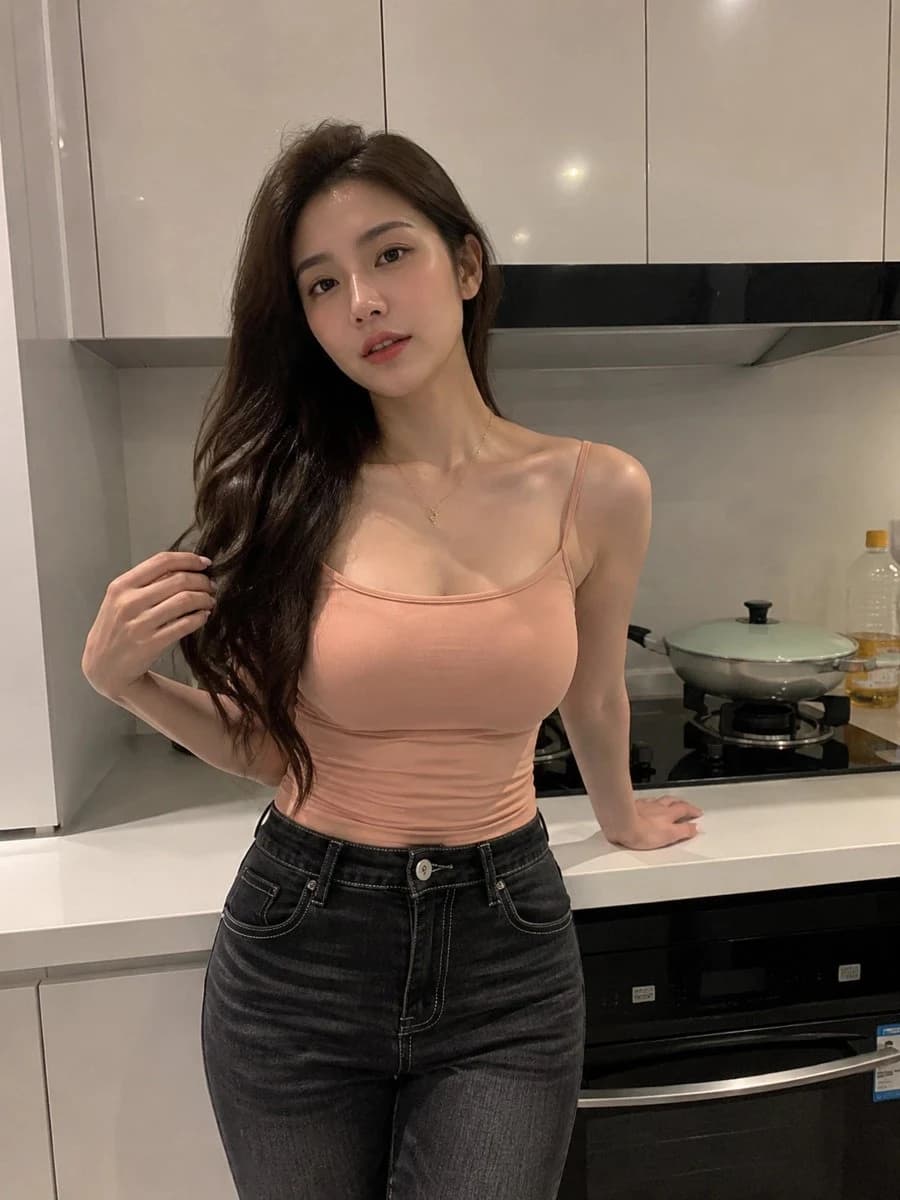
210 wordsCreate an ultra-realistic vertical smartphone photo of {argument name="character description" default="a young East Asian woman with long wavy dark brown hair"} standing in a modern minimalist kitchen at night, photographed from about mid-thigh upward. She is centered slightly left, leaning her right hand back on the white countertop while her left hand lightly holds a lock of hair near her shoulder, facing the camera with a calm neutral expression, soft lips, natural makeup, and direct eye contact. She wears {argument name="top color and style" default="a peach fitted spaghetti-strap camisole"}, {argument name="bottoms" default="high-waisted dark charcoal skinny jeans with white stitching"}, and a delicate small gold necklace. The kitchen has glossy cream-white upper cabinets with vertical seams, a black range hood strip, a pale backsplash, a white countertop, a black gas stovetop, a covered pale green pot on the right burner, a clear plastic cooking-oil bottle at the far right, and a black built-in oven below. Use warm indoor ceiling lighting with subtle reflections on cabinets and skin, realistic phone-camera perspective, slight wide-angle distortion, natural shadows, fine hair detail, authentic fabric texture, and a candid social-media snapshot feel. Keep the background tidy, no text, no watermark, no extra people, no exaggerated pose, and make the image look like a real unedited photograph.About this prompt
Realistic Kitchen Portrait is a ready-to-use social media prompt for GPT Image 2 on Image 2. Copy the 210 words below, paste them into the Create form, and you will get a result close to the preview above. Tweak the Social Media, Product, Beauty tag if you want to push it somewhere new.
Use it as a starting point, then adjust the subject, lighting, or composition to suit your idea. The credit cost stays the same whether you use it as written or customize it.
Use case
A strong starting point for Social Media
Start here when you want a social media image inspired by Realistic Kitchen Portrait. The prompt already sets the look and composition; replace the subject, product, colors, or scene details to match your project.
Easy places to tweak
- Subject Swap in your person, product, place, or object without changing the overall composition.
- Look and mood Tune the lighting, palette, camera angle, or materials so the image fits your brand.
- Final format Set the aspect ratio, background, text, or layout notes before you generate.
More prompt paths to explore
Find more GPT Image 2 prompts with a similar style, use case, or subject.
How to use it
- Step 1
Copy the prompt
Hit the Copy button above to grab the full text.
- Step 2
Open Image 2 Create
Head to the Create form and paste it in.
- Step 3
Generate
Hit Generate. Your version lands in seconds.
Make it yours
Load the prompt into the Create form with one click, then start tweaking.