Prompt
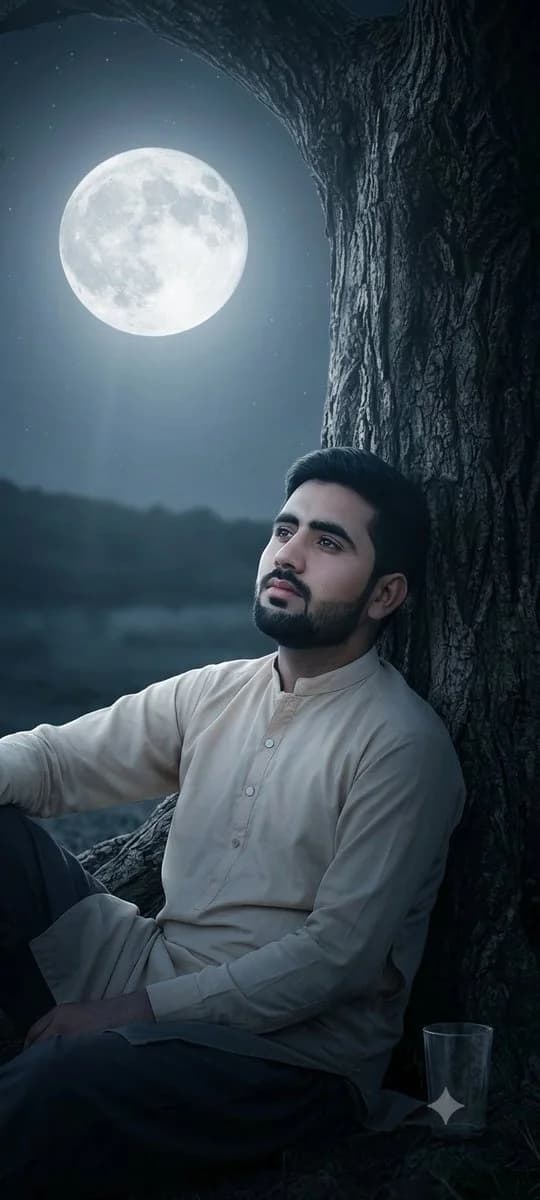
177 wordsA photograph, closely replicating the composition and visual elements of the image found in 44859_2.png. The photograph depicts a close-up of a large, gnarled, deeply textured {argument name="tree type" default="ancient tree trunk"} rising on the right side of the frame, its branches forming an arching dark canopy. Under this canopy, a {argument name="person description" default="solitary young man with dark, styled hair"}, identical to the person shown in 44859_2.png, is seen in the bottom right, looking directly upwards. The large, clear, luminous {argument name="sky element" default="full moon"}, exactly as positioned and appearing in 44859_2.png, is the central focus of the night sky on the left. Soft, cool moonlight from the moon is the primary light source, creating deep shadows on the tree bark and a distinct light beam illuminating the man and the tree's contours. The scene maintains a wide night sky showing a few stars, the dark horizon below the moon, and the specific composition. This image focuses entirely on the photorealistic render and does not include any social media text, UI elements, user profiles, or captions.About this prompt
Moonlit Ancient Tree Trunk Portrait is a ready-to-use social media prompt for GPT Image 2 on Image 2. Copy the 177 words below, paste them into the Create form, and you will get a result close to the preview above. Tweak the Social Media, UI, Beauty tag if you want to push it somewhere new.
Use it as a starting point, then adjust the subject, lighting, or composition to suit your idea. The credit cost stays the same whether you use it as written or customize it.
Use case
A strong starting point for Social Media
Start here when you want a social media image inspired by Moonlit Ancient Tree Trunk Portrait. The prompt already sets the look and composition; replace the subject, product, colors, or scene details to match your project.
Easy places to tweak
- Subject Swap in your person, product, place, or object without changing the overall composition.
- Look and mood Tune the lighting, palette, camera angle, or materials so the image fits your brand.
- Final format Set the aspect ratio, background, text, or layout notes before you generate.
More prompt paths to explore
Find more GPT Image 2 prompts with a similar style, use case, or subject.
How to use it
- Step 1
Copy the prompt
Hit the Copy button above to grab the full text.
- Step 2
Open Image 2 Create
Head to the Create form and paste it in.
- Step 3
Generate
Hit Generate. Your version lands in seconds.
Make it yours
Load the prompt into the Create form with one click, then start tweaking.