Prompt
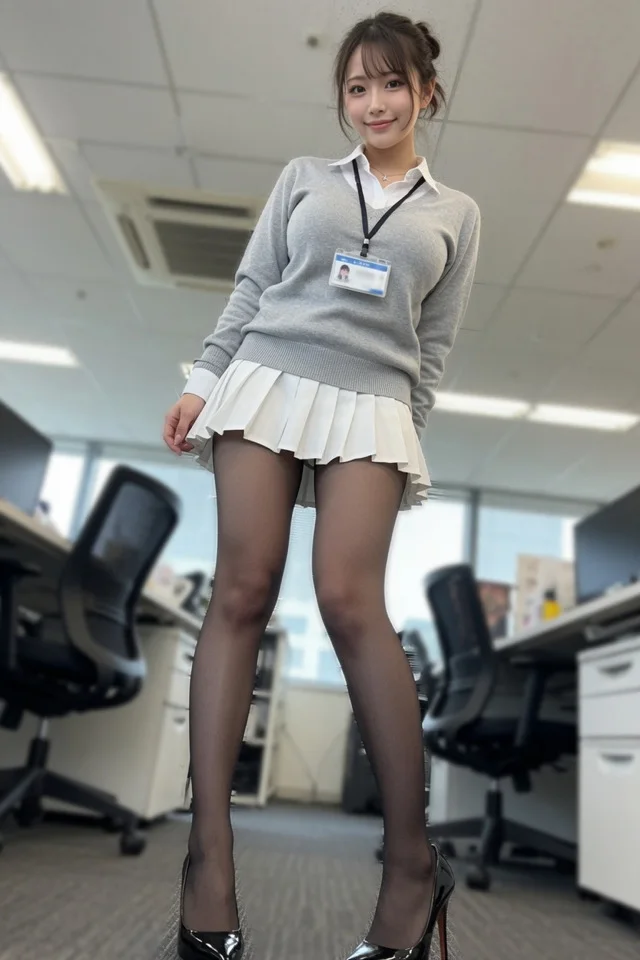
210 wordsCreate a realistic full-body fashion portrait of a young adult Japanese office worker standing in a modern open-plan office, photographed from a very low floor-level angle with a slight wide-angle perspective so her legs appear long and the ceiling and desks recede dramatically behind her. She has {argument name="hair color" default="dark brown"} hair styled in a soft messy updo with wispy bangs, a gentle friendly smile, natural makeup, and a delicate necklace. Outfit: a crisp white collared shirt under a light gray V-neck knit sweater, a black lanyard with a blue-and-white employee ID badge, a short white pleated skirt, sheer black tights, and glossy black high heels. Pose her standing confidently with one hand lightly touching the skirt hem and the other arm relaxed behind her, looking directly at the camera. The office background should include rows of desks, black swivel office chairs, white drawer units, large windows, fluorescent ceiling panels, and an air-conditioning vent, all softly blurred with shallow depth of field. Use photorealistic lighting, soft indoor daylight, subtle bokeh, high detail on the subject, natural skin texture, realistic fabric folds, and a clean corporate atmosphere. Vertical 2:3 composition, subject centered, full body visible from head to shoes, no extra people, no readable text except the indistinct ID badge.About this prompt
Low-Angle Office Fashion Portrait is a ready-to-use portrait prompt for GPT Image 2 on Image 2. Copy the 210 words below, paste them into the Create form, and you will get a result close to the preview above. Tweak the Storyboard, Portrait, Product tag if you want to push it somewhere new.
Use it as a starting point, then adjust the subject, lighting, or composition to suit your idea. The credit cost stays the same whether you use it as written or customize it.
Use case
A strong starting point for Portrait
Start here when you want a portrait image inspired by Low-Angle Office Fashion Portrait. The prompt already sets the look and composition; replace the subject, product, colors, or scene details to match your project.
Easy places to tweak
- Subject Swap in your person, product, place, or object without changing the overall composition.
- Look and mood Tune the lighting, palette, camera angle, or materials so the image fits your brand.
- Final format Set the aspect ratio, background, text, or layout notes before you generate.
More prompt paths to explore
Find more GPT Image 2 prompts with a similar style, use case, or subject.
How to use it
- Step 1
Copy the prompt
Hit the Copy button above to grab the full text.
- Step 2
Open Image 2 Create
Head to the Create form and paste it in.
- Step 3
Generate
Hit Generate. Your version lands in seconds.
Make it yours
Load the prompt into the Create form with one click, then start tweaking.